ローカルLLMの設定、効くもの・効かないもの一覧(実測つき) Local LLM Settings That Work and Settings That Don't (with Measurements)
はじめに
ローカル LLM の高速化の記事を読むと、設定が山ほど出てきます。
-b、-ub、-fa、KV キャッシュの量子化、投機デコード、プロンプトキャッシュ……。
実際に全部試してみると、効くものはごく一部でした。 効かないものもあれば、逆に遅くなるもの、入れたつもりで最初から無効だったものもあります。
このシリーズで測ってきた結果を、1 枚の早見表にまとめます。
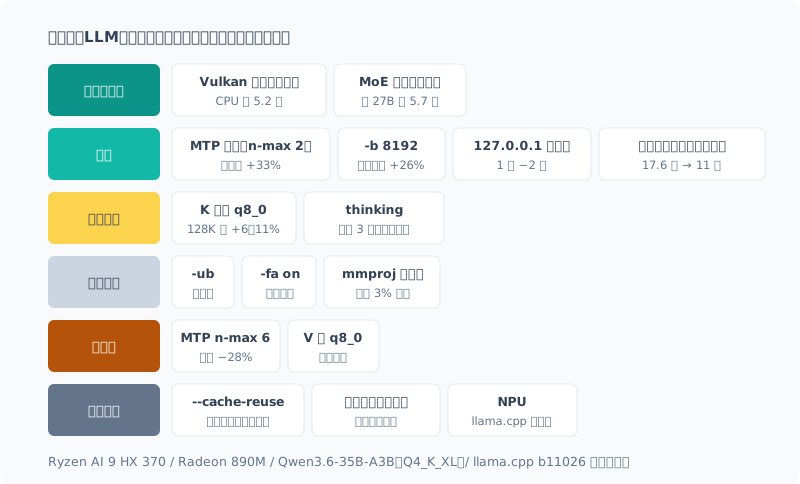
環境: Ryzen AI 9 HX 370 / Radeon 890M(iGPU)/ DDR5-5600 96GB / Windows 11 / llama.cpp b11026(Vulkan)/ Qwen3.6-35B-A3B(Q4_K_XL)。 別の機体やモデルでは、結果が変わる可能性があります。
大きく効く: この 2 つで決まる
| 設定 | 結果 | 詳しく |
|---|---|---|
| Vulkan バックエンド | 生成が CPU の 5.2 倍(2.59 → 13.41 t/s)。ROCm(4.76 t/s)より 2.8 倍速い | 構築の回 |
| MoE モデルを選ぶ | 密 27B に比べて生成 5.7 倍、読み込み 9.5 倍 | 〃 |
この 2 つで、速度はほぼ決まります。ほかの設定は、ここから 1〜3 割を上乗せする程度です。
MoE が速いのは、1 トークンごとに読むデータが少ないからです。 iGPU の生成速度はメモリの帯域でほぼ決まるので、「総パラメータ数」や「ファイルサイズ」ではなく、 **「1 トークンあたり何バイト読むか」**でモデルを選ぶのが正解でした。 ファイルが 4.5 GB 大きい MoE のほうが、密モデルより 5.7 倍速かったのはそのためです。
効く: 入れて損はない
| 設定 | 結果 | 詳しく |
|---|---|---|
MTP 投機デコード(--spec-type draft-mtp --spec-draft-n-max 2) | 散文 +12.6%、コード +33.4%。出力は変わらない | 構築の回 |
-b 8192 | 読み込み(プロンプト処理)+26%(281 → 353 t/s)。16384 では微減 | 〃 |
127.0.0.1 で接続する | 接続 1 回あたり 2.1 秒 → 0.05 秒。自分の llm は 5.3 秒 → 1.0 秒 | 下記 |
同じ文書に質問を重ねる(既定の --cache-prompt) | 128K の文書で、初回 17.6 分 → 別の質問は 10.7 秒 | キャッシュの回 |
localhost ではなく 127.0.0.1 に繋ぐ
いちばん手軽で、いちばん見落としやすいものです。
Windows では localhost がまず IPv6(::1)に解決されます。
llama-server は IPv4(127.0.0.1)でしか待ち受けていないので、
繋がらずに IPv4 へ切り替わるまで 2 秒ほど待たされます。
| 接続先 | PowerShell | Python |
|---|---|---|
localhost | 2.10 秒 | 2.29 秒 |
127.0.0.1 | 0.05 秒 | 0.03 秒 |
短い質問なら、応答時間の大半がこの待ち時間になります。 クライアント側の URL を書き換えるだけで消えます。
自分の llm コマンドも localhost のままだったので、直して測りました。
localhost | 127.0.0.1 | |
|---|---|---|
llm "1+1は?"(PowerShell) | 5.1〜5.6 秒 | 1.0〜1.2 秒 |
| dev-orchestra 用の CLI(Python) | 4.9 秒 | 0.8 秒 |
縮んだのは 2 秒ではなく 4 秒でした。どちらも「サーバが動いているかの確認」と「質問の送信」で 2 回接続していて、 その両方で 2 秒ずつ待たされていたためです。
同じ文書に質問を重ねる
長い文書の読み込みは重く、128K トークンで 17.6〜24.2 分かかりました。 ただし、同じ文書に別の質問をするなら、読み直すのは末尾の 515 トークンだけです。
これは既定で有効な --cache-prompt の働きで、何も設定しなくても効きます。
効かせるコツは、文書を先に、質問を最後に置くこと。文書の途中を書き換えると、全部読み直しになります。
条件つき: 場面によって得になる
| 設定 | 結果 | 詳しく |
|---|---|---|
K だけ q8_0(-ctk q8_0) | 128K では +6〜11%。32K では差なし(−3.5〜+2.0%)。正答率は変わらない | 128K の回、読み取り品質の回 |
| thinking | 定型の課題では正答率が同じで、時間 3.1 倍・トークン 3.9 倍 | thinking の回 |
K の量子化は、100K を超える長い文書を扱うときだけ得になります。 普段の 2 万トークン前後では速くならないので、既定では入れていません。
thinking は、定型の課題(計算、日付、単位変換)では正答率が変わらず、時間だけが 3 倍になりました。 既定では切り、難しそうな質問のときだけ有効にしています。 難しい問題で差が出るかは、まだ測っていません。
効かない: 入れても変わらない
| 設定 | 結果 | 詳しく |
|---|---|---|
-ub(マイクロバッチ) | 512〜2048 のどれでも横ばい | 構築の回 |
-fa on(FlashAttention) | 速度は誤差の範囲 | 〃 |
mmproj を外す(--no-mmproj) | 速度の差は 3% 未満。メモリは 1.1 GiB 減る | mmproj の回 |
-b と -ub はセットで紹介されることが多いのですが、効いていたのは -b のほうだけでした。
mmproj は画像を読むための部品です。テキストしか使わないなら外しても困らず、メモリが 1 GiB 浮きます。 速くはなりません。
逆効果: 入れると遅くなる
| 設定 | 結果 | 詳しく |
|---|---|---|
| MTP の n-max を上げる(4、6) | n-max 6 で散文が −28%。投機なしより遅い | 構築の回 |
V を q8_0(-ctv q8_0) | 測ったどの深さでも遅い(32K で −9.7%、128K で −5.4%) | ベンチのぶれの回、128K の回 |
投機デコードは「たくさん先読みするほど速い」わけではありません。 外れた先読みは捨てるので、予測しにくい散文では、先読みを増やすほど無駄な計算が増えます。 2 が最適でした。
KV キャッシュを量子化するなら、K だけにします。V まで量子化すると遅くなります。
使えない: 入れたつもりで無効
| 設定 | 結果 | 詳しく |
|---|---|---|
--cache-reuse | このモデルでは最初から無効。起動ログに not supported と出る | キャッシュの回 |
| スロットのディスク保存・復元 | 保存・復元はできるが、復元後は全部読み直し | 〃 |
| NPU | llama.cpp に NPU のバックエンドが無い | NPU の回 |
いちばん危ないのがこの段です。
--cache-reuse は、私も「効いている」と記事に書いていました。
実際には起動ログにこう出ていて、最初から無効でした。
srv load_model: cache_reuse is not supported by multimodal, it will be disabled画像用の mmproj を外しても、今度は not supported by this context で無効になります。
Qwen3.6-35B-A3B は SSM とのハイブリッド構成で、KV をずらして使い回す仕組みとは両立しないためです。
ディスクへの保存が効かないのも、同じ構造が理由でした。
設定を入れたら、起動ログを見る
最後に、この表を作って得た一番の教訓です。
入れた設定が本当に有効かは、起動ログで確かめる。
llama-server は、使えない設定を黙って無効にすることがあります。
エラーにはならず、起動もするので、ログを読まない限り気づけません。
私は --cache-reuse で 4 日間気づきませんでした。
llama-server ... 2>&1 | Select-String 'not supported|disabled|ignor'この表の「使えない」段は、そうやって見つけたものです。
まとめ
- 速度は Vulkan(5.2 倍) と MoE(5.7 倍) でほぼ決まる。残りは 1〜3 割の上乗せ
- 手軽に効くのは MTP(n-max 2)、
-b 8192、127.0.0.1で接続、文書を先・質問を後 - K の量子化と thinking は場面による。V の量子化と大きな n-max は逆効果
--cache-reuseは、このモデルでは無効。設定は起動ログで確かめる
Introduction
Articles about speeding up local LLMs list a huge number of settings:
-b, -ub, -fa, KV cache quantization, speculative decoding, prompt caching…
When I actually tried them all, only a few made a real difference. Some did nothing, some made things slower, and some I thought I had turned on were disabled from the start.
Here are the results I measured through this series, on a single cheat sheet.
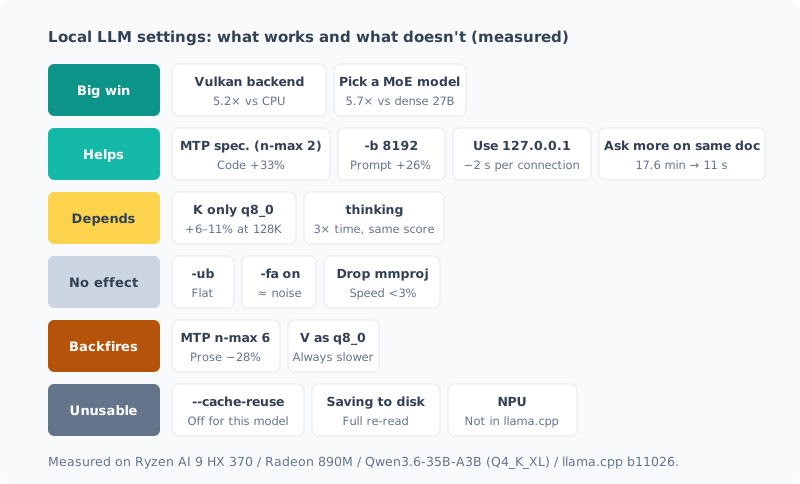
Environment: Ryzen AI 9 HX 370 / Radeon 890M (iGPU) / DDR5-5600 96GB / Windows 11 / llama.cpp b11026 (Vulkan) / Qwen3.6-35B-A3B (Q4_K_XL). Results may differ on other machines or models.
Big Wins: These Two Decide It
| Setting | Result | Details |
|---|---|---|
| Vulkan backend | Generation 5.2x CPU (2.59 → 13.41 t/s). 2.8x faster than ROCm (4.76 t/s) | Setup post |
| Choose an MoE model | 5.7x generation and 9.5x prompt processing compared with dense 27B | Same |
These two settle the speed almost entirely. Everything else adds 10-30% on top.
MoE is fast because it reads less data per token. On an iGPU, generation speed is set almost entirely by memory bandwidth, so the right way to pick a model is not by “total parameter count” or “file size” but by “how many bytes it reads per token”. That’s why the MoE model, whose file is 4.5 GB larger, was 5.7x faster than the dense model.
Helps: No Reason Not to Use
| Setting | Result | Details |
|---|---|---|
MTP speculative decoding (--spec-type draft-mtp --spec-draft-n-max 2) | Prose +12.6%, code +33.4%. Output is unchanged | Setup post |
-b 8192 | Prompt processing +26% (281 → 353 t/s). Slightly lower at 16384 | Same |
Connect to 127.0.0.1 | Per connection 2.1 s → 0.05 s. My own llm went from 5.3 s to 1.0 s | Below |
Stack questions on the same document (default --cache-prompt) | With a 128K document, 17.6 minutes the first time → 10.7 s for a different question | Cache post |
Connect to 127.0.0.1, Not localhost
This is the easiest one, and the easiest to miss.
On Windows, localhost resolves to IPv6 (::1) first.
llama-server only listens on IPv4 (127.0.0.1),
so the connection fails and you wait about 2 seconds until it falls back to IPv4.
| Target | PowerShell | Python |
|---|---|---|
localhost | 2.10 s | 2.29 s |
127.0.0.1 | 0.05 s | 0.03 s |
For a short question, most of the response time is this wait. Rewriting the URL on the client side makes it disappear.
My own llm command was still using localhost, so I fixed it and measured.
localhost | 127.0.0.1 | |
|---|---|---|
llm "1+1は?" (PowerShell) | 5.1-5.6 s | 1.0-1.2 s |
| CLI for dev-orchestra (Python) | 4.9 s | 0.8 s |
It got shorter by 4 seconds, not 2. Both tools connect twice, once to “check the server is running” and once to “send the question”, and each of those waited 2 seconds.
Stack Questions on the Same Document
Processing a long document is heavy: at 128K tokens it took 17.6-24.2 minutes. But if you ask a different question about the same document, only the last 515 tokens are processed again.
This is the work of --cache-prompt, which is on by default, so it works without any setting.
The trick is to put the document first and the question last. If you change the middle of the document, everything is processed again.
Situational: Worth It in Some Cases
| Setting | Result | Details |
|---|---|---|
q8_0 for K only (-ctk q8_0) | +6-11% at 128K. No difference at 32K (−3.5 to +2.0%). Accuracy unchanged | 128K post, reading quality post |
| thinking | Same accuracy on routine tasks, 3.1x the time and 3.9x the tokens | thinking post |
Quantizing K pays off only when handling long documents over 100K. At the usual 20K tokens or so it isn’t faster, so I don’t enable it by default.
With thinking, accuracy on routine tasks (arithmetic, dates, unit conversion) didn’t change; only the time tripled. I keep it off by default and turn it on only for questions that look hard. I haven’t measured yet whether it makes a difference on hard problems.
No Effect: Nothing Changes
| Setting | Result | Details |
|---|---|---|
-ub (micro-batch) | Flat anywhere from 512 to 2048 | Setup post |
-fa on (FlashAttention) | Speed within the noise | Same |
Drop mmproj (--no-mmproj) | Speed difference under 3%. Memory 1.1 GiB lower | mmproj post |
-b and -ub are often introduced as a pair, but only -b was doing anything.
mmproj is the component for reading images. If you only use text, you can drop it without trouble and free up 1 GiB of memory. It doesn’t make anything faster.
Backfires: Makes It Slower
| Setting | Result | Details |
|---|---|---|
| Raise MTP n-max (4, 6) | Prose −28% at n-max 6. Slower than no speculation | Setup post |
q8_0 for V (-ctv q8_0) | Slower at every depth I measured (−9.7% at 32K, −5.4% at 128K) | Benchmark noise post, 128K post |
Speculative decoding doesn’t get “faster the further ahead it guesses”. Wrong guesses are thrown away, so with hard-to-predict prose, more guessing means more wasted computation. 2 was optimal.
If you quantize the KV cache, do K only. Quantizing V too makes it slower.
Unusable: You Think It’s On, but It’s Disabled
| Setting | Result | Details |
|---|---|---|
--cache-reuse | Disabled from the start with this model. The startup log says not supported | Cache post |
| Saving and restoring slots to disk | Saving and restoring work, but after restoring everything is processed again | Same |
| NPU | llama.cpp has no NPU backend | NPU post |
This tier is the most dangerous one.
I had even written in a post that --cache-reuse was “working”.
In reality, the startup log said this, and it had been disabled from the start.
srv load_model: cache_reuse is not supported by multimodal, it will be disabledEven after dropping the image mmproj, it gets disabled again, this time with not supported by this context.
Qwen3.6-35B-A3B is a hybrid design with SSM layers, which doesn’t work with a mechanism that shifts and reuses the KV.
The same structure is why saving to disk doesn’t help either.
After Adding a Setting, Read the Startup Log
Finally, the biggest lesson I got from building this table:
Check the startup log to confirm a setting is actually enabled.
llama-server sometimes silently disables settings it can’t use.
There’s no error and it still starts, so unless you read the log, you won’t notice.
I didn’t notice for 4 days with --cache-reuse.
llama-server ... 2>&1 | Select-String 'not supported|disabled|ignor'The “Unusable” tier in this table is what I found that way.
Summary
- Speed is decided almost entirely by Vulkan (5.2x) and MoE (5.7x). The rest adds 10-30%
- Easy wins are MTP (n-max 2),
-b 8192, connecting to127.0.0.1, and document first, question last - K quantization and thinking depend on the situation. V quantization and a large n-max backfire
--cache-reuseis disabled with this model. Check your settings in the startup log
関連記事 Related Posts
コンテキストを 128K まで伸ばしたら、壁はメモリではなく待ち時間だった I Stretched the Context to 128K, and the Wall Was Waiting Time, Not Memory
ローカルLLMのコンテキストを32Kから128Kまで伸ばして測りました。予想していたメモリ不足は起きず、理由はモデルの構造にありました。代わりに見えた壁はプロンプトの取り込み時間で、128Kを読ませるだけで21〜24分かかります。途中で自分の自動起動に計測を汚された話も含みます。 I stretched my local LLM's context from 32K to 128K and measured it. The memory shortage I expected never happened, and the reason lay in the model's architecture. The wall I hit instead was prompt ingestion time: just reading 128K takes 21–24 minutes. It also covers how my own auto-start polluted the measurements along the way.
ベンチで「効果を見つけた」と思ったら、測定のぶれだった I Thought My Benchmark Found an Effect, but It Was Measurement Noise
過去に下した設定判断を検証しようとして、逆の結果が出ました。喜びかけたところで物理的におかしい点に気づき、測り直したら元の判断が正しかった。別々に起動したベンチを比較してはいけない、という話です。 When I tried to verify a settings decision I'd made earlier, I got the opposite result. Just as I was about to celebrate, I noticed something physically odd, measured again, and the original decision was right. This is about why you shouldn't compare benchmarks from separate launches.
ローカルLLMのベンチマークの取り方(チェックリスト付き) How to Benchmark a Local LLM (with a Checklist)
ローカルLLMの速度や品質を測るときに、結果を信用できるものにする手順をまとめました。同じ条件でも1割ぶれる、順番で結果が変わる、裏の処理で5倍ぶれる、採点器が壊れている。実際に踏んだ失敗から作った、測る前・測っている間・測ったあとのチェックリストです。 I put together the steps that make the results trustworthy when measuring the speed or quality of a local LLM. The same conditions vary by 10%, the order changes the result, background work causes 5x swings, and the grader is broken. This is a before, during and after checklist built from mistakes I actually made.