コンテキストを 128K まで伸ばしたら、壁はメモリではなく待ち時間だった I Stretched the Context to 128K, and the Wall Was Waiting Time, Not Memory
はじめに
前回のベンチでは、深度 32K までしか測っていません。 使っている Qwen3.6-35B-A3B は 262,144 トークンまで扱えます。 その 8 分の 1 しか確かめていないことになります。
測る前に、仮説を立てました。
128K まで伸ばすと KV キャッシュが膨らみ、メモリが足りなくなる。 そうなれば、第2回で不採用にした KV 量子化が必須になる。判断が「条件付き」に変わる。
結果から言うと、この仮説は外れました。 ただ、外れた理由のほうが面白い話でした。 そして、本当の壁は別のところにありました。
まず、128K は載るのか
1 時間級の計測に入る前に、成立するかだけを 1 回で確かめました。
llama-bench -hf unsloth/Qwen3.6-35B-A3B-MTP-GGUF:UD-Q4_K_XL
            -ngl 99 -fa 1 -b 8192 -p 0 -n 128 -d 131072 -r 1
tg128 @ d131072 → 10.05 t/s (所要 18.4 分)動きました。ただし 1 条件 1 回で 18 分です。 いきなり 4 条件 × 数回の本番を組んでいたら、落ちたときに数時間を失うところでした。
メモリ: 上限の 256K でも 28 GiB
llama-server を -c だけ変えて起動し、実メモリを比べました。
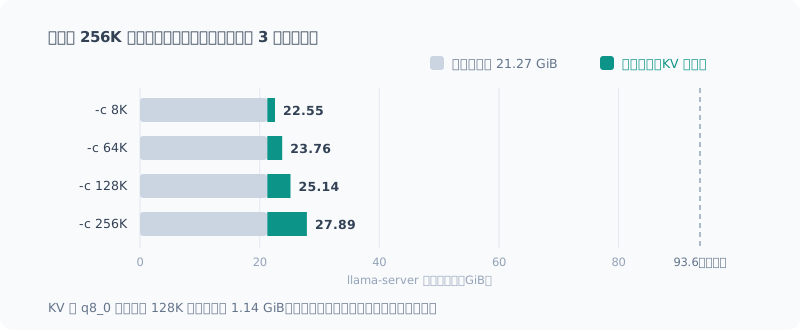
-c | KV | 実メモリ | 8K からの増分 |
|---|---|---|---|
| 8,192 | f16 | 22.55 GiB | — |
| 65,536 | f16 | 23.76 GiB | +1.21 GiB |
| 131,072 | f16 | 25.14 GiB | +2.59 GiB |
| 131,072 | q8_0 | 24.00 GiB | +1.45 GiB |
| 262,144 | f16 | 27.89 GiB | +5.34 GiB |
モデルの上限 256K まで起動して 28 GiB。 搭載 93.6 GiB の 3 割です。
KV を q8_0 にして浮くのは、128K で 1.14 GiB。 この機体でメモリを理由に量子化する理由はありません。仮説は外れました。
なぜ KV がこんなに小さいのか
128K ぶんの KV が 2.6 GiB しかないのは、一般的な構成から見ると小さすぎます。 GGUF のメタデータを読みました。
qwen35moe.block_count             = 41
qwen35moe.full_attention_interval = 4
qwen35moe.ssm.state_size          = 128
qwen35moe.attention.head_count_kv = 2
qwen35moe.attention.key_length    = 256
qwen35moe.attention.value_length  = 256
full_attention_interval = 4 と ssm.* が答えでした。
このモデルは SSM(状態空間モデル)とフルアテンションのハイブリッドです。
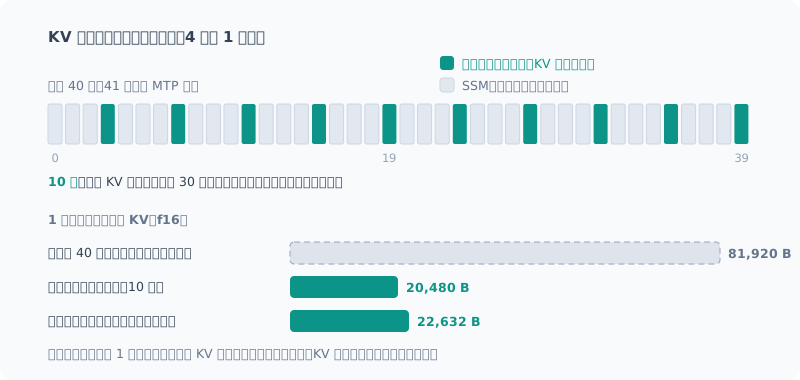
KV キャッシュがコンテキストに比例して伸びるのは、フルアテンション層だけです。 SSM 層が持つのは固定サイズの状態で、何トークン読んでも増えません。
フルアテンション層は 4 層に 1 層、本体 40 層のうち 10 層。理論値を出すと、
10 層 × (K + V) × 2 ヘッド × 256 次元 × 2 バイト = 20,480 B/tokenもし全 40 層がフルアテンションなら 81,920 B/token で、4 倍です。 「KV が小さい」のではなく、**「KV を持つ層が 4 分の 1 しかない」**わけです。
検算で自分の間違いを見つけた
最初、実測と理論が「3% で一致した」と書きかけました。
検算すると、実測を GiB(2³⁰)、理論を 10⁹ バイトで比べていました。 単位を揃えるとこうなります。
| KV | 理論 | 実測 | 超過 |
|---|---|---|---|
| f16 | 20,480 B | 22,632 B | +2,152 B |
| q8_0 | 10,880 B | 12,670 B | +1,790 B |
一致ではなく、約 1 割の超過でした。
ただ、超過分は KV の型によらず**ほぼ一定(約 2 KB/token)**です。 KV とは別に、コンテキスト長に比例して確保されるバッファがあると見られます。 中身までは確かめていません。構造の説明そのものは変わりません。
生成速度: 128K で 4 割強の減速
深度を振って生成速度を測りました(f16、1 回の起動内、各 2 回)。 後述する割り込み監視つきの最終計測の値です。
| 深度 | tg128 | 深度 0 比 |
|---|---|---|
| 0 | 17.38 | — |
| 32,768 | 14.77 | −15% |
| 131,072 | 9.72 | −44% |
128K まで積んでも毎秒 10 トークン弱出ます。読める速度です。 32K の −15% は、前回の −15.7% とも一致しました。
ここに辿り着くまでに、計測を 4 回やり直しています。
自分の自動起動に、計測を汚された
本番の 1 回目は、深度 3 点 × KV 4 通りを 1 回の起動内で振っていました。 途中まではまともでしたが、後半にこんな値が出ます。
| K / V | 深度 0 | 深度 32K |
|---|---|---|
| q8_0 / q8_0 | 9.61 | 14.67 |
KV が空の深度 0 のほうが、32K 積んだ状態より遅い。 物理的にありえません。
プロセスを調べると、計測の途中で llama-server が起動していました(26 GB)。
起動元は serve.ps1。CLI の回で組んだ
「llm を叩いたときにサーバが止まっていたら自動で起動する」仕組みです。
llama-bench   25.21 GB
llama-server  26.07 GB   ← 13:51 に割り込み
コミット 109.9 / 111.3 GB自分で作った便利機能が、自分の計測を汚したわけです。
前回「比較は 1 回の起動の中で振る」と書きました。 それ自体は正しいのですが、外から割り込まれれば同じ起動の中でも比較は成り立ちません。
2 回目からは、llama-server の出現を 10 秒ごとに記録する監視ジョブを併走させました。
KV 量子化: 128K では K だけ量子化が速い
監視つきの 2 回目です(深度 128K、各 2 回)。
| K / V | 深度 0 | 深度 128K |
|---|---|---|
| f16 / f16 | 17.13 | 9.90 |
| f16 / q8_0 | 17.71 | 9.37 |
| q8_0 / f16 | 18.79 | 11.51 |
| q8_0 / q8_0 | 18.72 | 10.44 |
K だけ量子化(q8_0 / f16)が最速で、f16 比 +16%。
ここで立ち止まりました。深度 0 の値が、実行順に上がっています。
17.13 → 17.71 → 18.79 → 18.72深度 0 では KV の型は効かないはずです。これは時間経過によるドリフトで、 後に測った q8_0 / f16 が得をしていた可能性があります。
そこで 3 回目は順序を逆にして、q8_0 / f16 を先に測りました。
| 順番 | K / V | 深度 0 | 深度 128K |
|---|---|---|---|
| 先 | q8_0 / f16 | 18.69 | 11.30 |
| 後 | f16 / f16 | 18.58 | 10.65 |
不利な先頭に置いても +6.1%。差は本物で、+16% は順序で水増しされていました。
さらに 4 回目(後述の最終計測)では、f16 → q8_0 → f16 と挟んで測りました。 最初と最後の f16 が揃えば、途中でドリフトしていないと言えます。
| 順 | K | 深度 0 | 深度 32K | 深度 128K |
|---|---|---|---|---|
| 1 | f16 | 17.16 | 14.75 | 9.65 |
| 2 | q8_0 | 17.45 | 15.06 | 10.75 |
| 3 | f16 | 17.59 | 14.79 | 9.79 |
32K の f16 が 14.75 と 14.79 で揃っています。この回はドリフトしていません。
K だけ量子化したときの損得をまとめるとこうなります。
| 深度 | 計測 | K だけ q8_0 |
|---|---|---|
| 32K | 前回の記事(各 5 回) | −3.5% |
| 32K | 4 回目(挟み込み) | +2.0% |
| 128K | 2 回目 | +16%(順序で水増し) |
| 128K | 3 回目(順序反転) | +6.1% |
| 128K | 4 回目(挟み込み) | +10.6% |
32K では差が無く、128K では 6〜11% 速い。 32K の ±3% はばらつきの範囲です。 V を量子化するのは、測ったどの深度でも損でした(4 回目では V は測っていません)。
第2回の判断は、予想とは違う理由で「条件付き」になったことになります。 メモリではなく速度の理由で、しかも 100K を超える深さに限った話です。
本当の壁: 128K を読ませるだけで 21〜24 分
生成速度はまだ読める水準でした。問題はその前です。
実サーバに 32K / 64K / 128K のプロンプトを実際に投げ、取り込みにかかる時間を測りました。 時間帯を変えて 2 回です。
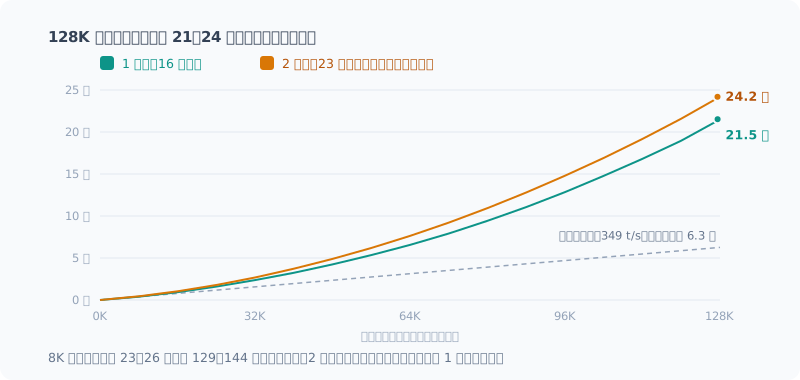
| プロンプト | 1 回目(16 時台) | 2 回目(23 時台) |
|---|---|---|
| 32K | 149 秒(2.5 分) | 167 秒(2.8 分) |
| 64K | 397 秒(6.6 分) | 469 秒(7.8 分) |
| 128K | 1,291 秒(21.5 分) | 1,451 秒(24.2 分) |
128K の文書を渡すと、最初の 1 文字が返ってくるまで 21〜24 分かかります。
追記(2026-09-27): 次の回で 3 回目を測ったところ、 128K の初回読み込みは 17.6 分でした。3 回で 17.6〜24.2 分と、同じ設定でも 4 割近い幅があります。 なお、同じ文書に 2 回目以降の質問をする場合は、読み直しが末尾の 515 トークンだけで済み、10.7 秒でした。
進行ログを見ると、後ろのチャンクほど遅くなっています。
| 位置 | その 8K の所要(1 回目) | (2 回目) |
|---|---|---|
| 0 → 8K | 23.5 秒 | 26.1 秒 |
| 32K → 40K | 52.7 秒 | 62.5 秒 |
| 64K → 72K | 82.0 秒 | 95.1 秒 |
| 112K → 120K | 129.1 秒 | 143.7 秒 |
新しく読むトークンは、それまでの全トークンを参照します。 1 チャンクの所要がほぼ直線的に伸びるので、合計は長さの 2 乗に近く伸びます。
MTP(投機的デコード)が足を引っ張っている可能性も疑い、1 回目の直後に外して測りました。
| プロンプト | 取り込み(MTP あり) | 取り込み(MTP なし) | 生成(あり) | 生成(なし) |
|---|---|---|---|---|
| 32K | 149.1 秒 | 148.8 秒 | 16.23 t/s | 14.52 t/s |
| 64K | 397.4 秒 | 377.2 秒 | 13.77 t/s | 12.40 t/s |
取り込みはほぼ同じです。遅さは MTP のせいではなく、アテンションそのものの重さです。 生成は MTP ありが約 1 割速く、第2回で測った効果(散文 +12.6%)と同じ傾向でした。 ただしどちらも 1 回ずつなので、1 割前後の差は後述のばらつきと同じ大きさです。
見積もりも外していた
計測前、私は「131K のプリフィルは約 6 分」と見積もっていました。 短いプロンプトの処理速度(約 350 t/s)がずっと続く前提で割り算していたからです。
実際は 21〜24 分。3.4〜3.8 倍の見込み違いです。 短い入力で測った速度を長い入力に外挿してはいけない、という当たり前の話でした。
裏で何か動いていなかったか、測り直した
ここまで書いてから、気になりました。監視していたのは llama-server の起動だけです。 ほかのプロセスが CPU や GPU を使っていても、この監視では気づけません。
実際、1 回目の f16 には引っかかる値がありました。
| 実行 | 深度 0 | 深度 32K | 劣化 |
|---|---|---|---|
| 前回の記事(各 5 回) | 18.57 | 15.65 | −16% |
| 今回の 1 回目 | 17.45 | 13.25 | −24% |
割り込みの前に終わっていたので「無傷」と判断していましたが、根拠は 「llama-server がまだ起動していなかった」ことだけでした。
そこで監視を広げました。10 秒ごとに、llama 以外のプロセスが使った CPU と GPU を記録します。
# 前回サンプルからの CPU 時間の差分を、プロセスごとに積む(llama-* は除外)
$pct = ($s - $prev[$p.Id]) / $dt / $ncpu * 100
# GPU はエンジンごとの使用率カウンタを pid で引き、llama 以外を合計
Get-Counter '\GPU Engine(*)\Utilization Percentage'
これを併走させて、ベンチ(f16 → q8_0 → f16 の挟み込み)とプリフィルを全部やり直したのが 4 回目です。
| 区間 | llama 以外の CPU(中央値 / 最大) | llama 以外の GPU(最大) |
|---|---|---|
| ベンチ(70 分) | 6.6% / 11.5% | 4.7% |
| プリフィル(37 分) | 6.6% / 8.9% | 4.2% |
6.6% は大半がこの作業に使っているアプリ自身で、計測前の平常時(7.3%)と同じ水準です。 今回は裏で何も動いていません。
その結果、変わったことが 2 つあります。
- 32K の劣化は −15%。前回の記事と一致し、1 回目の −24% のほうが外れ値でした。 原因は突き止められませんが、「無傷」の判断は甘かったことになります
- 32K での K 量子化の損得は +2.0%。前回の −3.5% と合わせて、差は無いと見るべきでした
一方で、割り込みが無くても値は動きました。プリフィルは 1 回目より 12〜18% 遅く、 最初の 8K チャンクから一様に遅い。途中で何かが割り込んだ形ではなく、 マシン全体の状態(熱や電力)の差と見ています。
監視は、見ているものしか守ってくれません。 そして全部を見張っても、1 割前後はまだ動きます。
設定はどうするか
変えません。
| 項目 | 現状 | 判断 |
|---|---|---|
-c | 65,536 | 据え置き。メモリ的には 256K も可能だが、64K の取り込みで既に 6.6〜7.8 分 |
| KV | f16 / f16 | 据え置き。K 量子化が得をするのは 100K 超だけ |
コードレビューに投げているのは 2 万トークン前後です。 その深さでは K を量子化しても速くならず、変える理由がありません。 128K 級の入力は、取り込みだけで 20 分を超えます。 対話的に使う範囲では、128K を常用する場面がありません。
「一晩かけて巨大な文書を読ませる」ような使い方をするなら、
そのときだけ -c 131072 -ctk q8_0 で起動する、という選択肢は残ります。
まとめ
- 128K は動く。 256K でもメモリは 28 GiB で、搭載の 3 割
- メモリが小さい理由はハイブリッド構成。KV を持つのは 40 層中 10 層だけ
- 生成速度は 128K で −44%(毎秒 10 トークン弱)。読める水準
- K だけ量子化は 128K で 6〜11% 速い。 32K では差が無い。V の量子化は損
- 本当の壁はプリフィル。 128K の取り込みに 21〜24 分
- 計測中に自分の自動起動が割り込んだ。監視は llama-server だけでなく、CPU・GPU 全体を見る
- 全部を見張っても、実行ごとに 1 割前後は動く
外れた仮説は「メモリが足りなくなる」でした。 外れたおかげで、モデルの構造と、待ち時間という本当の制約が見えました。
Introduction
In the previous benchmark, I only measured up to a depth of 32K. The Qwen3.6-35B-A3B I use can handle up to 262,144 tokens. That means I had only checked one eighth of it.
Before measuring, I formed a hypothesis:
Stretching to 128K will bloat the KV cache and run out of memory. If so, the KV quantization I rejected in part 2 becomes mandatory, and that decision turns “conditional”.
To give away the result: the hypothesis was wrong. But the reason it was wrong was the more interesting story. And the real wall was somewhere else.
First, Does 128K Even Fit?
Before starting hour-long measurements, I checked in a single run only whether it works at all.
llama-bench -hf unsloth/Qwen3.6-35B-A3B-MTP-GGUF:UD-Q4_K_XL
            -ngl 99 -fa 1 -b 8192 -p 0 -n 128 -d 131072 -r 1
tg128 @ d131072 → 10.05 t/s (所要 18.4 分)It ran. But one run of one condition took 18 minutes. Had I jumped straight into a real run of 4 conditions × several repetitions, a crash would have cost me hours.
Memory: 28 GiB Even at the 256K Maximum
I started llama-server changing only -c, and compared actual memory use.
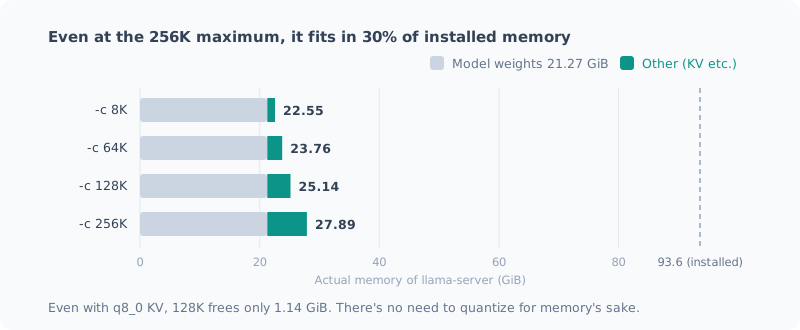
-c | KV | Actual memory | Increase from 8K |
|---|---|---|---|
| 8,192 | f16 | 22.55 GiB | — |
| 65,536 | f16 | 23.76 GiB | +1.21 GiB |
| 131,072 | f16 | 25.14 GiB | +2.59 GiB |
| 131,072 | q8_0 | 24.00 GiB | +1.45 GiB |
| 262,144 | f16 | 27.89 GiB | +5.34 GiB |
Starting it at the model’s 256K maximum takes 28 GiB. That’s 30% of the 93.6 GiB installed.
Switching KV to q8_0 frees 1.14 GiB at 128K. On this machine there’s no reason to quantize for memory. The hypothesis was wrong.
Why Is the KV So Small?
2.6 GiB of KV for 128K is far too small compared with a typical setup. I read the GGUF metadata:
qwen35moe.block_count             = 41
qwen35moe.full_attention_interval = 4
qwen35moe.ssm.state_size          = 128
qwen35moe.attention.head_count_kv = 2
qwen35moe.attention.key_length    = 256
qwen35moe.attention.value_length  = 256
full_attention_interval = 4 and ssm.* were the answer.
This model is a hybrid of SSM (state space model) and full attention.
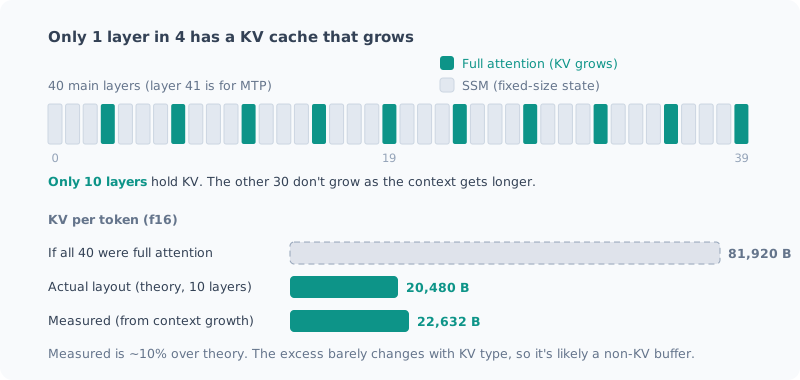
Only full attention layers have a KV cache that grows in proportion to the context. SSM layers hold a fixed-size state that doesn’t grow no matter how many tokens they read.
Full attention is 1 layer in 4, so 10 of the 40 main layers. The theoretical value is:
10 層 × (K + V) × 2 ヘッド × 256 次元 × 2 バイト = 20,480 B/tokenIf all 40 layers were full attention, it would be 81,920 B/token, 4 times as much. It’s not that “the KV is small”; it’s that “only a quarter of the layers have KV at all”.
Double-Checking Caught My Own Mistake
At first I almost wrote that the measurement and the theory “agreed within 3%”.
When I double-checked, I had been comparing the measurement in GiB (2³⁰) with the theory in 10⁹ bytes. With the units aligned, it looks like this:
| KV | Theory | Measured | Excess |
|---|---|---|---|
| f16 | 20,480 B | 22,632 B | +2,152 B |
| q8_0 | 10,880 B | 12,670 B | +1,790 B |
It wasn’t a match; it was about 10% over.
That said, the excess is nearly constant (about 2 KB/token) regardless of the KV type. It looks like there’s a buffer, separate from KV, allocated in proportion to the context length. I haven’t checked what’s in it. The structural explanation itself doesn’t change.
Generation Speed: Just Over 40% Slower at 128K
I measured generation speed across depths (f16, within one launch, 2 runs each). These are the values from the final measurement with interrupt monitoring, described below.
| Depth | tg128 | vs. depth 0 |
|---|---|---|
| 0 | 17.38 | — |
| 32,768 | 14.77 | −15% |
| 131,072 | 9.72 | −44% |
Even stacked up to 128K, it still puts out just under 10 tokens per second. That’s a readable speed. The −15% at 32K also matched the −15.7% from the previous post.
Getting here took four rounds of measurement.
My Own Auto-Start Polluted the Measurement
The first real run swept 3 depths × 4 KV combinations within a single launch. It was sane up to a point, but in the second half values like these came out:
| K / V | Depth 0 | Depth 32K |
|---|---|---|
| q8_0 / q8_0 | 9.61 | 14.67 |
Depth 0, with an empty KV, was slower than with 32K stacked up. That’s physically impossible.
When I checked the processes, llama-server had started in the middle of the measurement (26 GB).
It was started by serve.ps1: the mechanism I built in the CLI post
that “automatically starts the server if it’s stopped when I run llm”.
llama-bench   25.21 GB
llama-server  26.07 GB   ← 13:51 に割り込み
コミット      109.9 / 111.3 GB
A convenience feature I built myself had polluted my own measurement.
Last time I wrote “sweep comparisons within a single launch”. That’s still right, but if something interrupts from outside, even a comparison within one launch doesn’t hold.
From the second run on, I ran a monitoring job alongside that logged every 10 seconds whether llama-server had appeared.
KV Quantization: At 128K, Quantizing Only K Is Faster
This is the second run, with monitoring (depth 128K, 2 runs each).
| K / V | Depth 0 | Depth 128K |
|---|---|---|
| f16 / f16 | 17.13 | 9.90 |
| f16 / q8_0 | 17.71 | 9.37 |
| q8_0 / f16 | 18.79 | 11.51 |
| q8_0 / q8_0 | 18.72 | 10.44 |
Quantizing only K (q8_0 / f16) was the fastest, +16% over f16.
Here I stopped. The depth-0 values were rising in the order they ran.
17.13 → 17.71 → 18.79 → 18.72At depth 0 the KV type shouldn’t matter. This is drift over time, and q8_0 / f16, measured later, may have benefited from it.
So for the third run I reversed the order and measured q8_0 / f16 first.
| Order | K / V | Depth 0 | Depth 128K |
|---|---|---|---|
| First | q8_0 / f16 | 18.69 | 11.30 |
| Second | f16 / f16 | 18.58 | 10.65 |
Even in the unfavorable first slot it was +6.1%. The difference is real; the +16% had been inflated by the order.
Then in the fourth run (the final measurement described below) I sandwiched it: f16 → q8_0 → f16. If the first and last f16 agree, I can say nothing drifted in between.
| Order | K | Depth 0 | Depth 32K | Depth 128K |
|---|---|---|---|---|
| 1 | f16 | 17.16 | 14.75 | 9.65 |
| 2 | q8_0 | 17.45 | 15.06 | 10.75 |
| 3 | f16 | 17.59 | 14.79 | 9.79 |
The f16 values at 32K agree at 14.75 and 14.79. This run didn’t drift.
Here’s the gain or loss from quantizing only K:
| Depth | Measurement | q8_0 for K only |
|---|---|---|
| 32K | Previous post (5 runs each) | −3.5% |
| 32K | Run 4 (sandwiched) | +2.0% |
| 128K | Run 2 | +16% (inflated by order) |
| 128K | Run 3 (order reversed) | +6.1% |
| 128K | Run 4 (sandwiched) | +10.6% |
No difference at 32K, 6–11% faster at 128K. The ±3% at 32K is within the noise. Quantizing V was a loss at every depth I measured (run 4 didn’t measure V).
So the decision from part 2 did become “conditional”, but for a different reason than I expected. It’s about speed, not memory, and only at depths beyond 100K.
The Real Wall: 21–24 Minutes Just to Read 128K
Generation speed was still at a readable level. The problem comes before that.
I actually sent 32K / 64K / 128K prompts to the real server and measured how long it took to ingest them. Twice, at different times of day.
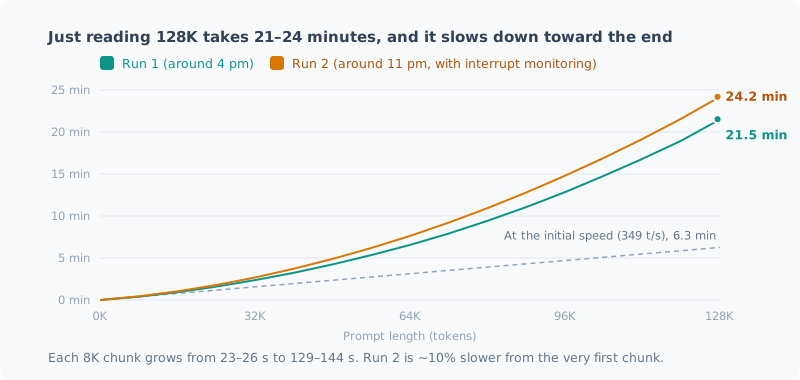
| Prompt | Run 1 (around 4 pm) | Run 2 (around 11 pm) |
|---|---|---|
| 32K | 149 s (2.5 min) | 167 s (2.8 min) |
| 64K | 397 s (6.6 min) | 469 s (7.8 min) |
| 128K | 1,291 s (21.5 min) | 1,451 s (24.2 min) |
Hand it a 128K document and it takes 21–24 minutes before the first character comes back.
Update (2026-09-27): When I measured a third time in the next post, the first read of 128K took 17.6 minutes. Across three runs that’s 17.6–24.2 minutes, a spread of nearly 40% with the same settings. Also, for the second and later questions about the same document, only the last 515 tokens had to be re-read, which took 10.7 seconds.
The progress log shows later chunks getting slower.
| Position | Time for that 8K (run 1) | (run 2) |
|---|---|---|
| 0 → 8K | 23.5 s | 26.1 s |
| 32K → 40K | 52.7 s | 62.5 s |
| 64K → 72K | 82.0 s | 95.1 s |
| 112K → 120K | 129.1 s | 143.7 s |
Each newly read token attends to every token before it. The time per chunk grows almost linearly, so the total grows close to the square of the length.
I also suspected MTP (speculative decoding) might be dragging it down, so right after run 1 I measured without it.
| Prompt | Ingestion (with MTP) | Ingestion (no MTP) | Generation (with) | Generation (without) |
|---|---|---|---|---|
| 32K | 149.1 s | 148.8 s | 16.23 t/s | 14.52 t/s |
| 64K | 397.4 s | 377.2 s | 13.77 t/s | 12.40 t/s |
Ingestion is almost the same. The slowness isn’t MTP’s fault; it’s the cost of attention itself. Generation with MTP was about 10% faster, the same trend as the effect I measured in part 2 (+12.6% on prose). But each was a single run, so a difference of around 10% is the same size as the run-to-run variation described below.
My Estimate Was Off Too
Before measuring, I had estimated “prefill for 131K takes about 6 minutes”. I had divided assuming the processing speed for short prompts (about 350 t/s) would hold all the way.
In reality it was 21–24 minutes. I was off by 3.4–3.8 times. The obvious lesson: don’t extrapolate a speed measured on short inputs to long inputs.
Was Anything Running in the Background? I Measured Again
After writing all this, something bothered me. The only thing I had been monitoring was llama-server starting. If some other process was using the CPU or GPU, that monitoring wouldn’t catch it.
In fact, the f16 values in run 1 looked suspicious.
| Run | Depth 0 | Depth 32K | Drop |
|---|---|---|---|
| Previous post (5 runs each) | 18.57 | 15.65 | −16% |
| This post, run 1 | 17.45 | 13.25 | −24% |
Because it had finished before the interruption, I had judged it “unaffected”, but the only basis for that was “llama-server hadn’t started yet”.
So I widened the monitoring. Every 10 seconds, it logs the CPU and GPU used by processes other than llama.
# 前回サンプルからの CPU 時間の差分を、プロセスごとに積む(llama-* は除外)
$pct = ($s - $prev[$p.Id]) / $dt / $ncpu * 100
# GPU はエンジンごとの使用率カウンタを pid で引き、llama 以外を合計
Get-Counter '\GPU Engine(*)\Utilization Percentage'
Run 4 was redoing everything, the benchmark (sandwiched f16 → q8_0 → f16) and the prefill, with this running alongside.
| Phase | Non-llama CPU (median / max) | Non-llama GPU (max) |
|---|---|---|
| Benchmark (70 min) | 6.6% / 11.5% | 4.7% |
| Prefill (37 min) | 6.6% / 8.9% | 4.2% |
Most of the 6.6% is the app I was using for this work itself, the same level as at rest before measuring (7.3%). Nothing was running in the background this time.
As a result, two things changed:
- The drop at 32K is −15%. It matches the previous post; the −24% in run 1 was the outlier. I couldn’t pin down the cause, but my judgment of “unaffected” was too lenient
- The gain from quantizing K at 32K is +2.0%. Together with the previous −3.5%, I should have read it as no difference
On the other hand, the values moved even without any interruption. Prefill was 12–18% slower than run 1, and uniformly slow from the very first 8K chunk. It doesn’t look like something cut in partway; I put it down to a difference in the state of the whole machine (heat or power).
Monitoring only protects you from what it watches. And even watching everything, around 10% still moves.
What to Do with the Settings
I’m not changing them.
| Item | Current | Decision |
|---|---|---|
-c | 65,536 | Keep. Memory-wise even 256K is possible, but ingesting 64K already takes 6.6–7.8 min |
| KV | f16 / f16 | Keep. Quantizing K only pays off beyond 100K |
What I send for code review is around 20,000 tokens. At that depth quantizing K doesn’t make it faster, so there’s no reason to change. Input on the order of 128K takes over 20 minutes just to ingest. Within interactive use, there’s no situation where I’d use 128K regularly.
If I ever want to “have it read a huge document overnight”,
I still have the option of starting it with -c 131072 -ctk q8_0 just for that.
Summary
- 128K works. Even at 256K, memory is 28 GiB, 30% of what’s installed
- Memory stays small because of the hybrid architecture. Only 10 of the 40 layers hold KV
- Generation speed is −44% at 128K (just under 10 tokens per second). Still readable
- Quantizing only K is 6–11% faster at 128K. No difference at 32K. Quantizing V is a loss
- The real wall is prefill. Ingesting 128K takes 21–24 minutes
- My own auto-start interrupted the measurement. Monitor the whole CPU and GPU, not just llama-server
- Even watching everything, around 10% moves from run to run
The hypothesis that turned out wrong was “it’ll run out of memory”. Because it was wrong, I got to see the model’s structure and the real constraint: waiting time.
関連記事 Related Posts
ベンチで「効果を見つけた」と思ったら、測定のぶれだった I Thought My Benchmark Found an Effect, but It Was Measurement Noise
過去に下した設定判断を検証しようとして、逆の結果が出ました。喜びかけたところで物理的におかしい点に気づき、測り直したら元の判断が正しかった。別々に起動したベンチを比較してはいけない、という話です。 When I tried to verify a settings decision I'd made earlier, I got the opposite result. Just as I was about to celebrate, I noticed something physically odd, measured again, and the original decision was right. This is about why you shouldn't compare benchmarks from separate launches.
ローカルLLMのベンチマークの取り方(チェックリスト付き) How to Benchmark a Local LLM (with a Checklist)
ローカルLLMの速度や品質を測るときに、結果を信用できるものにする手順をまとめました。同じ条件でも1割ぶれる、順番で結果が変わる、裏の処理で5倍ぶれる、採点器が壊れている。実際に踏んだ失敗から作った、測る前・測っている間・測ったあとのチェックリストです。 I put together the steps that make the results trustworthy when measuring the speed or quality of a local LLM. The same conditions vary by 10%, the order changes the result, background work causes 5x swings, and the grader is broken. This is a before, during and after checklist built from mistakes I actually made.
ローカルLLMの設定、効くもの・効かないもの一覧(実測つき) Local LLM Settings That Work and Settings That Don't (with Measurements)
Ryzen AI ミニPCでローカルLLMを動かすときに試した設定を、効果の大きさ順に1枚にまとめました。Vulkanは5.2倍、MoEは5.7倍。一方で、効かなかったもの、逆効果だったもの、そもそも無効だったものもあります。すべてこの機体での実測値です。 I put the settings I tried for running a local LLM on a Ryzen AI mini PC on one page, ordered by how much they help. Vulkan gave 5.2x, MoE 5.7x. Some settings did nothing, some backfired, and some were never enabled in the first place. Every number was measured on this machine.