Ryzen AI PCのローカルLLMを7倍速くした話(llama.cpp + Vulkan + Qwen) How I Made the Local LLM on My Ryzen AI PC 7 Times Faster (llama.cpp + Vulkan + Qwen)
はじめに
前回、Ryzen AI 9 HX 370 搭載のミニPCから ローカルLLM環境を全部消しました。68.84 GB を削除して、まっさらな状態です。
今回はそこに新しく環境を作ります。条件は3つ。
- コマンドだけで完結すること(GUIに依存しない)
- GPU を使って速くすること
- Qwen を動かすこと
結論から言うと、生成速度は旧環境の約7倍になりました。 そして途中で 最新モデルを選んで失敗しました。その話も含めて書きます。
結論
winget install --id ggml.llamacppllama-server -hf unsloth/Qwen3.6-35B-A3B-MTP-GGUF:UD-Q4_K_XL
--port 8080 -c 16384 -ngl 99
-b 8192 -fa on --cache-reuse 256 --kv-unified --jinja
--spec-type draft-mtp --spec-draft-n-max 2| 項目 | 旧環境 | 新環境 |
|---|---|---|
| 生成(コード) | 2.6 t/s 相当 | 20.7〜22.6 t/s |
| 生成(散文) | 〃 | 17.5 t/s |
| プロンプト処理 | — | 353 t/s |
品質を落とす設定は一切使っていません。以下、どうやってここに辿り着いたか。
なぜ Vulkan なのか
前回の掃除で設定ファイルを読んでいたとき、こんな記述を見つけました。
"llamacpp": { "backend": "cpu", ... }CPU で推論していました。 Radeon 890M も NPU も積んでいるのに。 96 GB のメモリのおかげで大きいモデルが動いてしまうので、 「動いてるからいいか」で半年放置されていたわけです。
では GPU を使うとして、AMD には ROCm と Vulkan の2つの道があります。 同じ Ryzen AI 9 HX 370 + DDR5-5600 での実測が公開されていました。
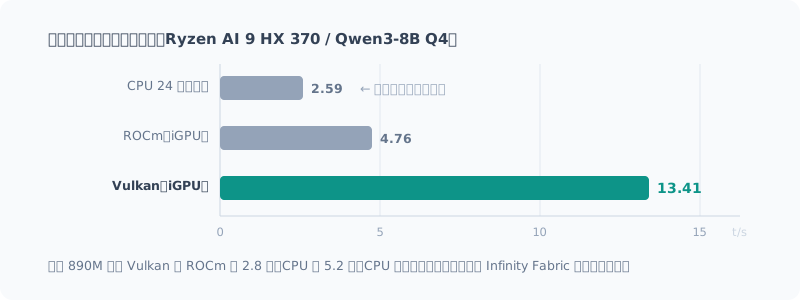
Vulkan が ROCm の2.8倍、CPU の5.2倍でした。 AMD 公式の ROCm が Vulkan に負けるのは意外ですが、理由もはっきりしています。
- gfx1150(890M)は ROCm の公式サポート表に今も載っていない
- プロンプト処理だけは ROCm が 41% 速いが、対話用途では生成速度のほうが効く
CPU が遅いのはメモリ帯域ではなく Infinity Fabric がボトルネックだから。 CPU コアはメモリコントローラを使い切れませんが、iGPU は使い切れます。
WSL は使いませんでした
Linux のツールチェーンが使えるので最初は有力候補でした。調べた結果、この用途では不利です。
- WSL2 の Vulkan はエミュレーション経由で性能が落ちる
- ROCm on WSL2 は Strix 対応が入ったが、乗る先が「遅いほうの ROCm」
amdgpu.gttsizeなどの GTT カーネルパラメータが WSL2 では効かせられない
WSL を選ぶと「遅い道」か「もっと遅い道」しかありませんでした。
導入はコマンド一発だった
winget install --id ggml.llamacppこれだけです。winget の公式パッケージが Vulkan ビルドを配布していて、
llama-cli / llama-server / llama-bench が PATH に載ります。
> llama-cli --list-devices
Vulkan0: AMD Radeon(TM) 890M Graphics (78739 MiB, 74802 MiB free)
BIOS をいじる覚悟をしていたのに、不要だった
事前に調べたとき、複数の記事に同じ警告がありました。
BIOS の UMA Frame Buffer Size が
Autoだと Vulkan が VRAM を 0 バイトと誤認し、 モデルロードに失敗する。Fixedに変更して容量を割り当てること。
再起動して BIOS に潜る手順まで書いて身構えていたのですが、 当環境では起きませんでした。
ドライバが報告する専用 VRAM は 2 GB のままです。 それなのに llama.cpp は 約 77 GB(空き 73 GB) を認識しています。 最近の llama.cpp が共有メモリを自動検出するようになったためでした。
結果として BIOS は一切触らず、再起動もなしで済みました。
先に --list-devices で実測しておいて良かった例です。
最新モデルを選んで失敗した
ここからが本題です。
モデルは Qwen を使うと決めていました。調べると Qwen3.8-27B(2026年8月リリース)が最新世代で、 「Qwen-Max クラスを初めてオープン化」と書いてあります。新しいほうがいいだろうと選びました。
測った結果がこれです。
| pp512 | tg128 | |
|---|---|---|
| Qwen3.8-27B Q4_K_M (16.23 GiB) | 29.6 t/s | 3.6 t/s |
3.6 t/s。 1000 トークンのプロンプトで初回応答まで34秒、 そのあと毎秒3.6トークン。対話には使えません。
設定では1ミリも動かなかった
チューニングで何とかならないかと一通り試しました。
| 試したこと | 結果 |
|---|---|
FlashAttention -fa on | 誤差範囲(むしろ微減) |
| ubatch 512 / 1024 / 2048 | 全部横ばい |
-b 8192 | pp のみ +18%、生成は不変 |
生成速度だけがびくともしません。帯域計算をしたら理由が分かりました。
16.23 GiB × 3.6 t/s = 実効 60.5 GB/s(理論 89.6 GB/s の 68%)ハードウェアはちゃんと性能を出していました。 27B の密モデルは 1 トークンごとに全重み 16 GB を読むので、 DDR5-5600 の 128bit(理論 89.6 GB/s)では物理的にこれ以上出ません。
設定の問題ではなく、モデルの選び方の問題でした。
ファイルが大きいほうが速かった
比較対象として、前の環境で使っていた Qwen3.6-35B-A3B(MoE)を測りました。 総パラメータは 35B で 27B より大きく、ファイルも 4.5 GB 大きいモデルです。
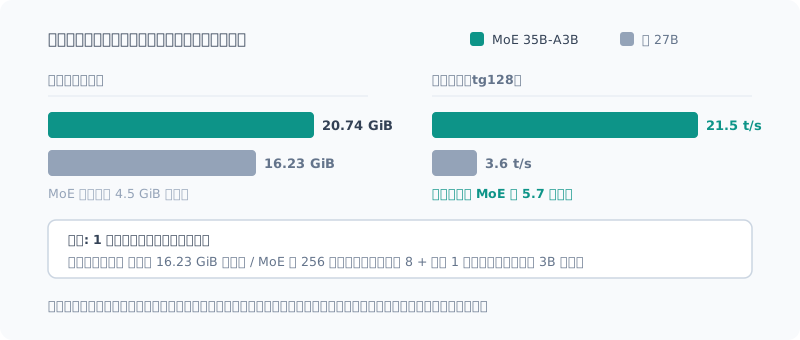
| ファイル | pp512 | tg128 | |
|---|---|---|---|
| Qwen3.8-27B(密) | 16.23 GiB | 29.6 t/s | 3.6 t/s |
| Qwen3.6-35B-A3B(MoE) | 20.74 GiB | 281 t/s | 20.7 t/s |
| 差 | MoE が 4.5 GiB 大きい | 9.5 倍 | 5.7 倍 |
大きいほうが5.7倍速い。 直感に反しますが、理由は単純です。
- 密モデルは毎トークン 全重み 16.23 GiB を読む
- MoE は 256 エキスパートのうち 8 + 共有1 しか読まない(実効 3B 相当)
実効帯域を検算すると MoE も 60 GB/s 前後で、密モデルと同じでした。 ハードウェアは同じ性能を出していて、違うのはモデル構造だけです。
体感で言うと、1000 トークンのプロンプトで初回応答が 34秒 → 3.6秒 になります。
この機体でのモデルの選び方 総パラメータ数でもファイルサイズでもなく、 **「1トークンあたり何バイト読むか」**で選ぶ。 帯域が天井なので、ここが速度に直結します。
最新世代を追うより、構造が合っているモデルを選ぶほうが効きました。
品質を落とさないチューニング
主役を MoE に決めてから、速度を詰めていきます。 方針は「計算を省くか並べ替えるだけの手しか使わない」です。
| 設定 | 効果 | 品質 |
|---|---|---|
-b 8192 | プロンプト処理 +26%(281→353 t/s) | 影響なし |
--cache-reuse 256 | 共通prefixの 95% を再計算せず(※訂正あり。下記) | 影響なし |
-fa on | FlashAttention | 影響なし |
--kv-unified | KV の断片化回避 | 影響なし |
-b はバッチサイズです。2048 / 4096 / 8192 / 16384 で振ったところ
8192 が最良で、16384 まで上げると微減しました。
一方 -ub(マイクロバッチ)は密・MoE のどちらでも効果ゼロだったので触っていません。
--cache-reuse が効いている証拠
llama-server は応答に timings を返します。
長めの system プロンプトを固定して連続リクエストすると、
cache_n  : 425    ← キャッシュから再利用したトークン
prompt_n : 21     ← 実際に計算したトークン
446 トークンのプロンプトのうち 425 トークン(95%)を再計算していません。 system プロンプトを固定する使い方なら、2回目以降の待ち時間がほぼ消えます。
訂正(2026-09-27): この再利用は
--cache-reuseの効果ではありませんでした。 起動ログにcache_reuse is not supported by multimodal, it will be disabledと出ており、 画像用の mmproj を読み込んでいるため--cache-reuseは最初から無効でした。 mmproj を外しても、SSM とのハイブリッド構成のためnot supported by this contextで無効になります。 上のcache_n 425は、既定で有効な--cache-prompt(先頭が一致する部分を再計算しない)によるものです。 現象は本物で、効果を別の設定のものと取り違えていました。 詳しくは長い文書を使い回す回に書いています。
あえて使わなかったもの: KV キャッシュ量子化
-ctk q8_0 でKVキャッシュを量子化する手があります。
品質劣化はほぼ無い(f16 と同等の perplexity)とされる定番の手ですが、不採用にしました。
f16 が収まる環境では f16 のほうが速いからです。 量子化すると毎トークン逆量子化が走り、深いコンテキストほど不利になります (64K 深度で f16 比 55% まで落ちるという計測もあります)。
当環境は Vulkan が 73 GB を認識していて f16 で十分収まるので、 量子化しないほうが速いという結論でした。メモリが足りなくなったときの予備手です。
投機デコードは「伸ばしすぎると遅くなる」
最後に MTP(Multi-Token Prediction)投機デコードを試しました。
小さなドラフトが数トークン先を先読みし、本体モデルがまとめて検証する仕組みです。 外れたら破棄して本体の出力を使うので、出力の分布は変わりません。 つまり無損失で速くなります。
Qwen3.6-35B-A3B には MTP 層を含むビルドがあり、公称「1.5〜2倍」。
--spec-draft-n-max(何トークン先読みするか)を振って測りました。
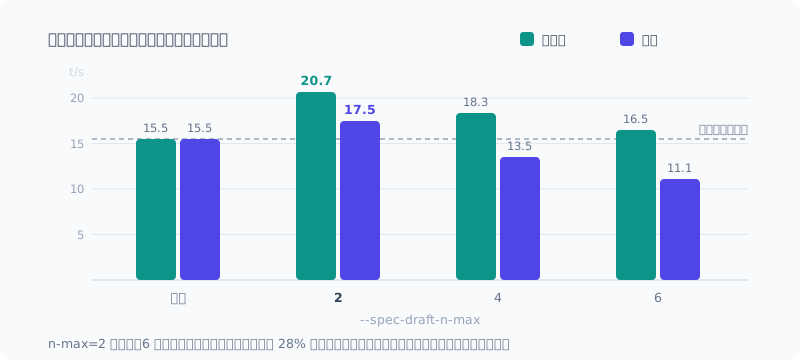
| n-max | 散文 | コード |
|---|---|---|
| なし | 15.5 t/s | 15.5 t/s |
| 2 | 17.5 t/s (+12.6%) | 20.7 t/s (+33.4%) |
| 4 | 13.5 t/s (−13%) | 18.3 t/s (+16%) |
| 6 | 11.1 t/s (−28%) | 16.5 t/s (+3%) |
伸ばすほど速くなる、ではありませんでした。 n-max=6 の散文は投機なしより 28% 遅いです。
- コードは次のトークンが予測しやすく、当たり率が高い → 伸ばしても効く
- 散文は予測しにくく外れやすい → 伸ばすほど捨てる計算が増えて遅くなる
両方扱うなら短めが安全で、2 が最適でした。 公称の1.5〜2倍には届きませんでしたが、確実にプラスです。
投機デコードは「とりあえず有効にすれば速くなる」ものではありません。 必ず有効・無効の両方を測って比較してください。
測り方をしくじった話
最初の計測では、対照群(投機なし)の起動がタイムアウトで失敗し、 投機ありの数字しか残りませんでした。 モデル 22.9 GB のダウンロードが終わる前に計測を始めてしまい、 起動待ちの上限を使い切っていたのです。
片側だけの数字は「速いか」の証拠になりません。取り直しました。 初回ダウンロードを伴う計測は、先にモデルを取得してから比較を回すのが教訓です。
まとめ
| 旧環境 | 新環境 | |
|---|---|---|
| バックエンド | CPU | Vulkan(iGPU) |
| モデル | — | Qwen3.6-35B-A3B MTP(MoE) |
| 生成 | 2.6 t/s 相当 | 17.5〜22.6 t/s |
約7倍になりました。効いた順に並べると、
- MoE モデルを選ぶ(密27B比 5.7倍)
- Vulkan を使う(CPU比 5.2倍)
- MTP 投機デコード(+12.6〜33.4%)
-b 8192(プロンプト処理 +26%)
上2つが圧倒的で、細かいフラグは最後の味付けでした。 大きい判断を間違えなければ、細かいチューニングは大して要らないというのが実感です。
今回いちばんの学びは、最新モデルが最適とは限らないことでした。 Qwen3.8-27B は確かに新しく強いモデルですが、 89.6 GB/s しかない機体では構造が合いませんでした。 スペック表の「最新」「高性能」より、自分の機体のボトルネックに合うかで選ぶべきでした。
検証で4モデル・61.2 GB まで膨らんだキャッシュは、 役割の済んだものを消して 23.3 GB に戻しました。前回の掃除を無駄にしないためにも、 検証用に落としたモデルはその場で始末するのを習慣にしたいところです。
Introduction
Last time, I removed the entire local LLM setup from my mini PC with a Ryzen AI 9 HX 370. I deleted 68.84 GB and ended up with a clean slate.
This time I build a new setup on top of that. I had three requirements:
- It works entirely from the command line (no dependence on a GUI)
- It uses the GPU to be fast
- It runs Qwen
To give the conclusion first: generation became about 7 times faster than the old setup. And along the way, I picked the newest model and it backfired. I’ll cover that story too.
The Result
winget install --id ggml.llamacppllama-server -hf unsloth/Qwen3.6-35B-A3B-MTP-GGUF:UD-Q4_K_XL
--port 8080 -c 16384 -ngl 99
-b 8192 -fa on --cache-reuse 256 --kv-unified --jinja
--spec-type draft-mtp --spec-draft-n-max 2| Item | Old setup | New setup |
|---|---|---|
| Generation (code) | Equivalent to 2.6 t/s | 20.7–22.6 t/s |
| Generation (prose) | Same | 17.5 t/s |
| Prompt processing | — | 353 t/s |
I didn’t use a single setting that lowers quality. Here’s how I got there.
Why Vulkan?
While reading the config files during last time’s cleanup, I found this:
"llamacpp": { "backend": "cpu", ... }It was running inference on the CPU, even though the machine has a Radeon 890M and an NPU. Thanks to the 96 GB of memory, large models ran anyway, so it had been left alone for half a year with a “well, it works” attitude.
So if I’m going to use the GPU, AMD offers two paths: ROCm and Vulkan. Someone had published measurements on the same Ryzen AI 9 HX 370 + DDR5-5600.
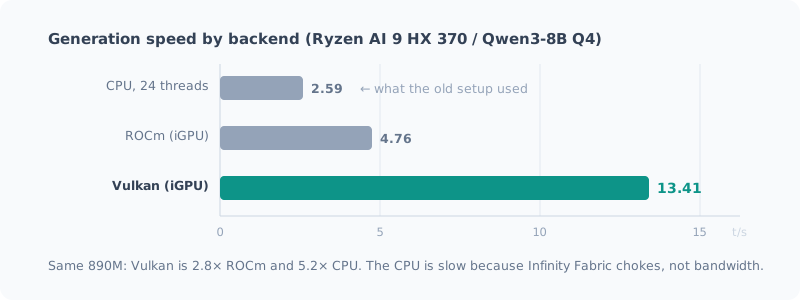
Vulkan was 2.8 times faster than ROCm and 5.2 times faster than the CPU. It’s surprising that AMD’s own ROCm loses to Vulkan, but the reasons are clear.
- gfx1150 (890M) is still not listed in ROCm’s official support matrix
- ROCm is 41% faster only at prompt processing, and for chat, generation speed matters more
The CPU is slow not because of memory bandwidth but because Infinity Fabric is the bottleneck. The CPU cores can’t saturate the memory controller, but the iGPU can.
I Didn’t Use WSL
Since it gives access to the Linux toolchain, it was a strong candidate at first. After looking into it, it’s at a disadvantage for this use case.
- Vulkan on WSL2 goes through emulation, which costs performance
- ROCm on WSL2 has gained Strix support, but what you get is “the slower ROCm”
- GTT kernel parameters such as
amdgpu.gttsizecan’t be applied on WSL2
Choosing WSL would have left me with only “the slow path” or “the even slower path.”
Installation Was a Single Command
winget install --id ggml.llamacppThat’s it. The official winget package ships a Vulkan build,
and llama-cli / llama-server / llama-bench end up on your PATH.
> llama-cli --list-devices
Vulkan0: AMD Radeon(TM) 890M Graphics (78739 MiB, 74802 MiB free)
I Was Ready to Tweak the BIOS, but It Wasn’t Needed
When I researched beforehand, several articles carried the same warning:
If the BIOS UMA Frame Buffer Size is
Auto, Vulkan mistakes VRAM for 0 bytes and fails to load the model. Change it toFixedand allocate memory.
I had even written down the steps for rebooting into the BIOS and braced myself, but it didn’t happen in my environment.
The dedicated VRAM the driver reports is still 2 GB. Even so, llama.cpp sees about 77 GB (73 GB free). That’s because recent versions of llama.cpp detect shared memory automatically.
As a result, I got away with not touching the BIOS at all and no reboot.
A good example of why it pays to check with --list-devices first.
Picking the Newest Model Backfired
Now for the main part.
I had decided to use Qwen. Looking into it, Qwen3.8-27B (released August 2026) was the latest generation, described as “the first time a Qwen-Max-class model has been made open.” I figured newer would be better and chose it.
Here’s what I measured.
| pp512 | tg128 | |
|---|---|---|
| Qwen3.8-27B Q4_K_M (16.23 GiB) | 29.6 t/s | 3.6 t/s |
3.6 t/s. With a 1,000-token prompt, it takes 34 seconds until the first response, and then 3.6 tokens per second. Not usable for chat.
Settings Didn’t Move It One Bit
I tried everything I could think of to tune my way out of it.
| What I tried | Result |
|---|---|
FlashAttention -fa on | Within noise (if anything, slightly slower) |
| ubatch 512 / 1024 / 2048 | All flat |
-b 8192 | pp only +18%, generation unchanged |
Only the generation speed wouldn’t budge. Working out the bandwidth told me why.
16.23 GiB × 3.6 t/s = 実効 60.5 GB/s(理論 89.6 GB/s の 68%)(That is, an effective 60.5 GB/s, 68% of the theoretical 89.6 GB/s.)
The hardware was performing as it should. A 27B dense model reads all 16 GB of weights for every token, so with 128-bit DDR5-5600 (89.6 GB/s theoretical) it physically can’t go any faster.
It wasn’t a settings problem; it was a model choice problem.
The Bigger File Was Faster
For comparison, I measured Qwen3.6-35B-A3B (MoE), which I had used in the old setup. With 35B total parameters, it’s larger than the 27B model, and its file is 4.5 GB bigger too.
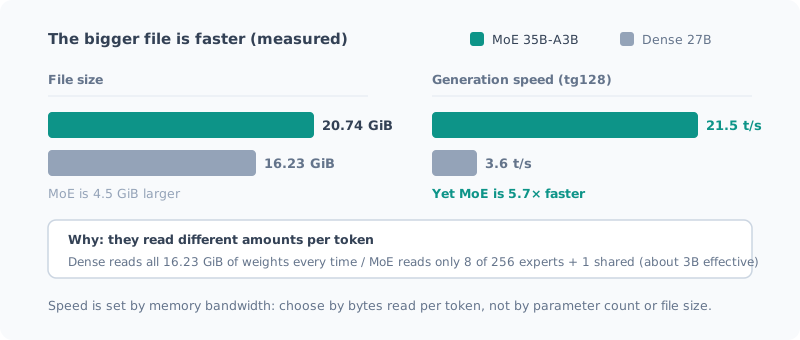
| File | pp512 | tg128 | |
|---|---|---|---|
| Qwen3.8-27B (dense) | 16.23 GiB | 29.6 t/s | 3.6 t/s |
| Qwen3.6-35B-A3B (MoE) | 20.74 GiB | 281 t/s | 20.7 t/s |
| Difference | MoE is 4.5 GiB larger | 9.5× | 5.7× |
The bigger one is 5.7 times faster. It’s counterintuitive, but the reason is simple.
- The dense model reads all 16.23 GiB of weights for every token
- The MoE reads only 8 of its 256 experts + 1 shared (about 3B effective)
Checking the effective bandwidth, the MoE was also around 60 GB/s, the same as the dense model. The hardware delivers the same performance; the only difference is the model’s structure.
In practical terms, with a 1,000-token prompt, the time to first response goes from 34 seconds → 3.6 seconds.
How to choose a model on this machine Not by total parameter count, and not by file size, but by “how many bytes it reads per token.” Bandwidth is the ceiling, so this translates directly into speed.
Choosing a model whose structure fits paid off more than chasing the latest generation.
Tuning Without Losing Quality
With the MoE chosen as the main model, I started squeezing out more speed. The rule: only use tricks that skip or reorder computation.
| Setting | Effect | Quality |
|---|---|---|
-b 8192 | Prompt processing +26% (281→353 t/s) | No impact |
--cache-reuse 256 | Skips recomputing 95% of the shared prefix (see the correction below) | No impact |
-fa on | FlashAttention | No impact |
--kv-unified | Avoids KV fragmentation | No impact |
-b is the batch size. I swept 2048 / 4096 / 8192 / 16384, and
8192 was best; going up to 16384 made it slightly slower.
-ub (micro-batch), on the other hand, had zero effect on both the dense model and the MoE, so I left it alone.
Evidence That --cache-reuse Works
llama-server returns timings with its responses.
Fix a longish system prompt and send consecutive requests, and you get:
cache_n  : 425    ← キャッシュから再利用したトークン
prompt_n : 21 ← 実際に計算したトークン(cache_n is the tokens reused from the cache; prompt_n is the tokens actually computed.)
Of the 446-token prompt, 425 tokens (95%) were not recomputed. If you keep the system prompt fixed, the wait from the second request onward almost disappears.
Correction (2026-09-27): This reuse was not the effect of
--cache-reuse. The startup log saidcache_reuse is not supported by multimodal, it will be disabled; because the mmproj for images was loaded,--cache-reusewas disabled from the start. Even without the mmproj, it’s disabled withnot supported by this contextbecause of the hybrid SSM architecture. Thecache_n 425above came from--cache-prompt, which is on by default (it skips recomputing the part where the beginning matches). The effect was real; I had attributed it to the wrong setting. I go into detail in the post on reusing long documents.
What I Deliberately Didn’t Use: KV Cache Quantization
You can quantize the KV cache with -ctk q8_0.
It’s a standard trick said to cause almost no quality loss (perplexity on par with f16), but I didn’t adopt it.
That’s because when f16 fits, f16 is faster. Quantizing means dequantizing on every token, which hurts more the deeper the context (one measurement shows it dropping to 55% of f16 at 64K depth).
In my environment, Vulkan sees 73 GB, so f16 fits comfortably, and the conclusion was that not quantizing is faster. It’s a fallback for when memory runs short.
Speculative Decoding Gets Slower If You Push It Too Far
Finally, I tried MTP (Multi-Token Prediction) speculative decoding.
A small draft looks a few tokens ahead, and the main model verifies them all at once. If they’re wrong, they’re discarded and the main model’s output is used, so the output distribution doesn’t change. In other words, it’s a lossless speedup.
Qwen3.6-35B-A3B has a build that includes MTP layers, advertised as “1.5–2 times” faster.
I swept --spec-draft-n-max (how many tokens to look ahead) and measured.
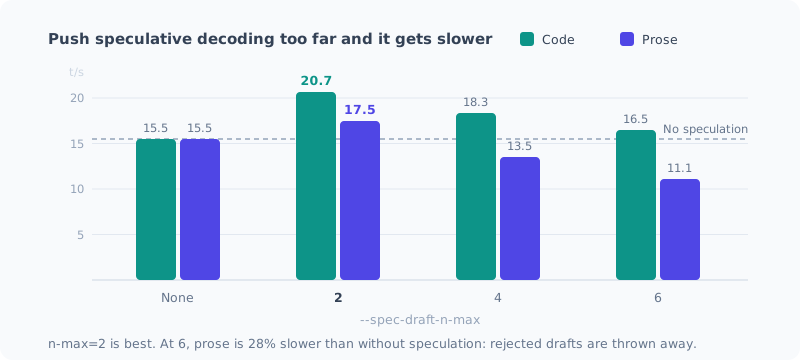
| n-max | Prose | Code |
|---|---|---|
| None | 15.5 t/s | 15.5 t/s |
| 2 | 17.5 t/s (+12.6%) | 20.7 t/s (+33.4%) |
| 4 | 13.5 t/s (−13%) | 18.3 t/s (+16%) |
| 6 | 11.1 t/s (−28%) | 16.5 t/s (+3%) |
Longer did not mean faster. With n-max=6, prose is 28% slower than without speculation.
- Code: the next token is easy to predict and the hit rate is high → longer drafts still pay off
- Prose: harder to predict and misses more often → the longer the draft, the more computation is thrown away, and it slows down
If you handle both, shorter is safer, and 2 was optimal. It didn’t reach the advertised 1.5–2 times, but it’s a definite gain.
Speculative decoding is not something that “just makes things faster once you turn it on.” Always measure both with and without it and compare.
How I Botched the Measurement
In my first measurement, the control run (without speculation) failed to start because of a timeout, and only the numbers with speculation were left. I had started measuring before the 22.9 GB model download finished, and it used up the startup wait limit.
Numbers from only one side are no evidence of “is it faster?” I redid it. The lesson: when a measurement involves a first-time download, fetch the model first and then run the comparison.
Summary
| Old setup | New setup | |
|---|---|---|
| Backend | CPU | Vulkan (iGPU) |
| Model | — | Qwen3.6-35B-A3B MTP (MoE) |
| Generation | Equivalent to 2.6 t/s | 17.5–22.6 t/s |
It became about 7 times faster. In order of impact:
- Choose an MoE model (5.7 times the dense 27B)
- Use Vulkan (5.2 times the CPU)
- MTP speculative decoding (+12.6–33.4%)
-b 8192(prompt processing +26%)
The top two were overwhelming; the finer flags were just the final seasoning. My takeaway: if you get the big decisions right, you don’t need much fine-tuning.
The biggest lesson this time was that the newest model isn’t necessarily the best. Qwen3.8-27B is certainly a new and strong model, but its structure didn’t suit a machine with only 89.6 GB/s. Rather than “newest” or “high performance” on a spec sheet, I should have chosen by whether it fits my machine’s bottleneck.
The cache, which had ballooned to 4 models and 61.2 GB during testing, went back down to 23.3 GB after I deleted the ones that had served their purpose. So as not to waste last time’s cleanup, I want to make a habit of getting rid of models downloaded for testing right away.
関連記事 Related Posts
Ryzen AI ミニPCでローカルLLMを実用速度で動かす完全ガイド(2026年版) The Complete Guide to Running a Local LLM at Usable Speed on a Ryzen AI Mini PC (2026 Edition)
Ryzen AI 9 HX 370(Radeon 890M)のミニPCで、ローカルLLMを毎秒20トークン前後で動かすまでの手順を1本にまとめました。llama.cppのVulkan版を入れ、MoEモデルを選び、効く設定だけを入れて、llmと打つだけで使える状態にします。つまずいた点も全部載せています。 All the steps to run a local LLM at around 20 tokens per second on a Ryzen AI 9 HX 370 (Radeon 890M) mini PC, in one post. Install the Vulkan build of llama.cpp, pick an MoE model, add only the settings that help, and end up able to just type llm. Every stumbling point I hit is included.
Ryzen AI PCのローカルLLM環境を一度まっさらにする Wiping the Local LLM Setup on My Ryzen AI PC Clean
AMD Ryzen AI 9 HX 370搭載機に積み上げたローカルLLM環境を、最新の方法で組み直すために一度全部消します。何が残っているかの棚卸しから、削除の手順、消してはいけないものまでをまとめました。 To rebuild the local LLM setup I had piled up on my AMD Ryzen AI 9 HX 370 machine with the latest approach, I'm deleting it all first. I cover taking inventory of what's left, the removal steps, and what you shouldn't delete.
Ryzen AI の NPU を使わなかった理由 Why I Didn't Use the Ryzen AI NPU
50 TOPS の NPU を積んだ機体でローカルLLMを動かしてきましたが、一度も NPU を使っていません。使えるのか調べたら、動く保証がなく、動いても iGPU より遅く、最大の利点が自分の使い方では効かないと分かりました。インストーラを落としたところで止めた記録です。 I've been running local LLMs on a machine with a 50 TOPS NPU, but I've never used the NPU. When I looked into whether I could, I found there's no guarantee it runs, it's slower than the iGPU even if it does, and its biggest advantage doesn't apply to how I use it. A record of stopping right after downloading the installer.