128K の文書は、読ませ直さずに使い回せるのか Can a 128K Document Be Reused Without Reading It Again?
はじめに
前回の結論は、「128K は動くが、読み込みに 21〜24 分かかる」でした。
ただ、これは初回の話です。同じ文書に何度も質問するなら、 2 回目以降は読み込み済みの状態を使い回せるはずです。 llama-server にはそのための仕組みがいくつもあります。
| オプション | 既定 | 役割 |
|---|---|---|
--cache-prompt | 有効 | 前回と先頭が一致する部分を再計算しない |
--ctx-checkpoints | 32 | 途中の状態を保存しておく数 |
--cache-ram | 8192 MiB | 使い終わった状態を RAM に置いておく |
--cache-reuse | 0 | KV をずらして、途中から一致する塊も使い回す |
--slot-save-path | 無効 | 状態をディスクに保存・復元する |
ただし、このモデルには癖があります。前回わかったとおり、 SSM とフルアテンションのハイブリッド構成です。
SSM の状態は、読んだトークンを積み重ねた「今の状態」がひとつあるだけです。 KV キャッシュのように「100 トークン目まで戻す」ことができません。 そのため、普通のモデルと同じようには使い回せないかもしれません。
使い回せるなら、どういう条件で使い回せるのか。 測りました。
測り方
判定は体感ではなく、サーバが返す **timings.prompt_n(実際に処理し直したトークン数)**で行います。
「速くなった気がする」ではなく、「何トークン読み直したか」を見ます。
文書は、このシリーズの作業記録を連結したものです。 まず 32K で 6 通りを試して仕組みを見極め、そのあと 128K で確認しました。
| # | 試したこと |
|---|---|
| E1 | 同じプロンプトをもう一度送る |
| E2 | 同じ文書に、別の質問を送る |
| E3 | 文書の途中(50% の位置)に 1 行差し込んで送る |
| E4 | 別の文書を挟んでから、元の文書に戻る |
| E5 | ディスクに保存し、サーバを再起動してから復元する |
32K の結果
| # | 試したこと | 処理し直し | 取り込み |
|---|---|---|---|
| — | 初回 | 32,155 | 159.4 秒 |
| E1 | 同じプロンプトを再送 | 4 | 0.7 秒 |
| E2 | 同じ文書・別の質問 | 515 | 4.7 秒 |
| E3 | 文書の途中を書き換え | 32,170(全部) | 160.7 秒 |
| E4 | 別の文書を挟んで戻る | 4 | 0.7 秒 |
| E5 | ディスクから復元 | 32,154(全部) | 156.0 秒 |
質問を変えるだけなら 4.7 秒。 初回の 34 分の 1 です。 別の文書を挟んでも、RAM に残っていて 0.7 秒で戻れました。
一方で、途中を 1 行書き換えると全部読み直し、 ディスクから復元しても全部読み直しでした。
なぜこうなるのか: 戻れる場所が 2 か所しかない
詳細ログ(-lv 4)を出すと、理由がそのまま書いてありました。
created context checkpoint 1 of 32 (n_tokens = 31466, size = 124.990 MiB)
created context checkpoint 2 of 32 (n_tokens = 31978, size = 126.002 MiB)
チェックポイント(SSM の状態の保存)は、プロンプト末尾の 2 か所にだけ作られます。 末尾の 512 トークン手前と、4 トークン手前です。 8K、16K、24K と読み進める途中では作られていません。
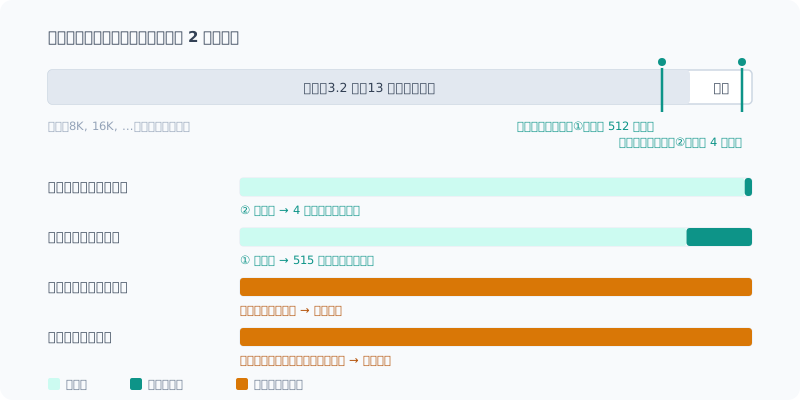
これで 4 つの結果がすべて説明できます。
- 同じプロンプト: 4 手前に戻り、4 トークンだけ処理する
- 別の質問: 512 手前に戻り、文書の末尾 500 トークン弱と質問を処理する
- 途中の書き換え: 書き換えより手前に戻れる場所が無いので、最初から処理する
- ディスクから復元: 次の節で説明します
KV キャッシュだけなら、どの位置にでも戻れます。 戻れないのは SSM の状態のほうで、保存しておいた地点にしか戻れないわけです。
ディスクからの復元は、KV しか戻らない
保存(0.68 GiB、3.6 秒)も復元(0.3 秒)も成功していました。 サーバは復元した内容が完全に一致していることまで認識しています。
selected slot by LCP similarity, f_sim_best = 1.000 (> 0.100 thold), f_keep = 1.000それでも読み直した理由は、サーバ自身が出していました。
forcing full prompt re-processing due to lack of cache data
(likely due to SWA or hybrid/recurrent memory, ...)
保存ファイルに入るのは KV だけで、チェックポイントは入りません。 質問を変えなくても、応答の生成に 4 トークン戻る必要があります。 その 4 トークンを戻せないので、最初から読み直すことになります。
念のため、同じ質問をそのまま送る場合も試しました。こちらも全部読み直しでした。
| 処理し直し | |
|---|---|
| 復元 → 同じ質問 | 31,982(全部) |
| 復元 → 別の質問 | 31,981(全部) |
このモデルでは、ディスクへの保存はまったく役に立ちません。
128K で確かめる
仕組みが分かったので、128K では E1・E2・E4 だけを測りました。 途中の書き換えと、ディスクからの復元は、32K と同じ理由で全部読み直しになるのが確定しています。
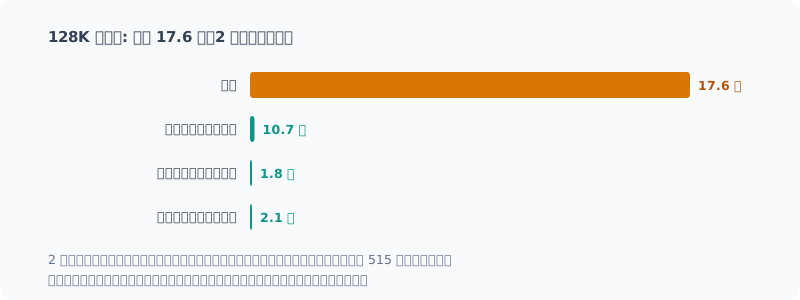
| # | 試したこと | 処理し直し | 取り込み |
|---|---|---|---|
| — | 初回 | 130,179 | 1,053.5 秒(17.6 分) |
| E1 | 同じプロンプトを再送 | 4 | 1.8 秒 |
| E2 | 同じ文書・別の質問 | 515 | 10.7 秒 |
| E4 | 別の 128K 文書(初回 15.6 分)を挟んで戻る | 4 | 2.1 秒 |
128K でも、質問を変えるだけなら 10.7 秒。初回のおよそ 100 分の 1 です。 32K(4.7 秒)より遅いのは、読み直す 515 トークンが深い位置にあり、 1 トークンごとに 13 万トークン分を参照するからです。
E4 も効きました。128K ぶんの状態(KV 約 2.8 GiB + チェックポイント 2 個)が RAM キャッシュ(上限 8 GiB)に収まり、別の 128K 文書を読ませたあとでも 2.1 秒で戻れました。
初回の読み込み時間が、また動いた
今回の初回は 17.6 分でした。前回測った 2 回(21.5 分、24.2 分)より明らかに速い。 割り込みもスリープも起きていないことは確認しています。 直前まで PC が 10 時間スタンバイしていたので、冷えていたのかもしれません。
3 回測って 17.6〜24.2 分。同じ設定でも 4 割近い幅があります。 前回の記事は「21〜24 分」と書いていたので、追記しておきました。
ついでに見つかった、以前の記事の誤り
サーバの起動ログに、こんな行が出ていました。
srv load_model: cache_reuse is not supported by multimodal, it will be disabledserve.ps1 に入れている --cache-reuse 256 が、最初から無効でした。
このモデルは画像も扱えるマルチモーダル版で、画像用の mmproj を読み込んでいるためです。
では mmproj を外せば使えるのか。外して起動すると、理由が変わって同じく無効になりました。
srv load_model: cache_reuse is not supported by this context, it will be disabled--cache-reuse は KV をずらして、途中から一致する塊を使い回す仕組みです。
ずらせない SSM の状態とは両立しません。このモデルでは構造的に使えないわけです。
困るのは、第2回でこう書いていたことです。
--cache-reuseが効いている証拠cache_n : 425 ← キャッシュから再利用したトークン prompt_n : 21 ← 実際に計算したトークン
再利用は実際に起きていました。ただしそれは、既定で有効な --cache-prompt によるものです。
先頭が一致する部分を再計算しない、という基本の仕組みでした。
現象は本物で、効果を別の設定のものと取り違えていました。 「設定を入れた → 速くなった → その設定のおかげ」と結びつけて、 その設定が本当に有効になっているかを確かめていませんでした。
第2回の記事には訂正を追記しました。serve.ps1 の --cache-reuse は、
別のモデルでは効く可能性があり害も無いので、コメントを直したうえで残しています。
どう使えばいいか
| 使い方 | 2 回目以降 |
|---|---|
| 同じ文書に質問を重ねる | 速い(数秒) |
| 別の文書と行き来する | 速い(RAM に残っている間は) |
| 文書を書き換えて読ませ直す | 全部読み直し |
| サーバを再起動する | 全部読み直し(ディスク保存も効かない) |
まとめると、文書は末尾に足していく、質問は最後に置く、サーバは止めない。 この 3 つを守れば、読み込みの待ち時間は初回だけで済みます。
一方で、llm の設定には気をつける点があります。
CLI の回で、
12 時間使わなければモデルをメモリから降ろす設定(--sleep-idle-seconds 43200)を入れました。
降ろしたあとの挙動は測っていませんが、キャッシュも一緒に消えると考えるのが自然です。
長い文書を扱う日は、この設定を意識しておく必要があります。
まとめ
- 質問を変えるだけなら数秒。 同じ文書への 2 回目以降は、ほぼ待たずに済む
- 途中を書き換えると、全部読み直し。 戻れる場所(チェックポイント)が末尾の 2 か所にしかない
- ディスクへの保存は役に立たない。 KV は戻るが、SSM の状態は戻らない
- 理由はどれもハイブリッド構成。SSM の状態は、保存しておいた地点にしか戻れない
- 第2回の「
--cache-reuseが効いている」は誤り。効いていたのは既定の--cache-promptだった
前回の「21〜24 分」は、初回だけ払えば済む待ち時間でした。 ただし、それは文書を書き換えず、サーバを止めないことが前提です。
Introduction
The conclusion of the previous post was “128K works, but reading it in takes 21–24 minutes”.
But that’s the first time. If you ask many questions about the same document, from the second time on it should be able to reuse the state it has already read. llama-server has several mechanisms for that.
| Option | Default | Role |
|---|---|---|
--cache-prompt | On | Doesn’t recompute the part whose beginning matches the previous request |
--ctx-checkpoints | 32 | How many intermediate states to keep |
--cache-ram | 8192 MiB | Keeps finished states in RAM |
--cache-reuse | 0 | Shifts the KV so chunks that match partway through can be reused too |
--slot-save-path | Off | Saves and restores the state to and from disk |
This model has a quirk, though. As I found last time, it’s a hybrid of SSM and full attention.
An SSM state is just a single “current state” built up from the tokens read so far. Unlike a KV cache, you can’t “roll it back to token 100”. So it might not be reusable the way an ordinary model’s state is.
If it can be reused, under what conditions? I measured it.
How I Measured
I judge by timings.prompt_n (the number of tokens actually reprocessed) returned by the server, not by feel.
Not “it feels faster”, but “how many tokens did it re-read”.
The document is this series’ work logs concatenated together. I first tried 6 scenarios at 32K to understand the mechanism, then confirmed at 128K.
| # | What I tried |
|---|---|
| E1 | Send the same prompt again |
| E2 | Send a different question about the same document |
| E3 | Insert one line in the middle of the document (at 50%) and send it |
| E4 | Read a different document in between, then go back to the original |
| E5 | Save to disk, restart the server, then restore |
Results at 32K
| # | What I tried | Reprocessed | Ingestion |
|---|---|---|---|
| — | First time | 32,155 | 159.4 s |
| E1 | Resend the same prompt | 4 | 0.7 s |
| E2 | Same document, different question | 515 | 4.7 s |
| E3 | Edit the middle of the document | 32,170 (all) | 160.7 s |
| E4 | Go back after another document | 4 | 0.7 s |
| E5 | Restore from disk | 32,154 (all) | 156.0 s |
Just changing the question takes 4.7 seconds. That’s 1/34 of the first time. Even with another document in between, the state stayed in RAM and it came back in 0.7 seconds.
On the other hand, editing one line in the middle meant re-reading everything, and restoring from disk also meant re-reading everything.
Why: There Are Only Two Places to Go Back To
With verbose logging (-lv 4), the reason was written right there.
created context checkpoint 1 of 32 (n_tokens = 31466, size = 124.990 MiB)
created context checkpoint 2 of 32 (n_tokens = 31978, size = 126.002 MiB)
Checkpoints (saved SSM states) are created only at two places near the end of the prompt: 512 tokens before the end, and 4 tokens before the end. None are created along the way at 8K, 16K, 24K and so on.
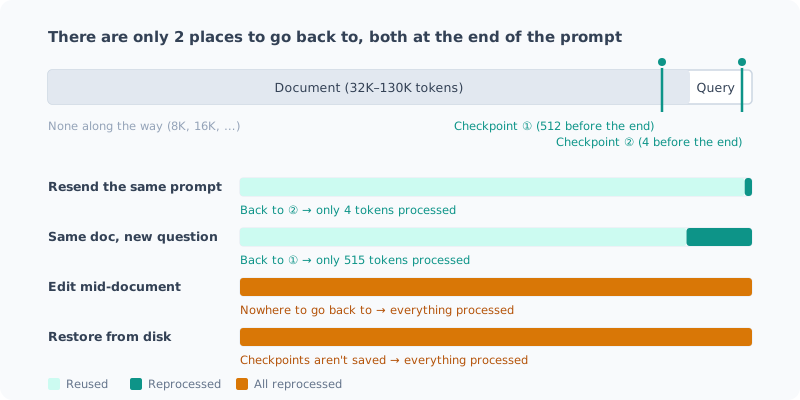
That explains all four results.
- Same prompt: goes back to 4 before the end and processes just 4 tokens
- Different question: goes back to 512 before the end and processes just under 500 tokens at the end of the document plus the question
- Edit in the middle: there’s no place to go back to before the edit, so it processes from the start
- Restore from disk: explained in the next section
A KV cache alone could go back to any position. What can’t go back is the SSM state: it can only return to a point that was saved.
Restoring from Disk Only Brings Back the KV
Both saving (0.68 GiB, 3.6 s) and restoring (0.3 s) succeeded. The server even recognized that the restored content matched exactly.
selected slot by LCP similarity, f_sim_best = 1.000 (> 0.100 thold), f_keep = 1.000The server itself printed why it re-read anyway:
forcing full prompt re-processing due to lack of cache data
(likely due to SWA or hybrid/recurrent memory, ...)
The save file contains only the KV; checkpoints aren’t included. Even without changing the question, generating a response requires going back 4 tokens. It can’t go back those 4 tokens, so it ends up re-reading from the start.
Just in case, I also tried sending the exact same question. That re-read everything too.
| Reprocessed | |
|---|---|
| Restore → same question | 31,982 (all) |
| Restore → different question | 31,981 (all) |
With this model, saving to disk is no help at all.
Confirming at 128K
Now that I understood the mechanism, at 128K I measured only E1, E2 and E4. Editing the middle and restoring from disk are certain to re-read everything for the same reasons as at 32K.
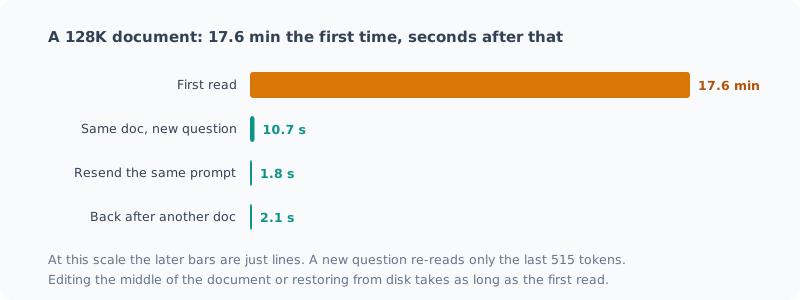
| # | What I tried | Reprocessed | Ingestion |
|---|---|---|---|
| — | First time | 130,179 | 1,053.5 s (17.6 min) |
| E1 | Resend the same prompt | 4 | 1.8 s |
| E2 | Same document, different question | 515 | 10.7 s |
| E4 | Go back after another 128K document (first read 15.6 min) | 4 | 2.1 s |
Even at 128K, just changing the question takes 10.7 seconds. That’s roughly 1/100 of the first time. It’s slower than at 32K (4.7 s) because the 515 re-read tokens sit deep in the context, and each token attends to 130,000 tokens’ worth.
E4 worked too. The state for 128K (about 2.8 GiB of KV + 2 checkpoints) fit in the RAM cache (8 GiB limit), so even after reading another 128K document it came back in 2.1 seconds.
The First-Read Time Moved Again
This time the first read took 17.6 minutes. Clearly faster than the two runs I measured last time (21.5 and 24.2 minutes). I confirmed there were no interruptions or sleeps. The PC had been on standby for 10 hours right before, so maybe it was cool.
Three measurements, 17.6–24.2 minutes. Nearly a 40% spread with the same settings. The previous post said “21–24 minutes”, so I added an update to it.
A Mistake in an Earlier Post I Found Along the Way
The server’s startup log had this line:
srv load_model: cache_reuse is not supported by multimodal, it will be disabledThe --cache-reuse 256 in my serve.ps1 had been disabled from the start.
This model is the multimodal version that also handles images, and I was loading the mmproj for images.
So does it work if I drop the mmproj? When I started without it, the reason changed but it was still disabled.
srv load_model: cache_reuse is not supported by this context, it will be disabled--cache-reuse shifts the KV to reuse chunks that match partway through.
That doesn’t go together with an SSM state, which can’t be shifted. It’s structurally unusable with this model.
The problem is that in part 2 I had written this:
Evidence That
--cache-reuseWorkscache_n : 425 ← キャッシュから再利用したトークン prompt_n : 21 ← 実際に計算したトークン
The reuse really did happen. But it came from --cache-prompt, which is on by default:
the basic mechanism that skips recomputing the part whose beginning matches.
The effect was real; I had attributed it to the wrong setting. I connected “I added the setting → it got faster → thanks to that setting” without checking whether the setting was actually enabled.
I added a correction to the part 2 post. I kept --cache-reuse in serve.ps1, with a fixed comment,
since it may work with other models and does no harm.
How to Use It
| Usage | From the second time on |
|---|---|
| Ask more questions about the same document | Fast (a few seconds) |
| Switch back and forth between documents | Fast (while the state stays in RAM) |
| Edit the document and have it read again | Re-reads everything |
| Restart the server | Re-reads everything (saving to disk doesn’t help either) |
In short: append to the end of the document, put the question last, and don’t stop the server. Stick to those three and you only pay the reading wait the first time.
On the other hand, there’s one thing to watch in my llm setup.
In the CLI post,
I added a setting that unloads the model from memory after 12 hours unused (--sleep-idle-seconds 43200).
I haven’t measured what happens after unloading, but it’s natural to assume the cache goes with it.
On days when I work with long documents, I need to keep this setting in mind.
Summary
- Just changing the question takes a few seconds. From the second time on, the same document needs almost no wait
- Editing the middle re-reads everything. The only places to go back to (checkpoints) are two near the end
- Saving to disk doesn’t help. The KV comes back, but the SSM state doesn’t
- The reason for all of these is the hybrid architecture. An SSM state can only return to a point that was saved
- Part 2’s “
--cache-reuseworks” was wrong. What worked was the default--cache-prompt
The previous post’s “21–24 minutes” turned out to be a wait you only pay the first time. That assumes, though, that you don’t edit the document and don’t stop the server.
関連記事 Related Posts
使っていない画像機能を外したら、メモリは1GiB減り、速度は変わらなかった Dropping an Unused Image Feature Saved 1 GiB of Memory and Didn't Change Speed
ローカルLLMのサーバが、テキストしか使わないのに画像用のmmprojを毎回読み込んでいました。外すと速くなるかを、前回まとめたチェックリストに沿って測りました。1回目は計測中のずれが大きく速度について何も言えず、裏で別のAIセッションが動いていたと分かったので、止めて測り直しました。メモリは1GiB減り、速度は3%未満の差で変わりませんでした。既定は外すことにしました。 My local LLM server was loading the image mmproj on every start, even though I only use text. I measured whether dropping it makes things faster, following the checklist from my previous post. In the first run the drift during measurement was too large to say anything about speed, and it turned out another AI session was running in the background, so I stopped it and measured again. Memory went down by 1 GiB, and speed stayed the same, within 3%. I made dropping it the default.
128K の文書の奥まで、ちゃんと読めているのか Can It Really Read All the Way into a 128K Document?
ローカルLLMに128Kトークンの文書を読ませ、20か所に仕込んだ事実を拾えるか測りました。深さによる取りこぼしは無く、文書に無いことは「記載なし」と答えました。唯一の誤りは、先頭2文字が同じ別の番号との取り違えで、片方の名前を変えると消えました。 I had a local LLM read a 128K-token document and measured whether it could pick up facts planted in 20 places. Nothing was missed because of depth, and for things not in the document it answered "not stated". The only mistake was mixing up a different ID that shared its first two characters, and it went away when I renamed one of them.
コンテキストを 128K まで伸ばしたら、壁はメモリではなく待ち時間だった I Stretched the Context to 128K, and the Wall Was Waiting Time, Not Memory
ローカルLLMのコンテキストを32Kから128Kまで伸ばして測りました。予想していたメモリ不足は起きず、理由はモデルの構造にありました。代わりに見えた壁はプロンプトの取り込み時間で、128Kを読ませるだけで21〜24分かかります。途中で自分の自動起動に計測を汚された話も含みます。 I stretched my local LLM's context from 32K to 128K and measured it. The memory shortage I expected never happened, and the reason lay in the model's architecture. The wall I hit instead was prompt ingestion time: just reading 128K takes 21–24 minutes. It also covers how my own auto-start polluted the measurements along the way.