128K の文書の奥まで、ちゃんと読めているのか Can It Really Read All the Way into a 128K Document?
はじめに
128K の回で、こう書いたままでした。
128K は動く。……ここまで測ったのは速度だけです。
動くことと、読めていることは別です。 13 万トークンの文書を渡して、その奥に書いてあることを本当に拾えるのか。 これを確かめないまま「128K 対応」と言うのは片手落ちでした。
測る準備は前回で整っています。 文書を一度読ませれば、2 回目以降の質問は 10 秒ほどで返ってきます。 以前なら 1 問ごとに 20 分の読み込みが必要でしたが、今は 1 回の読み込みで何十問も聞けます。
測り方
いわゆる needle-in-a-haystack(干し草の中の針)です。
- 干し草: このシリーズの作業記録を連結した文書(約 13 万トークン)
- 針: 「検証メモ: 備品番号 XA-4752 の保管棚は 2740 番です。」という文を 20 個、 深さ 2.5% から 97.5% まで 5% 刻みで差し込む
- 質問: 「備品番号 XA-4752 の保管棚は何番ですか」を 1 つずつ聞く
- 引っかけ: 文書に無い番号を 4 つ聞き、「記載なし」と答えられるかを見る
引っかけを入れたのは、正解率だけでは「分からないときにでっち上げる」癖が見えないからです。 存在しない番号に、それらしい数字を答えてしまうなら、それも読めていないのと同じです。
比較する条件は 3 つです。
| 条件 | 狙い |
|---|---|
| 16K・f16 | 基準。短ければ全部答えられるか |
| 128K・f16 | 本題。長くしたら落ちるか |
| 128K・K を q8_0 | 128K で 6〜11% 速かった設定で、正答率が落ちないか |
16K の基準が大事です。128K で間違えたとき、長さのせいなのか、 そもそも答えられない問題なのかを切り分けられます。
測る前に潰した落とし穴
thinking の回では、採点スクリプトのバグを 2 回踏みました。 今回は測る前に、思いつく落とし穴を潰しました。
| 落とし穴 | 対策 |
|---|---|
| 本文全体に正規表現をかけ、途中の数字に反応する | 「答え:」の行だけを見る |
\b が日本語で効かない | 数字は (?<!\d)2740(?!\d) で囲む |
| 答えの数字が、元の文書に偶然含まれている | 実行時に文書を検索し、含まれない数字だけを使う |
| スクリプト自身や結果ファイルが文書に紛れ込む | 文書から除外する(紛れ込むと答えが文書に書いてあることになる) |
| 計測中にスリープする | スクリプト自身がスリープを抑止する |
3 つ目と 4 つ目は、干し草を「このリポジトリの文書」から作っているので起きうる問題です。 結果ファイルには前回の答えが全部書いてあります。それを干し草に混ぜたら、測っているのは記憶ではなく検索です。
採点器は、本番の前に 12 通りの文字列で確かめました。
OK  True  : 答え: 4821番
OK  True  : 答え: **4821** 番の棚です
OK  True  : 途中の説明 1482 | 答え: 4821番
OK  False : 答え: 1482番
OK  False : 答え: 48210番
OK  False : 4821番です(答えの行なし)
OK  True  : 答え: 記載なし
OK  False : 答え: 不明(3321番かもしれません)
……
採点器の検証: 12 件すべて期待どおり
それでも 1 つ踏んだ: 答えの前に打ち切られていた
16K の試走で、1 問だけ「答えの行が空」で不正解になりました。
採点器は検証済みです。では何が起きたのか。 最初のスクリプトは答えの行しか残していなかったので、分かりません。 不正解のときは本文全体を残すように直して、もう一度流しました。
本文: 備品番号 AF-6519 に関する記述は、2つ目の記事「……」内の
「測り方をしくじった話」のセクションにあります。 記載モデルは答えの前に説明を書き始め、max_tokens 64 の上限で打ち切られていました。
「答え:」の行に届く前に、私が止めていたわけです。
これでは、取り出しに失敗したのか、書く前に切られたのかを区別できません。 上限を 256 に上げると、16K は 20 問すべて正解になりました。
採点器を検証しても、採点器に渡す前の段階に穴がありました。 助けになったのは、不正解の本文を実際に読んだことです。
結果
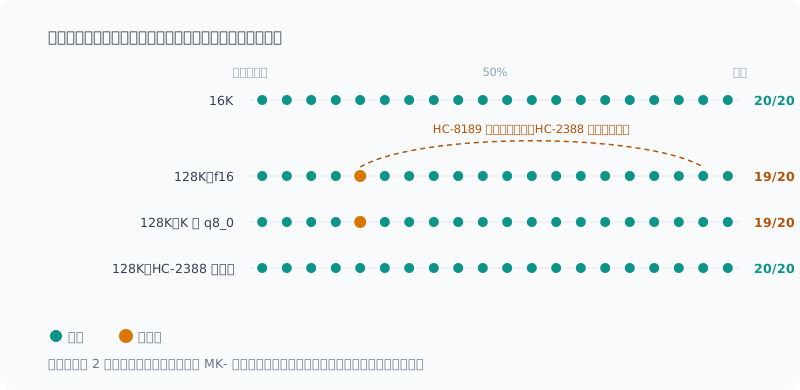
| 条件 | 針(20 問) | 記載なし(4 問) | 初回の読み込み | 1 問あたり |
|---|---|---|---|---|
| 16K・f16 | 20/20 | 4/4 | 56 秒 | 3 秒 |
| 128K・f16 | 19/20 | 4/4 | 19.5 分 | 11 秒 |
| 128K・K を q8_0 | 19/20 | 4/4 | 19.6 分 | 12 秒 |
深さ 2.5% でも 97.5% でも拾えています。 文書の真ん中あたりで取りこぼす、 といった傾向は見えませんでした。
文書に無い番号 4 つは、**全条件で「記載なし」**と答えています。でっち上げはゼロでした。
K の量子化は、正答率に影響しませんでした。間違えた 1 問の答えまで、f16 と完全に同じです。
唯一の誤りは、深さのせいではなかった
128K で間違えた 1 問は、2 条件とも同じでした。
22.5% の位置  HC-8189 → 正解 2539   モデルの答え: 8953
92.5% の位置  HC-2388 → 正解 8953
答えた 8953 は、文書の別の場所にある、別の番号の値です。 しかもその番号は、同じ 「HC-」で始まっています。
深いところの情報を見失ったのではなく、似た番号を取り違えて、後ろ(質問に近い)ほうを答えたように見えます。 16K では同じ組み合わせで正解しているので、長くなると起きやすくなるのでしょう。
ここまでは推測です。確かめるために、HC-2388 だけを MK-2388 に改名して、同じ 128K をもう一度流しました。 文書、位置、値は一切変えていません。
| 条件 | 針 | HC-8189 の答え |
|---|---|---|
| 128K・f16 | 19/20 | 8953(HC-2388 の値) |
| 128K・HC-2388 を MK-2388 に改名 | 20/20 | 2539(正解) |
改名しただけで正解に変わりました。 取り違えで確定です。
ただし、言えるのは「この 1 組については」までです。 先頭 2 文字が同じ組は、20 個の中にこの 1 組しかありませんでした。
1 文字目だけが同じ組なら、ほかにもあります(X が XA / XY / XX の 3 つ、W が WE / WP / WA の 3 つ、H が HC-8189 / HP-1922 / HC-2388 の 3 つ)。 こちらは取り違えていません(HP-1922 も正解)。取り違えたのは 2 文字まで一致した組だけでした。 「似た番号は必ず取り違える」「後ろのほうを答えやすい」と一般化できるほどの件数はありません。
どう使えばいいか
128K の文書でも、奥に書いてあることは拾えます。 少なくとも、この種の「番号を引く」質問では。
気をつけるのは長さよりも、似た名前のものが文書の中に複数あるときです。
コードで言えば、getUserById と getUserByIdOrNull のような関数が離れた場所にあるケースが近いでしょう。
長い文書で似た名前のものについて聞くなら、答えを鵜呑みにせず、該当箇所を確かめたほうが安全です。
K の量子化は、正答率を落とさずに 128K で 6〜11% 速くなる設定だと分かりました。 ただ、128K の回で書いたとおり、 普段使っている 2 万トークン前後では速くならないので、既定の設定は変えていません。
この結論が言えないこと
- 問題の種類が 1 つだけです。「番号を引く」は取り出しの中でも易しい部類で、 複数の箇所を突き合わせる質問や、要約のような課題は測っていません
- 針は 1 条件 20 個です。1 問の誤りで 5% 動く粒度なので、条件の細かい差は言えません
- 干し草はこのシリーズの作業記録です。内容の性質が違う文書では結果が変わるかもしれません
まとめ
- 128K でも 20 問中 19 問。深さによる取りこぼしは見えなかった
- 文書に無いことは**全部「記載なし」**と答えた。でっち上げなし
- 唯一の誤りは、先頭 2 文字が同じ別の番号との取り違え。片方を改名すると消えた
- K の量子化は正答率に影響なし
- 採点器を検証しても、
max_tokensの打ち切りという穴が残っていた。不正解の本文を読んで見つけた
「128K で読めるか」の答えは、読める。ただし似たものは取り違えることがある、でした。
Introduction
In the 128K post, I had left it at this:
128K works. … All I’ve measured so far is speed.
Running and actually reading are two different things. Hand it a 130,000-token document: can it really pick up what’s written deep inside? Saying “supports 128K” without checking that was only half the story.
The previous post set me up to measure it. Once the document has been read, questions from the second one on come back in about 10 seconds. Before, every question needed a 20-minute read; now I can ask dozens of questions from a single read.
How I Measured
This is the so-called needle-in-a-haystack test.
- Haystack: this series’ work logs concatenated into one document (about 130,000 tokens)
- Needles: 20 sentences like “検証メモ: 備品番号 XA-4752 の保管棚は 2740 番です。” (“Test note: the storage shelf for equipment ID XA-4752 is number 2740.”), inserted at depths from 2.5% to 97.5% in 5% steps
- Questions: ask “What is the storage shelf number for equipment ID XA-4752?”, one at a time
- Traps: ask about 4 IDs that aren’t in the document, and see whether it can answer “not stated”
I added the traps because accuracy alone doesn’t reveal a habit of “making things up when it doesn’t know”. If it gives a plausible-looking number for an ID that doesn’t exist, that’s just as much a failure to read.
There are three conditions to compare.
| Condition | Purpose |
|---|---|
| 16K, f16 | Baseline. Can it answer everything when the document is short? |
| 128K, f16 | The main question. Does it drop when the document is long? |
| 128K, K as q8_0 | Does the setting that was 6–11% faster at 128K lose accuracy? |
The 16K baseline matters. When it gets something wrong at 128K, it lets me tell whether the length is to blame or the question just can’t be answered.
Pitfalls I Closed Off Before Measuring
In the thinking post, I hit bugs in my grading script twice. This time, before measuring, I closed off every pitfall I could think of.
| Pitfall | Countermeasure |
|---|---|
| Running a regex over the whole response and reacting to intermediate numbers | Look only at the “答え:” (Answer:) line |
\b doesn’t work with Japanese | Fence numbers with (?<!\d)2740(?!\d) |
| The answer number happens to appear in the original document | Search the document at run time and use only numbers it doesn’t contain |
| The script itself or the result files get mixed into the document | Exclude them from the document (if they get in, the answers are written in the document) |
| The PC sleeps during measurement | The script itself suppresses sleep |
The third and fourth can happen because I build the haystack from “this repository’s documents”. The result files contain every answer from the previous run. Mix those into the haystack and what I’m measuring is search, not memory.
Before the real run, I checked the grader against 12 strings.
OK  True  : 答え: 4821番
OK  True  : 答え: **4821** 番の棚です
OK  True  : 途中の説明 1482 | 答え: 4821番
OK  False : 答え: 1482番
OK  False : 答え: 48210番
OK  False : 4821番です(答えの行なし)
OK  True  : 答え: 記載なし
OK  False : 答え: 不明(3321番かもしれません)
……
採点器の検証: 12 件すべて期待どおり
I Still Hit One: It Was Cut Off Before the Answer
In a 16K trial run, exactly one question was marked wrong because “the answer line was empty”.
The grader had been verified. So what happened? My first script kept only the answer line, so I couldn’t tell. I changed it to keep the whole response when the answer is wrong and ran it again.
本文: 備品番号 AF-6519 に関する記述は、2つ目の記事「……」内の
「測り方をしくじった話」のセクションにあります。 記載
(It began explaining that “the description of equipment ID AF-6519 is in the section … of the second post”, and stopped mid-word.)
The model had started writing an explanation before the answer and was cut off at the max_tokens 64 limit.
I was the one stopping it before it reached the “答え:” line.
That way, I couldn’t tell whether retrieval had failed or it was cut off before writing. Raising the limit to 256, 16K got all 20 questions right.
Even with a verified grader, there was a hole in the stage before the grader. What helped was actually reading the responses that were marked wrong.
Results
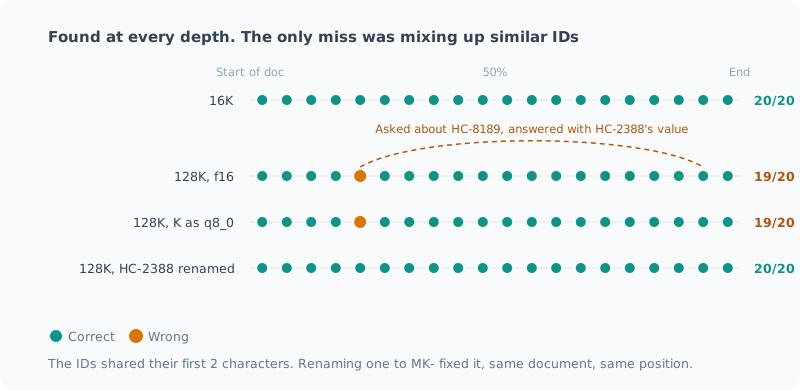
| Condition | Needles (20) | Not stated (4) | First read | Per question |
|---|---|---|---|---|
| 16K, f16 | 20/20 | 4/4 | 56 s | 3 s |
| 128K, f16 | 19/20 | 4/4 | 19.5 min | 11 s |
| 128K, K as q8_0 | 19/20 | 4/4 | 19.6 min | 12 s |
It found them at a depth of 2.5% and at 97.5% alike. I saw no tendency like dropping things around the middle of the document.
For the 4 IDs not in the document, it answered “not stated” under every condition. Zero made-up answers.
Quantizing K had no effect on accuracy. Even the answer to the one question it missed was exactly the same as with f16.
The Only Mistake Wasn’t About Depth
The one question it missed at 128K was the same under both conditions.
22.5% の位置  HC-8189 → 正解 2539   モデルの答え: 8953
92.5% の位置  HC-2388 → 正解 8953
(At 22.5%: HC-8189, correct answer 2539, model’s answer 8953. At 92.5%: HC-2388, correct answer 8953.)
The 8953 it answered is the value of a different ID somewhere else in the document. And that ID also starts with “HC-”.
It doesn’t look like it lost track of information deep in the document; it looks like it mixed up two similar IDs and answered with the later one (closer to the question). At 16K the same pair was answered correctly, so presumably this becomes more likely as the document gets longer.
Up to this point it’s a guess. To confirm it, I renamed only HC-2388 to MK-2388 and ran the same 128K again. I didn’t change the document, the positions or the values at all.
| Condition | Needles | Answer for HC-8189 |
|---|---|---|
| 128K, f16 | 19/20 | 8953 (HC-2388’s value) |
| 128K, HC-2388 renamed to MK-2388 | 20/20 | 2539 (correct) |
Just renaming it turned the answer correct. That confirms it was a mix-up.
But all I can say is “for this one pair”. Among the 20, this was the only pair that shared its first two characters.
There are other pairs that share only the first character (with X: XA / XY / XX; with W: WE / WP / WA; with H: HC-8189 / HP-1922 / HC-2388). Those weren’t mixed up (HP-1922 was answered correctly too). The only pair it confused matched up to two characters. There aren’t enough cases to generalize to “it always confuses similar IDs” or “it tends to answer with the later one”.
How to Use It
Even in a 128K document, it can pick up what’s written deep inside. At least for this kind of “look up a number” question.
What to watch out for is less the length and more when the document contains several things with similar names.
In code, the closest case would be functions like getUserById and getUserByIdOrNull in different places.
If you ask about similarly named things in a long document, it’s safer not to take the answer at face value and to check the relevant passage.
I learned that quantizing K is a setting that’s 6–11% faster at 128K without losing accuracy. But as I wrote in the 128K post, it isn’t faster at the roughly 20,000 tokens I normally use, so I haven’t changed the default settings.
What This Conclusion Can’t Tell You
- There’s only one kind of question. “Look up a number” is among the easiest kinds of retrieval; I didn’t measure questions that require cross-referencing several places, or tasks like summarization
- There are 20 needles per condition. One wrong answer moves the result by 5%, so I can’t speak to fine differences between conditions
- The haystack is this series’ work logs. Results might differ for documents of a different nature
Summary
- Even at 128K, 19 of 20 questions were right. I saw no drop-off by depth
- For things not in the document, it always answered “not stated”. No made-up answers
- The only mistake was mixing up a different ID that shared its first two characters. Renaming one of them made it go away
- Quantizing K has no effect on accuracy
- Even with a verified grader, there was a hole: the
max_tokenscutoff. I found it by reading the responses marked wrong
The answer to “can it read 128K?” turned out to be: yes, but it can mix up similar things.
関連記事 Related Posts
使っていない画像機能を外したら、メモリは1GiB減り、速度は変わらなかった Dropping an Unused Image Feature Saved 1 GiB of Memory and Didn't Change Speed
ローカルLLMのサーバが、テキストしか使わないのに画像用のmmprojを毎回読み込んでいました。外すと速くなるかを、前回まとめたチェックリストに沿って測りました。1回目は計測中のずれが大きく速度について何も言えず、裏で別のAIセッションが動いていたと分かったので、止めて測り直しました。メモリは1GiB減り、速度は3%未満の差で変わりませんでした。既定は外すことにしました。 My local LLM server was loading the image mmproj on every start, even though I only use text. I measured whether dropping it makes things faster, following the checklist from my previous post. In the first run the drift during measurement was too large to say anything about speed, and it turned out another AI session was running in the background, so I stopped it and measured again. Memory went down by 1 GiB, and speed stayed the same, within 3%. I made dropping it the default.
128K の文書は、読ませ直さずに使い回せるのか Can a 128K Document Be Reused Without Reading It Again?
ローカルLLMに128Kトークンの文書を読ませると20分以上かかります。2回目以降を速くできるか、プロンプトキャッシュを6通りの使い方で測りました。質問を変えるだけなら数秒で済みますが、ディスクに保存して再起動すると全部読み直しになります。理由はモデルのハイブリッド構成にありました。以前の記事の誤りも見つかりました。 Having a local LLM read a 128K-token document takes over 20 minutes. To see whether later requests can be faster, I measured the prompt cache in 6 scenarios. Changing just the question takes seconds, but saving to disk and restarting means re-reading everything. The reason lies in the model's hybrid architecture. I also found a mistake in an earlier post.
コンテキストを 128K まで伸ばしたら、壁はメモリではなく待ち時間だった I Stretched the Context to 128K, and the Wall Was Waiting Time, Not Memory
ローカルLLMのコンテキストを32Kから128Kまで伸ばして測りました。予想していたメモリ不足は起きず、理由はモデルの構造にありました。代わりに見えた壁はプロンプトの取り込み時間で、128Kを読ませるだけで21〜24分かかります。途中で自分の自動起動に計測を汚された話も含みます。 I stretched my local LLM's context from 32K to 128K and measured it. The memory shortage I expected never happened, and the reason lay in the model's architecture. The wall I hit instead was prompt ingestion time: just reading 128K takes 21–24 minutes. It also covers how my own auto-start polluted the measurements along the way.