thinking を切っていいのか測ったら、採点器のほうが2回壊れていた I Measured Whether Turning Off Thinking Was OK, and It Was My Grader That Broke Twice
はじめに
CLI を整えた回で、 thinking を既定でオフにしました。理由はこう書いています。
これがトークンを大量に食います。 「日本語で1文だけ自己紹介してください」という質問に対して、思考に 1313 文字使っていました。
速度しか見ていません。 品質が落ちていないかは測っていませんでした。 切ったせいで損をしている可能性が残ったままです。
測りました。結論は「この難易度帯では切って問題なし」でしたが、 そこに至るまでに採点スクリプトのバグを 2 回踏んでいます。 今回の収穫はそちらでした。
測り方を決める
品質を主観で採点すると比較になりません。 なので正解が機械的に検証できる課題だけを使うことにしました。
「説明文が丁寧になるか」は測れないので、測らないと決めました。 測れないものを測ったふりをするほうが害が大きいと考えています。
課題は 5 問。thinking が効きそうなものと、効かないはずのものを混ぜてあります。
| 課題 | 種類 | 想定 | 正解 |
|---|---|---|---|
| T1 | 多段の算術(まとめ買い割引) | 効きそう | 1800 円 |
| T2 | 数え上げ(包除原理) | 効きそう | 53 個 |
| T3 | 日付計算(月跨ぎ) | 効きそう | 2026-11-10 |
| T4 | 単純な抽出(2 番目に大きい値) | 効かないはず | 7 |
| T5 | 単位変換(秒 → 時分秒) | 効かないはず | 2 時間 46 分 40 秒 |
正解はすべて計算で検算しました。
「効かないはず」を混ぜたのが肝です。 もし全課題で差が出たら、それは thinking の効果ではなく 別の要因(温度、運の偏り)を疑うべき、という切り分けになります。
前回で 「もっともらしい説明ほど危ない」を学んだので、 仮説が外れる可能性を先に組み込んでおきました。
条件は temperature 0、max_tokens 4096、各条件 2 回ずつです。
1 回目: thinking OFF のほうが正答率が高い?
結果はこうでした。
ON   正答 4/5
OFF  正答 5/5
T2(数え上げ)で thinking ON だけが不正解。 4171 文字も考えて間違えている。
「考えすぎて自滅した」という筋書きが浮かびました。面白い結果です。
念のため、実際の出力を見ました。
3または5で割り切れる数は 33 + 20 - 6 = 47個です。
したがって、3でも5でも割り切れない数は 100 - 47 = 53個となります。

答え: 53個
正解していました。 包除原理を正しく使っています。 不正解だったのは私の採点でした。
バグ 1: 採点対象が条件によって変わっていた
本文全体に正規表現をかけていました。
thinking を出すと、本文に途中計算が並びます。33 個、20 個、6 個、47 個……。 一方 thinking OFF は結論だけを短く返します。
同じ正規表現を当てても、見ている文章の量がまるで違うわけです。 ON 側だけが余計な数字に晒される、フェアでない採点でした。
「答え:」で始まる行だけを採点するよう直しました。 出力形式を指示してあるので、形式を守っているかも同時に測れるという副次効果もあります。
2 回目: 今度は両方とも不正解
直して測り直したら、T2 が両条件とも不正解になりました。
前回 OFF は正解していたのに、です。明らかにおかしい。
バグ 2: \b が日本語で効かない
正規表現に \b53\b を使っていました。
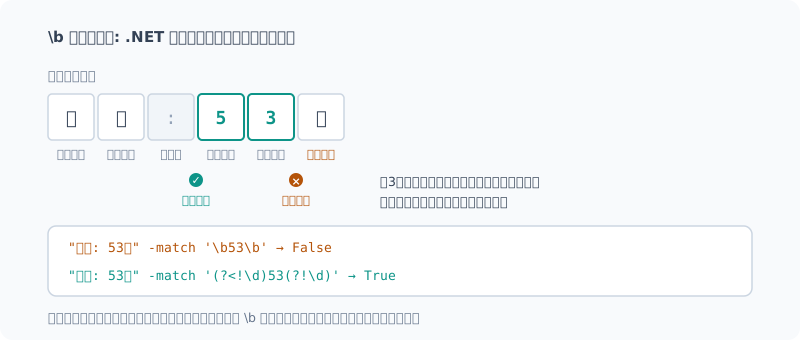
\b は「単語文字と非単語文字の境目」にマッチします。
そして .NET の正規表現は、漢字やかなを「単語文字」として扱います。
「53個」の 3 と 個 はどちらも単語文字なので、その間に境界が立ちません。
"答え: 53個" -match '\b53\b'          # False
"答え: 53個" -match '(?<!\d)53(?!\d)' # True正解を不正解と記録していたわけです。
数字を囲みたいなら、\b ではなく
「前後が数字でないこと」を直接書くのが確実でした。
今度は採点器を先に検証した
3 度目は、測る前に採点器のほうをテストしました。
正解を拾えるか。
答え: 1800円        -> True
答え: 1,800円       -> True
答え: 53個          -> True
答え: **7**         -> True
答え: 2時間46分40秒 -> True
誤答を弾けるか。
答え: 47個    -> False
答え: 9       -> False
答え: 1700円  -> False
両方を実際の文字列で確かめてから、本番を回しました。
確定した結果
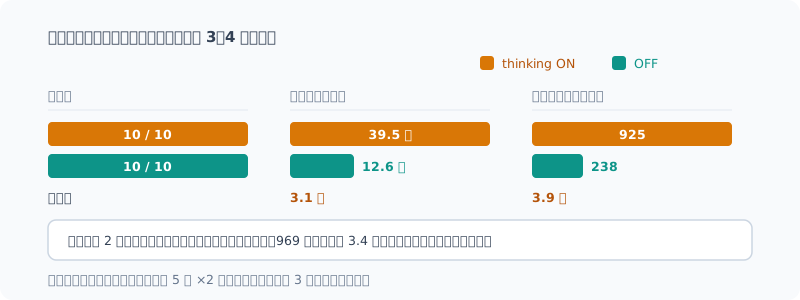
| 正答 | 平均時間 | 平均トークン | 思考 | |
|---|---|---|---|---|
| thinking ON | 10/10 | 39.5 秒 | 925 | 1,931 字 |
| thinking OFF | 10/10 | 12.6 秒 | 238 | 0 |
正答率は同じ。時間が 3.1 倍、トークンが 3.9 倍。
課題別に見ても、時間差は一貫していました。
| 課題 | 種類 | ON | OFF | 時間比 |
|---|---|---|---|---|
| T1 | 多段の算術 | 26.6s / 508tok | 9.0s / 145tok | 3.0 倍 |
| T2 | 数え上げ | 74.4s / 1762tok | 21.8s / 454tok | 3.4 倍 |
| T3 | 日付計算 | 44.7s / 1028tok | 13.1s / 249tok | 3.4 倍 |
| T4 | 単純な抽出 | 19.0s / 444tok | 5.6s / 78tok | 3.4 倍 |
| T5 | 単位変換 | 34.9s / 864tok | 13.4s / 261tok | 2.6 倍 |
効きそうだと踏んだ T1〜T3 でも、正答率は上がりませんでした。 どちらも全問正解です。
T4 が象徴的でした。「配列 [3, 7, 2, 9, 4] の 2 番目に大きい値」を答えるだけで、
969 文字考えて 3.4 倍の時間をかけています。答えは同じ 7 です。
この結論が言えること、言えないこと
言えること。 CLI で thinking を切った判断は、この難易度帯では正しかった。 対価を払うだけの効果はありませんでした。
言えないこと。 今回の課題は「正解が一意に決まり、手順も定型」のものばかりです。 もっと難しい問題では差が出る可能性があります。 その領域は測っていません。
llm -Think "..." で個別に有効化できるようにしてあるので、
「難しそうなときだけ付ける」という使い分けは残してあります。
教訓: 測定器を先に疑う
前回のベンチで「差を見つけたら、まず測定系のばらつきを確かめる」と書きました。 その直後に、今度は測定器そのもののバグを 2 回踏んでいます。
共通していたのは、**最初の結果が「面白かった」**ことです。
- 1 回目は「thinking は考えすぎて自滅する」
- 2 回目は「両方間違えるほど難しい問題だった」
どちらも記事になりそうな筋書きで、そのぶん疑いにくかった。 助かったのは、どちらも物理的・論理的におかしい点があったからでした。 包除原理を正しく解いている出力を見れば、不正解のはずがありません。
測定結果より先に、測定器が正しいかを確かめる。 そのコストは、今回で言えば数分でした。 3 回測り直した時間のほうがずっと長くついています。
まとめ
- thinking を切った判断は、この難易度帯では正しかった(正答率は同率)
- ただし 3.1 倍の時間と 3.9 倍のトークンを使う。定型課題では払う意味が薄い
- 難しい問題での差は測っていない。切り替えられる余地は残す
\bは日本語で効かない。 .NET は漢字・かなを単語文字とみなす- 採点器は、本番の前にテストする。 正解を拾えるかと、誤答を弾けるかの両方
測りたかったのは thinking の効果でしたが、 いちばん学んだのは自分の採点スクリプトの信用度でした。
Introduction
In the post where I set up the CLI, I turned thinking off by default. Here’s the reason I gave:
This eats a lot of tokens. For the question “Introduce yourself in one sentence in Japanese”, it used 1313 characters on thinking.
I only looked at speed. I never measured whether quality dropped. The possibility that turning it off was costing me something was still open.
So I measured it. The conclusion was “at this difficulty level, turning it off is fine”, but on the way there I hit bugs in my grading script twice. That turned out to be the real takeaway.
Deciding How to Measure
If I graded quality by gut feeling, there’d be nothing to compare. So I decided to use only tasks whose answers can be checked mechanically.
I can’t measure “does the explanation get more careful”, so I decided not to measure it. I think pretending to measure something you can’t measure does more harm.
There are 5 tasks. I mixed tasks where thinking should help with ones where it shouldn’t.
| Task | Type | Expectation | Answer |
|---|---|---|---|
| T1 | Multi-step arithmetic (bulk discount) | Should help | 1800 yen |
| T2 | Counting (inclusion–exclusion) | Should help | 53 |
| T3 | Date arithmetic (across months) | Should help | 2026-11-10 |
| T4 | Simple extraction (second-largest value) | Shouldn’t help | 7 |
| T5 | Unit conversion (seconds → h/m/s) | Shouldn’t help | 2 h 46 min 40 s |
I verified every answer by calculation.
Mixing in the “shouldn’t help” tasks is the key. If a difference showed up on every task, that would point not to thinking but to some other factor (temperature, a run of luck), which gives me a way to separate the two.
In the previous post I learned that “the more plausible the explanation, the more dangerous it is”, so I built in the possibility of my hypothesis being wrong from the start.
Conditions: temperature 0, max_tokens 4096, two runs per condition.
Round 1: Thinking OFF Is More Accurate?
Here’s what I got:
ON   正答 4/5
OFF  正答 5/5
On T2 (counting), only thinking ON was wrong. It thought for a whole 4171 characters and still got it wrong.
A storyline came to mind: “it overthought and tripped itself up”. An interesting result.
Just in case, I looked at the actual output:
3または5で割り切れる数は 33 + 20 - 6 = 47個です。
したがって、3でも5でも割り切れない数は 100 - 47 = 53個となります。

答え: 53個
It was correct. It used inclusion–exclusion properly. What was wrong was my grading.
Bug 1: What Got Graded Depended on the Condition
I was running a regular expression over the whole response.
With thinking on, the response lists the intermediate steps: 33, 20, 6, 47…. With thinking off, it returns just a short conclusion.
The same regex was looking at completely different amounts of text. Only the ON side was exposed to extra numbers, so the grading wasn’t fair.
I changed it to grade only the line starting with “答え:” (Answer:). Since I tell the model the output format, this has the side benefit of also measuring whether it follows the format.
Round 2: Now Both Are Wrong
After the fix I measured again, and T2 was wrong under both conditions.
Even though OFF had been right the previous time. Clearly something was off.
Bug 2: \b Doesn’t Work with Japanese
My regex used \b53\b.
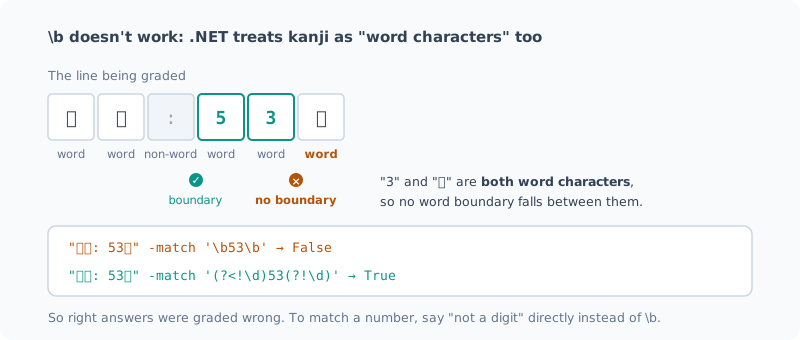
\b matches “the border between a word character and a non-word character”.
And .NET regular expressions treat kanji and kana as “word characters”.
In “53個”, the 3 and the 個 are both word characters, so there’s no boundary between them.
"答え: 53個" -match '\b53\b'          # False
"答え: 53個" -match '(?<!\d)53(?!\d)'  # True
So I had been recording correct answers as wrong.
If you want to fence off a number, instead of \b,
writing “not a digit before or after” directly is the reliable way.
This Time I Tested the Grader First
On the third round, before measuring, I tested the grader itself.
Does it pick up correct answers?
答え: 1800円        -> True
答え: 1,800円       -> True
答え: 53個          -> True
答え: **7**         -> True
答え: 2時間46分40秒 -> True
Does it reject wrong ones?
答え: 47個    -> False
答え: 9       -> False
答え: 1700円  -> False
Only after checking both against real strings did I run the actual measurement.
The Final Results
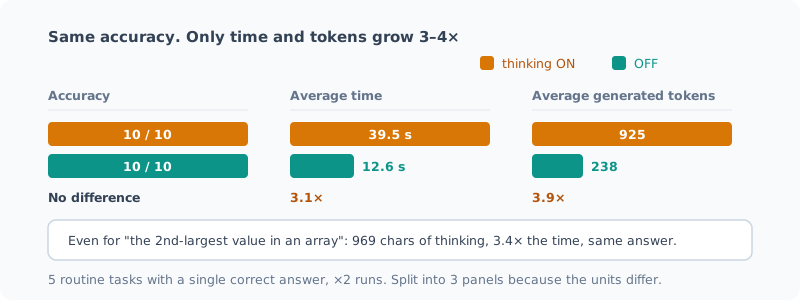
| Correct | Avg time | Avg tokens | Thinking | |
|---|---|---|---|---|
| thinking ON | 10/10 | 39.5 s | 925 | 1,931 chars |
| thinking OFF | 10/10 | 12.6 s | 238 | 0 |
Same accuracy. 3.1× the time, 3.9× the tokens.
Broken down by task, the time difference was consistent.
| Task | Type | ON | OFF | Time ratio |
|---|---|---|---|---|
| T1 | Multi-step arithmetic | 26.6s / 508tok | 9.0s / 145tok | 3.0× |
| T2 | Counting | 74.4s / 1762tok | 21.8s / 454tok | 3.4× |
| T3 | Date arithmetic | 44.7s / 1028tok | 13.1s / 249tok | 3.4× |
| T4 | Simple extraction | 19.0s / 444tok | 5.6s / 78tok | 3.4× |
| T5 | Unit conversion | 34.9s / 864tok | 13.4s / 261tok | 2.6× |
Even on T1–T3, where I expected thinking to help, accuracy didn’t go up. Both got every question right.
T4 says it all. Just to answer “the second-largest value in the array [3, 7, 2, 9, 4]”,
it thought for 969 characters and took 3.4× as long. The answer was the same 7.
What This Conclusion Does and Doesn’t Show
What it shows: turning thinking off in the CLI was the right call at this difficulty level. The benefit wasn’t worth the cost.
What it doesn’t show: every task this time had “a single correct answer and a routine procedure”. Harder problems might show a difference. I haven’t measured that range.
I made it possible to turn it on per request with llm -Think "...",
so I can still “add it only when something looks hard”.
Lesson: Suspect the Measuring Instrument First
In the previous benchmark post I wrote “when you find a difference, first check the variance of your measurement setup”. Right after that, I hit bugs in the measuring instrument itself, twice.
What the two had in common was that the first result was “interesting”.
- The first time: “thinking overthinks and trips itself up”
- The second time: “the problem was so hard that both got it wrong”
Both were storylines that could make a post, and that made them harder to doubt. What saved me was that both had something physically or logically wrong with them. An output that solves inclusion–exclusion correctly can’t be a wrong answer.
Before trusting the measurement, check that the measuring instrument is right. This time, that cost a few minutes. Measuring three times over cost far more.
Summary
- Turning thinking off was the right call at this difficulty level (same accuracy)
- But thinking uses 3.1× the time and 3.9× the tokens. For routine tasks, it’s hardly worth paying for
- I haven’t measured the difference on hard problems. I keep the option to switch it on
\bdoesn’t work with Japanese. .NET treats kanji and kana as word characters- Test the grader before the real run. Both whether it picks up correct answers and whether it rejects wrong ones
What I wanted to measure was the effect of thinking, but what I learned most about was how far I could trust my own grading script.
関連記事 Related Posts
ローカルLLMをターミナルから日常的に使えるようにした Making a Local LLM Part of My Daily Terminal Use
速くしただけでは使わない。PC起動後に`llm`と打つだけで答えが返る状態にするまでと、アイドル時に22.7GBを手放す仕組み、そして48GBを無駄に占有していたバグの話です。 Making it fast wasn't enough to get me to use it. How I got to the point where typing `llm` after booting the PC returns an answer, a way to give back 22.7GB when idle, and a bug that was needlessly taking up 48GB.
自分が書いた1418行を3つのAIにレビューさせたら、実バグが11件出た I Had Three AIs Review 1418 Lines I Wrote, and They Found 11 Real Bugs
Claude・Codex・ローカルQwenの3枚に、自分で書いて自分で動かしていたスクリプトをレビューさせました。3件は自力では気づけないもので、1件は「レビュー結果を集計するスクリプト自体」のバグでした。一方で、3枚とも見逃した欠陥もあります。 I had three reviewers, Claude, Codex and a local Qwen, review scripts I had written and been running myself. Three were bugs I couldn't have found on my own, and one was in the very script that tallies the review results. There was also a defect all three missed.
使っていない画像機能を外したら、メモリは1GiB減り、速度は変わらなかった Dropping an Unused Image Feature Saved 1 GiB of Memory and Didn't Change Speed
ローカルLLMのサーバが、テキストしか使わないのに画像用のmmprojを毎回読み込んでいました。外すと速くなるかを、前回まとめたチェックリストに沿って測りました。1回目は計測中のずれが大きく速度について何も言えず、裏で別のAIセッションが動いていたと分かったので、止めて測り直しました。メモリは1GiB減り、速度は3%未満の差で変わりませんでした。既定は外すことにしました。 My local LLM server was loading the image mmproj on every start, even though I only use text. I measured whether dropping it makes things faster, following the checklist from my previous post. In the first run the drift during measurement was too large to say anything about speed, and it turned out another AI session was running in the background, so I stopped it and measured again. Memory went down by 1 GiB, and speed stayed the same, within 3%. I made dropping it the default.