Ryzen AI の NPU を使わなかった理由 Why I Didn't Use the Ryzen AI NPU
はじめに
この連載でローカルLLM環境を作り直してきましたが、 一度も触っていない部品があります。NPU です。
Ryzen AI 9 HX 370 には XDNA2 の NPU が載っていて、50 TOPS を謳っています。 第2回で Vulkan(iGPU)を選んだきり、 NPU は完全に空白のままでした。
せっかく積んでいるので、使えるのか調べました。 結論は使いませんでした。インストーラをダウンロードしたところで止めています。
ハードウェアは正常
まず確認しました。
NPU Compute Accelerator Device   Status: OK
ドライバ: AMD 32.0.20102.3930(2026年5月7日)デバイスもドライバも問題ありません。使えない理由はハード側にはないわけです。
壁 1: llama.cpp に NPU バックエンドが無い
最初の壁がこれでした。
いま使っている llama.cpp には、NPU を叩く口がそもそもありません。 Vulkan、ROCm、CUDA、CPU はありますが、XDNA2 向けのバックエンドは存在しません。 (XDNA1 向けの有志フォークはあるようですが、うちは XDNA2 です。)
つまり NPU を使うなら、いまのスタックを丸ごと別のものに替える必要があります。
選択肢: FastFlowLM
NPU で LLM を動かす選択肢として出てきたのが FastFlowLM でした。 AMD の GitHub 組織(ROCm)から配布されている、Ryzen AI NPU 専用のランタイムです。
- XDNA2 全系統(Strix / Strix Halo / Kraken / Gorgon Point)対応
- OpenAI 互換 API あり
- 最大 256k コンテキスト
- Windows は MSI で 30 MB
OpenAI 互換 API があるのは重要でした。 第3回で作ったレビュアーの仕組みが、 ほぼそのまま流用できることになります。
そしてモデルカタログを見て、期待が上がりました。
Qwen3.6-35B-A3B が載っています。 いま主役として使っているモデルそのものです。
壁 2: うちのチップで動く保証がない
カタログにある、と、自分の石で動くは別の話でした。
公開されているベンチマークは Ryzen AI 7 350(Kraken Point) と Ryzen AI MAX+ 395(Strix Halo) のみ。 うちの HX 370(Strix Point)は入っていません。
そして探したら、こういう Issue が見つかりました。
Support Qwen3.6-35B-A3B on Ryzen AI HX 370 / XDNA2(#547) ラベル: model request 2026年5月13日に作成、メンテナからの返答なし
4 か月以上、動きがありません。
NPU 向けモデルはチップごとに xclbin(回路構成)が要ります。
同じ XDNA2 だから動くだろう、とは言えないのがこの世界です。
壁 3: 動いたとしても、iGPU より遅い
仮に動いたとして、速くなるのかを確かめました。
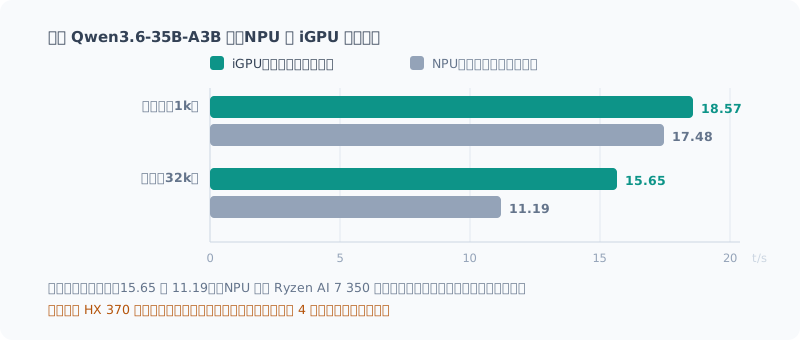
| 深度 | iGPU(この機体で実測) | NPU(Ryzen AI 7 350 の公開値) |
|---|---|---|
| 浅い(〜1k) | 18.57 | 17.48 |
| 深い(32k) | 15.65 | 11.19 |
iGPU のほうが速いです。しかも深いほど差が開きます。
さらに、Strix Halo での報告では リクエストごとに固定で約 2.7 秒の TTFT(最初の1トークンまでの時間)が乗るとありました。 対話では体感に直結します。
念のため書いておくと、NPU 側はうちのチップの実測ではありません。 ただ、期待できる方向の数字が出ていないのは確かです。
壁 4: 最大の利点が、うちでは効かない
ここが決定打でした。
FastFlowLM が前面に出しているのは速度ではなく電力効率です。
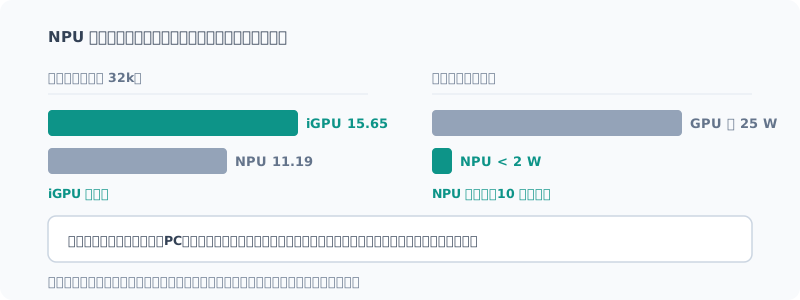
< 2 W(CPU + NPU 合計)、約 25 W の GPU に対して 10 倍以上の効率
これは本物の強みです。10 倍以上の差は誤差ではありません。 バッテリー駆動のノートで LLM を常駐させるなら、これ以外の選択肢は無いでしょう。
ただしうちはミニPC で常時給電です。 机の上で電源に繋がったまま動いている機体にとって、 2 W と 25 W の差から得られる価値はほぼゼロでした。
勝っている軸が、自分の使い方では効かない。 それだけの話です。
インストーラを落として、止めた
ここまで調べたうえで、「動かないと確定させる価値はある」と考えて インストーラをダウンロードしました。
| 項目 | 結果 |
|---|---|
| 入手元 | GitHub ROCm/FastFlowLM 公式リリース(HTTPS) |
| サイズ | 30,491,316 バイト — API の申告値と完全一致 |
| Authenticode 署名 | 無し |
署名がありませんでした。
出所は AMD の GitHub 組織で、サイズも一致していて、改ざんの形跡はありません。 OSS で署名なし配布は珍しくもありません。
それでも、ここで止めました。得られるものと釣り合わなかったからです。
仮に動いたとしても iGPU より遅く、電力の利点は効かない。 つまりこの検証で得られるのは「動かないことの確認」か 「動くが使わないことの確認」のどちらかです。 そのために、署名を検証できないバイナリを入れる理由がありませんでした。
ダウンロードしたファイルは削除し、環境は何も変えていません。
やるとしたらの条件
永久にない、とは思っていません。条件が変わればやります。
llama.cpp に XDNA2 バックエンドが入ったとき — スタックを替えずに済むなら、 試すコストが一気に下がります。
HX 370 が公式サポートに入ったとき — Issue #547 が解決すれば、 「動く保証がない」という最大の不確定要素が消えます。
バッテリー駆動の機体で使うようになったとき — 電力効率の 10 倍差が、 そのまま価値になります。
NPU と iGPU を併走させたくなったとき — iGPU で 35B を回しながら、 NPU で軽い分類や要約を同時に処理する。これは「今の困りごとの解決」ではなく 「新しい使い方を作る」話なので、必要になってからです。
まとめ
- NPU のハードとドライバは正常。使えない理由はハード側には無い
- llama.cpp に NPU バックエンドが無いので、今のスタックからは手が出ない
- FastFlowLM なら可能だが、HX 370 の対応要望は 4 か月未回答
- 動いたとしてもiGPU より遅い(32k 深度で 15.65 対 11.19)
- NPU の強みは電力効率(10 倍以上)。本物だが、据え置き機では効かない
「50 TOPS 積んでいるのに使わないのはもったいない」と思って調べ始めましたが、 もったいないのは、使わないことではなく、合わない道具に時間を使うことでした。
スペック表に載っている性能と、自分の使い方で効く性能は別物です。 この機体ではメモリ帯域がすべてを決めていて、 NPU はその軸では勝負していませんでした。
Introduction
Over this series I’ve been rebuilding my local LLM environment, but there’s one part I’ve never touched: the NPU.
The Ryzen AI 9 HX 370 has an XDNA2 NPU, advertised at 50 TOPS. Ever since I chose Vulkan (the iGPU) in part 2, the NPU had been left completely untouched.
Since it’s there anyway, I looked into whether I could use it. The conclusion: I didn’t use it. I stopped right after downloading the installer.
The Hardware Is Fine
First, I checked:
NPU Compute Accelerator Device   Status: OK
ドライバ: AMD 32.0.20102.3930(2026年5月7日)
No problems with the device or the driver. Whatever keeps me from using it, it isn’t the hardware.
Wall 1: llama.cpp Has No NPU Backend
This was the first wall.
The llama.cpp I’m using has no way to drive the NPU at all. There’s Vulkan, ROCm, CUDA, and CPU, but no backend for XDNA2. (There seems to be a community fork for XDNA1, but mine is XDNA2.)
So to use the NPU, I’d need to replace my current stack with something else entirely.
The Option: FastFlowLM
The option that came up for running LLMs on the NPU was FastFlowLM. It’s a runtime dedicated to Ryzen AI NPUs, distributed from AMD’s GitHub organization (ROCm).
- Supports the whole XDNA2 lineup (Strix / Strix Halo / Kraken / Gorgon Point)
- Has an OpenAI-compatible API
- Up to 256k context
- 30 MB MSI on Windows
The OpenAI-compatible API was important. It means the reviewer setup I built in part 3 could be reused almost as is.
And when I looked at the model catalog, my hopes went up.
Qwen3.6-35B-A3B is listed. It’s the very model I’m using as my main one.
Wall 2: No Guarantee It Runs on My Chip
Being in the catalog and running on my own chip turned out to be two different things.
The published benchmarks only cover the Ryzen AI 7 350 (Kraken Point) and the Ryzen AI MAX+ 395 (Strix Halo). My HX 370 (Strix Point) isn’t included.
And when I searched, I found this issue:
Support Qwen3.6-35B-A3B on Ryzen AI HX 370 / XDNA2 (#547) Label: model request Opened May 13, 2026, no response from the maintainers
No movement for more than 4 months.
NPU models need an xclbin (circuit configuration) for each chip.
In this world, you can’t assume it’ll run just because it’s the same XDNA2.
Wall 3: Even If It Ran, It’d Be Slower Than the iGPU
Supposing it did run, I checked whether it would be any faster.
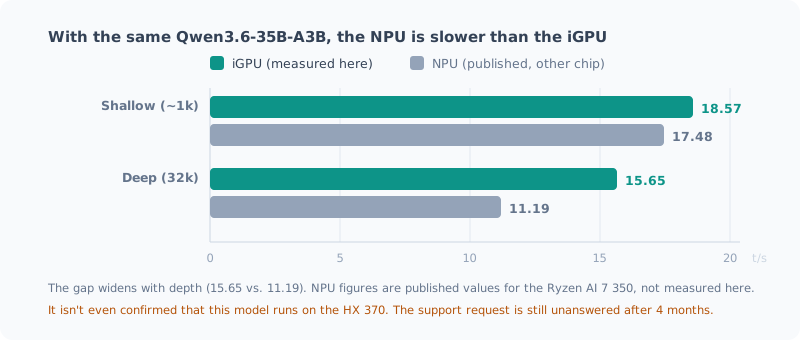
| Depth | iGPU (measured on this machine) | NPU (published values for the Ryzen AI 7 350) |
|---|---|---|
| Shallow (~1k) | 18.57 | 17.48 |
| Deep (32k) | 15.65 | 11.19 |
The iGPU is faster. And the gap widens with depth.
On top of that, reports from Strix Halo said there’s a fixed TTFT (time to first token) of about 2.7 seconds on every request. In a conversation, you feel that directly.
To be clear, the NPU numbers aren’t measurements on my chip. But it’s certain that the numbers aren’t pointing in a promising direction.
Wall 4: Its Biggest Advantage Doesn’t Apply to Me
This was the deciding factor.
What FastFlowLM puts front and center is not speed but power efficiency.
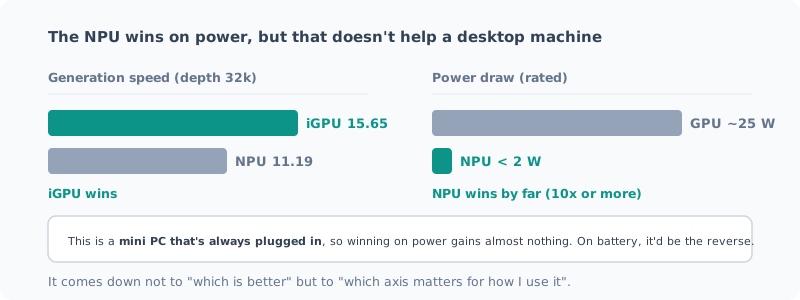
< 2 W (CPU + NPU combined), over 10x the efficiency of a GPU at about 25 W
That’s a real strength. A difference of more than 10x isn’t noise. If you want an LLM always running on a battery-powered laptop, there’s probably no other choice.
But mine is a mini PC that’s always plugged in. For a machine sitting on a desk, connected to power, the difference between 2 W and 25 W is worth almost nothing.
The axis it wins on doesn’t matter for how I use it. That’s all there is to it.
I Downloaded the Installer, Then Stopped
After all that research, I thought “it’s worth confirming that it doesn’t work”, and downloaded the installer.
| Item | Result |
|---|---|
| Source | Official ROCm/FastFlowLM release on GitHub (HTTPS) |
| Size | 30,491,316 bytes — exactly matches the value reported by the API |
| Authenticode signature | None |
It wasn’t signed.
It came from AMD’s GitHub organization, the size matched, and there were no signs of tampering. Unsigned releases aren’t unusual in OSS.
Even so, I stopped here. What I’d gain wasn’t worth it.
Even if it ran, it would be slower than the iGPU, and the power advantage doesn’t apply. So all this test could give me was either “confirmation that it doesn’t run” or “confirmation that it runs but I won’t use it”. For that, I had no reason to install a binary whose signature I couldn’t verify.
I deleted the downloaded file, and I haven’t changed anything in my environment.
When I Would Do It
I don’t think it’s “never”. If conditions change, I’ll do it.
When llama.cpp gets an XDNA2 backend — if I don’t have to replace my stack, the cost of trying drops sharply.
When the HX 370 gets official support — if issue #547 is resolved, the biggest uncertainty, “no guarantee it runs”, goes away.
When I start using a battery-powered machine — the 10x difference in power efficiency becomes real value as is.
When I want to run the NPU and the iGPU side by side — run the 35B on the iGPU while the NPU handles light classification or summarization at the same time. That’s not “solving a current problem” but “creating a new way of using it”, so only once I need it.
Summary
- The NPU hardware and driver are fine. Whatever keeps me from using it, it isn’t the hardware
- llama.cpp has no NPU backend, so it’s out of reach from my current stack
- FastFlowLM makes it possible, but the support request for the HX 370 has been unanswered for 4 months
- Even if it ran, it would be slower than the iGPU (15.65 vs. 11.19 at 32k depth)
- The NPU’s strength is power efficiency (10x or more). It’s real, but it doesn’t help a desktop machine
I started looking into this thinking “it’s a waste to have 50 TOPS and not use it”, but what’s actually wasteful isn’t leaving it unused; it’s spending time on a tool that doesn’t fit.
The performance on a spec sheet and the performance that matters for how you use it are different things. On this machine, memory bandwidth decides everything, and that’s not the axis the NPU competes on.
関連記事 Related Posts
Ryzen AI PCのローカルLLMを7倍速くした話(llama.cpp + Vulkan + Qwen) How I Made the Local LLM on My Ryzen AI PC 7 Times Faster (llama.cpp + Vulkan + Qwen)
まっさらにしたRyzen AI 9 HX 370機に、llama.cppとVulkanでローカルLLM環境を作り直しました。CPU推論から約7倍。最新モデルを選んで失敗した話と、ファイルが大きいほうが速いという実測結果をまとめます。 I rebuilt the local LLM setup on my freshly wiped Ryzen AI 9 HX 370 machine with llama.cpp and Vulkan: about 7 times faster than CPU inference. Here's how picking the newest model backfired, and measurements showing the bigger file was faster.
Ryzen AI PCのローカルLLM環境を一度まっさらにする Wiping the Local LLM Setup on My Ryzen AI PC Clean
AMD Ryzen AI 9 HX 370搭載機に積み上げたローカルLLM環境を、最新の方法で組み直すために一度全部消します。何が残っているかの棚卸しから、削除の手順、消してはいけないものまでをまとめました。 To rebuild the local LLM setup I had piled up on my AMD Ryzen AI 9 HX 370 machine with the latest approach, I'm deleting it all first. I cover taking inventory of what's left, the removal steps, and what you shouldn't delete.
ローカルLLMにメモリは何GB必要か: 96GB積んだミニPCで実測した How Much Memory Does a Local LLM Need? Measured on a Mini PC with 96GB
Ryzen AI ミニPCに96GBのメモリを積んでローカルLLMを動かし、実際に何GB使っているかを測りました。35BのMoEモデルで24GiB、コンテキストを上限の256Kまで伸ばしても28GiB程度です。32GB・64GB・96GBでそれぞれ何ができそうかを、実測と推定を分けて整理します。 I ran a local LLM on a Ryzen AI mini PC with 96GB of memory and measured how many GB it actually uses. A 35B MoE model takes 24GiB, and even with the context stretched to its 256K limit, it stays around 28GiB. I sort out what 32GB, 64GB and 96GB are each likely to handle, keeping measurements and estimates apart.