ローカルLLMにメモリは何GB必要か: 96GB積んだミニPCで実測した How Much Memory Does a Local LLM Need? Measured on a Mini PC with 96GB
はじめに
ローカル LLM 用に PC を買うとき、いちばん迷うのがメモリの量です。 私は Ryzen AI 9 HX 370 のミニPCに 96GB 積みました。多いほうが安心だろう、という理由です。
では実際に何 GB 使っているのか。このシリーズで測ってきた数字から整理します。
結論を先に書くと、いま使っている 35B の MoE モデルなら 24〜28 GiB です。 96GB の 3 割ほどで、64GB あれば十分、32GB は厳しいと見ています。 ただし 32GB と 64GB の話は、この機体で測ったものではなく推定です。
実測: モデルが使うメモリ
使っているのは Qwen3.6-35B-A3B(Q4_K_XL、ファイル 21.27 GiB)。
普段の設定(コンテキスト 64K、MTP 投機デコードあり、画像用の mmproj なし)で、
llama-server の使用量を測りました。
| 状態 | 使用量 |
|---|---|
| 起動直後 | 23.97 GiB |
| 32K トークンの文書を読ませた後 | 24.89 GiB |
モデルのファイルが 21.27 GiB なので、それ以外(KV キャッシュ、MTP 用の領域、作業領域)が 3 GiB ほどです。
コンテキストを伸ばすと、どれだけ増えるか
コンテキスト長を変えたときの増え方は、別の条件(MTP なし・mmproj あり)で測っています。
| コンテキスト | 使用量 | 64K からの増分 |
|---|---|---|
| 8K | 22.55 GiB | −1.21 GiB |
| 64K | 23.76 GiB | — |
| 128K | 25.14 GiB | +1.38 GiB |
| 256K(モデルの上限) | 27.89 GiB | +4.13 GiB |
この増分を普段の設定の値に足すと、128K で約 25.3 GiB、256K で約 28.1 GiB になります(推定)。
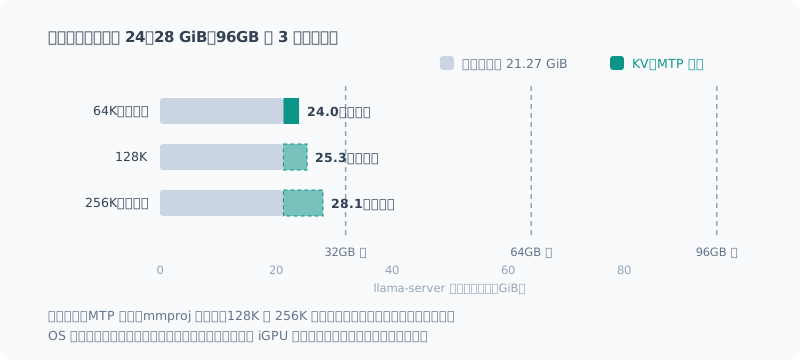
上限の 256K まで伸ばしても 28 GiB。 思ったより増えません。
KV キャッシュが小さいのは、このモデルの特徴
コンテキストを伸ばすと KV キャッシュが増えるのは一般的な話です。 このモデルでは、1 トークンあたり約 22 KB(f16)しか増えませんでした。
理由はモデルの構造にあります。Qwen3.6-35B-A3B は SSM とフルアテンションのハイブリッドで、 KV キャッシュを持つのは 40 層のうち 10 層だけです。 全層がフルアテンションのモデルなら、同じコンテキストで 4 倍前後になります。
ほかのモデルでは、長いコンテキストのメモリがずっと重くなる可能性があります。 「256K でも 28 GiB」は、このモデルだからこその数字だと考えてください(128K の回)。
iGPU はメインメモリを使う
ミニPCの内蔵 GPU(Radeon 890M)は、専用のメモリをほとんど持っていません。
| 項目 | 値 |
|---|---|
| iGPU 専用メモリ(BIOS の設定) | 2 GiB |
| OS から見えるメモリ | 93.6 GiB(96GB のうち) |
| llama-server 動作中の GPU 共有メモリの使用量 | 24.6 GiB |
| Vulkan が報告する使える量 | 76.9 GiB(78,739 MiB) |
モデルは専用メモリではなく、メインメモリ(共有メモリ)にそのまま置かれています。 だから、メモリの搭載量がそのまま「載せられるモデルの大きさ」になります。
ただし、搭載量の全部を iGPU が使えるわけではありません。 この機体では 93.6 GiB のうち 76.9 GiB(約 8 割)が使えると報告されました。 この割合がメモリの量やドライバの設定でどう変わるかは、確かめていません。
32GB / 64GB / 96GB で何ができるか
ここからは推定です。上の実測と、「OS とほかのアプリにも数 GB〜十数 GB 要る」という前提から考えています。
| 搭載量 | このモデル(35B MoE・Q4) | 見立て |
|---|---|---|
| 32GB | 動くかはぎりぎり | モデルと KV で 24 GiB。OS とブラウザを足すと足りなくなりやすい。iGPU が使える量が 8 割なら約 25 GiB で、ほぼ上限。量子化をもっと強くする(小さいファイルにする)か、小さいモデルにする必要がありそう |
| 64GB | 余裕を持って動く | 256K まで伸ばしても 28 GiB。OS やアプリと同時に使っても困らない |
| 96GB | 余る | このモデルでは 3 割しか使わない。もっと大きいモデルは載るが、速くはならない(下記) |
私の用途(この MoE モデルを普段使いし、ときどき長い文書を読ませる)なら、64GB で足りたことになります。
メモリを増やしても、速くはならない
最後に、いちばん大事なことです。メモリの量は「載るかどうか」を決めるだけで、速さは決めません。
iGPU の生成速度は、メモリから重みを読む速さ(帯域)でほぼ決まります。 この機体は DDR5-5600・128bit で理論 89.6 GB/s、実効で 60 GB/s ほどでした。
1 トークン生成するたびに読む量で割ると、速度の見当がつきます。
| モデル | 1 トークンで読む量 | 生成速度(実測) |
|---|---|---|
| Qwen3.8-27B(密) | 全体の 16.23 GiB | 3.6 t/s |
| Qwen3.6-35B-A3B(MoE) | 一部だけ(実効 3B 相当) | 20.7 t/s |
96GB あれば 70B 級の密モデルも載ります。でも、1 トークンごとに 40 GB 前後を読むことになるので、 計算上は 毎秒 1〜2 トークンしか出ません。載っても、使える速さにはなりません。
速さを求めるなら、メモリを増やすより、1 トークンあたり読む量が少ないモデル(MoE)を選ぶほうが効きます (構築の回)。
まとめ
- 35B の MoE モデル(Q4)で、使うメモリは 24 GiB。上限の 256K まで伸ばしても 約 28 GiB
- 長いコンテキストで増えにくいのは、このモデルがハイブリッド構成だから。ほかのモデルでは重くなりうる
- iGPU はメインメモリを使う。ただし全部ではなく、この機体では約 8 割
- 見立てでは、64GB で十分、32GB はぎりぎり(推定)
- メモリは「載るか」を決めるだけ。速さは帯域とモデルの構造で決まる
Introduction
When you buy a PC for local LLMs, the amount of memory is the hardest thing to decide. I put 96GB in my Ryzen AI 9 HX 370 mini PC, on the reasoning that more would be safer.
So how many GB does it actually use? I’ll sort it out from the numbers I’ve measured in this series.
To give the conclusion first, the 35B MoE model I use now takes 24–28 GiB. That’s about 30% of 96GB, and my view is that 64GB is plenty and 32GB is tight. However, the 32GB and 64GB parts are estimates, not measurements on this machine.
Measured: Memory Used by the Model
The model is Qwen3.6-35B-A3B (Q4_K_XL, a 21.27 GiB file).
With my usual settings (64K context, MTP speculative decoding on, no mmproj for images),
I measured how much llama-server uses.
| State | Usage |
|---|---|
| Right after startup | 23.97 GiB |
| After reading a 32K-token document | 24.89 GiB |
The model file is 21.27 GiB, so everything else (KV cache, the MTP area, working space) comes to about 3 GiB.
How Much It Grows with a Longer Context
I measured the growth with context length under different conditions (no MTP, with mmproj).
| Context | Usage | Increase from 64K |
|---|---|---|
| 8K | 22.55 GiB | −1.21 GiB |
| 64K | 23.76 GiB | — |
| 128K | 25.14 GiB | +1.38 GiB |
| 256K (the model’s limit) | 27.89 GiB | +4.13 GiB |
Adding these increases to the usual-settings value gives about 25.3 GiB at 128K and about 28.1 GiB at 256K (estimated).
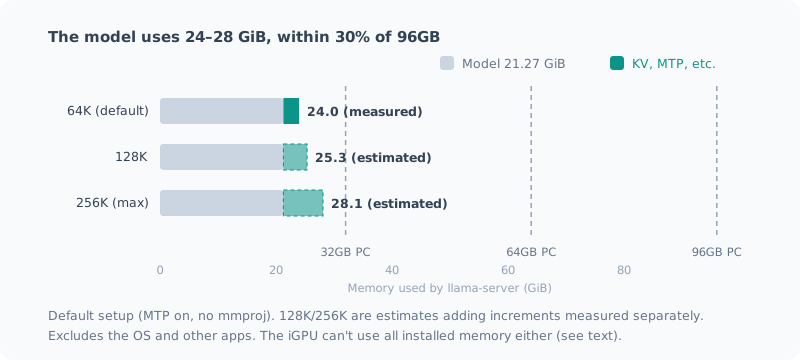
Even stretched to the 256K limit, it’s 28 GiB. It grows less than I expected.
The Small KV Cache Is a Trait of This Model
It’s common knowledge that the KV cache grows as the context gets longer. With this model, it grew by only about 22 KB per token (f16).
The reason is the model’s architecture. Qwen3.6-35B-A3B is a hybrid of SSM and full attention, and only 10 of its 40 layers hold a KV cache. A model with full attention in every layer would need around 4 times as much for the same context.
With other models, memory for long contexts could be much heavier. Treat “28 GiB even at 256K” as a number that holds because of this model (the 128K post).
The iGPU Uses Main Memory
The mini PC’s integrated GPU (Radeon 890M) has almost no dedicated memory.
| Item | Value |
|---|---|
| iGPU dedicated memory (BIOS setting) | 2 GiB |
| Memory visible to the OS | 93.6 GiB (of 96GB) |
| GPU shared memory in use while llama-server runs | 24.6 GiB |
| Usable amount reported by Vulkan | 76.9 GiB (78,739 MiB) |
The model isn’t in dedicated memory; it sits directly in main memory (shared memory). So the installed memory directly sets “how large a model you can load”.
However, the iGPU can’t use all of the installed memory. On this machine, 76.9 GiB of the 93.6 GiB (about 80%) was reported as usable. I haven’t checked how this ratio changes with the amount of memory or driver settings.
What You Can Do with 32GB / 64GB / 96GB
From here on, these are estimates. I base them on the measurements above and the assumption that “the OS and other apps also need several GB to a dozen or so GB”.
| Installed | This model (35B MoE, Q4) | Assessment |
|---|---|---|
| 32GB | Barely runs, if at all | 24 GiB for the model and KV. Add the OS and a browser and it easily runs short. If the iGPU can use 80%, that’s about 25 GiB, which is almost the limit. You’d likely need stronger quantization (a smaller file) or a smaller model |
| 64GB | Runs with room to spare | Even stretched to 256K it’s 28 GiB. No trouble using it alongside the OS and apps |
| 96GB | More than enough | This model uses only 30%. Larger models fit, but they don’t get faster (see below) |
For my use (this MoE model day to day, sometimes reading long documents), that means 64GB would have been enough.
More Memory Doesn’t Make It Faster
Finally, the most important point. The amount of memory only decides “whether it fits”, not how fast it runs.
iGPU generation speed is set almost entirely by how fast weights are read from memory (bandwidth). This machine has DDR5-5600 at 128-bit, 89.6 GB/s in theory and about 60 GB/s in practice.
Dividing by the amount read per generated token gives a rough idea of the speed.
| Model | Read per token | Generation speed (measured) |
|---|---|---|
| Qwen3.8-27B (dense) | All 16.23 GiB | 3.6 t/s |
| Qwen3.6-35B-A3B (MoE) | Only part (effectively 3B) | 20.7 t/s |
With 96GB, even a 70B-class dense model fits. But it would read around 40 GB per token, so on paper it puts out only 1–2 tokens per second. It fits, but it isn’t usably fast.
If you want speed, picking a model that reads less per token (MoE) does more than adding memory (the setup post).
Summary
- A 35B MoE model (Q4) uses 24 GiB of memory. Even stretched to the 256K limit, it’s about 28 GiB
- It grows little with long contexts because this model is a hybrid architecture. Other models can get heavy
- The iGPU uses main memory. But not all of it: about 80% on this machine
- My assessment: 64GB is plenty, 32GB is borderline (estimated)
- Memory only decides “whether it fits”. Speed is set by bandwidth and the model’s architecture
関連記事 Related Posts
Ryzen AI ミニPCでローカルLLMを実用速度で動かす完全ガイド(2026年版) The Complete Guide to Running a Local LLM at Usable Speed on a Ryzen AI Mini PC (2026 Edition)
Ryzen AI 9 HX 370(Radeon 890M)のミニPCで、ローカルLLMを毎秒20トークン前後で動かすまでの手順を1本にまとめました。llama.cppのVulkan版を入れ、MoEモデルを選び、効く設定だけを入れて、llmと打つだけで使える状態にします。つまずいた点も全部載せています。 All the steps to run a local LLM at around 20 tokens per second on a Ryzen AI 9 HX 370 (Radeon 890M) mini PC, in one post. Install the Vulkan build of llama.cpp, pick an MoE model, add only the settings that help, and end up able to just type llm. Every stumbling point I hit is included.
Ryzen AI PCのローカルLLMを7倍速くした話(llama.cpp + Vulkan + Qwen) How I Made the Local LLM on My Ryzen AI PC 7 Times Faster (llama.cpp + Vulkan + Qwen)
まっさらにしたRyzen AI 9 HX 370機に、llama.cppとVulkanでローカルLLM環境を作り直しました。CPU推論から約7倍。最新モデルを選んで失敗した話と、ファイルが大きいほうが速いという実測結果をまとめます。 I rebuilt the local LLM setup on my freshly wiped Ryzen AI 9 HX 370 machine with llama.cpp and Vulkan: about 7 times faster than CPU inference. Here's how picking the newest model backfired, and measurements showing the bigger file was faster.
Ryzen AI の NPU を使わなかった理由 Why I Didn't Use the Ryzen AI NPU
50 TOPS の NPU を積んだ機体でローカルLLMを動かしてきましたが、一度も NPU を使っていません。使えるのか調べたら、動く保証がなく、動いても iGPU より遅く、最大の利点が自分の使い方では効かないと分かりました。インストーラを落としたところで止めた記録です。 I've been running local LLMs on a machine with a 50 TOPS NPU, but I've never used the NPU. When I looked into whether I could, I found there's no guarantee it runs, it's slower than the iGPU even if it does, and its biggest advantage doesn't apply to how I use it. A record of stopping right after downloading the installer.