ローカルLLMをdev-orchestraのコードレビュアーに追加してみた Adding a Local LLM as a dev-orchestra Code Reviewer
はじめに
追記(2026-10-25): dev-orchestra 1.0.0 で、アダプタを一から書いてローカル LLM を繋ぐ手順は、dev-orchestra に自作のエージェントを繋いでみた(ローカルLLM編)にまとめ直しました。これから繋ぐなら、そちらが近道です。この記事は、0.8.0 のころに試行錯誤した記録です。
前回、Ryzen AI 搭載のミニPCに ローカルLLM環境(llama.cpp + Vulkan + Qwen3.6-35B-A3B)を作りました。 生成 20 t/s 前後で、対話には十分使える速さです。
せっかく手元にモデルがあるので、コードレビューに使えないかと考えました。 使っているのは dev-orchestra という Claude Code のプラグインで、 複数の AI に独立してコードレビューさせる仕組みを持っています。
既定では Claude と Codex の 2 枚。ここに 3 枚目としてローカルの Qwen を足します。
動機は 3 つ。
- 課金されない — 何度レビューさせてもタダ
- コードが手元から出ない — 外に出せないものにも使える
- 独立した 3 つ目の意見 — 2 つが一致したときの「本当に正しいのか」に対する別の目
結論から言うと動きました。ただし素直には繋がらず、壁が 1 つありました。
壁: プロバイダは API ではなく CLI をラップしていた
dev-orchestra に「レビュアーを追加する」機能はあります。
dev_orchestra.py reviewer add --provider <名前> --role generalただし --provider に指定できるのは claude / codex といった既存の CLI だけ。
ローカルLLMは OpenAI 互換 API を出しているので、
「エンドポイントを設定すれば繋がるだろう」と踏んでいたのですが、
アダプタの実装を読んで違うと分かりました。
def build_command(self, mode, resolved, cwd, extra_args, options) -> List[str]:
    ...
プロバイダが返すのは コマンドの配列です。 そして実行側はこうなっていました。
proc = subprocess.Popen(
    list(command), cwd=cwd,
    stdin=subprocess.PIPE, stdout=subprocess.PIPE, ...
)
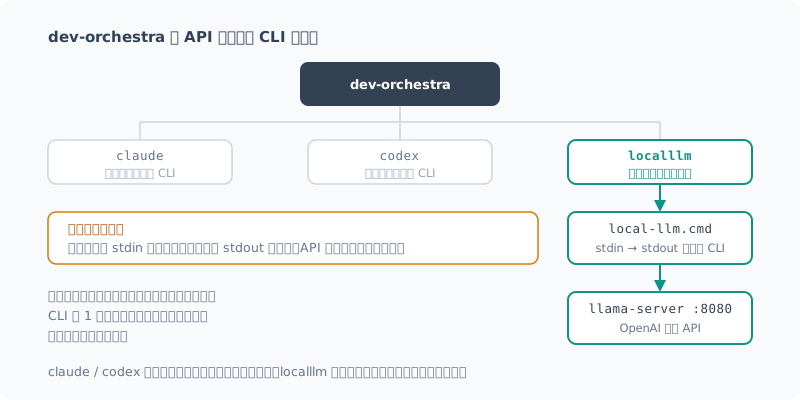
プロンプトは stdin で渡され、答えは stdout から読まれます。 つまりプロバイダは「CLI をラップするもの」であって、API を叩く口はありません。
解決: 薄い CLI を 1 枚挟む
本体に手を入れるのは筋が悪いので、プロンプトを受けて答えを返すだけの CLI を作りました。
prompt = sys.stdin.read()
answer = complete(prompt, port, ...)   # localhost:8080 に投げるだけ
sys.stdout.write(answer)標準ライブラリだけで書いてあります(urllib.request で十分でした)。
サーバが落ちていたら自動で起動して待つようにもしています。
レビューは無人で走るので、ここで止まると困るためです。
--version に応答させるのも忘れずに。dev-orchestra は CLI の存在確認にこれを使います。
バッチファイルは ASCII で書く
Windows なので .cmd のラッパーを置いたのですが、最初こうなりました。
'。' is not recognized as an internal or external command,
operable program or batch file.
REM に日本語コメントを書いたのが原因です。
cmd.exe は UTF-8 のバイト列を OEM コードページで読むので、
コメントが壊れてコマンドとして解釈されます。動きはしますが毎回エラーが出ます。
バッチファイルは ASCII のみで書くのが無難でした。
アダプタを書く
あとは CLI をラップするアダプタを書くだけです。
class LocalLLMProvider(Provider):
    name = "localllm"
    executable = r"C:\Projects\local-llm\bin\local-llm.cmd"

    def build_command(self, mode, resolved, cwd, extra_args, options):
        if mode == MODE_IMPLEMENT:
            raise ModelResolutionError(
                "localllm cannot implement: it has no file access."
            )
        ...
implement モードを明示的に拒否しています。 この CLI はファイルを読み書きできないので、うっかり実装役に割り当てると 「成功したのに何も変わっていない」という、いちばん気づきにくい失敗をします。 できないことは、できないと言わせておくのが安全です。
登録はプロバイダのレジストリに 1 行足すだけでした。
register(localllm.LocalLLMProvider.name, localllm.build_provider)プラグインキャッシュに置くので、更新すると消える
アダプタの置き場所はここです。
%USERPROFILE%\.claude\plugins\cache\dev-orchestra\dev-orchestra\0.8.0\
  scripts\orchestrator\providers\
名前のとおり キャッシュなので、プラグインを更新すると消えます。 パスにバージョン番号も入っています。
なので、原本は自分のプロジェクト側に置き、 流し直せば復旧する導入スクリプトを用意しました。
pwsh -File integrations\dev-orchestra\install.ps1            # 導入
pwsh -File integrations\dev-orchestra\install.ps1 -Status    # 状態確認
pwsh -File integrations\dev-orchestra\install.ps1 -Uninstall # 撤去
レビュアーの登録自体は %APPDATA%\dev-orchestra\config.yaml にあるので消えません。
アダプタだけ消えて「unknown provider」になる、という壊れ方をします。
こういう「更新すると消える場所に置かざるを得ない」改造は、 復旧手順をセットで用意しておかないと、半年後の自分が確実に困ります。
【追記】この節は 0.8.0 時点の話です。 0.9.0 で公式の仕組みが入り、プラグインを改変する必要はなくなりました。 いま同じことをするなら、この方法は使わないでください。 経緯は記事末尾の「追記: 公式の仕組みが入った」に書きました。
動くか試す
登録できました。
1. claude-general     claude   opus               latest   general
2. codex-general      codex    recommended-coding latest   general
3. localllm-qwen      localllm qwen3.6-35b-a3b    latest   general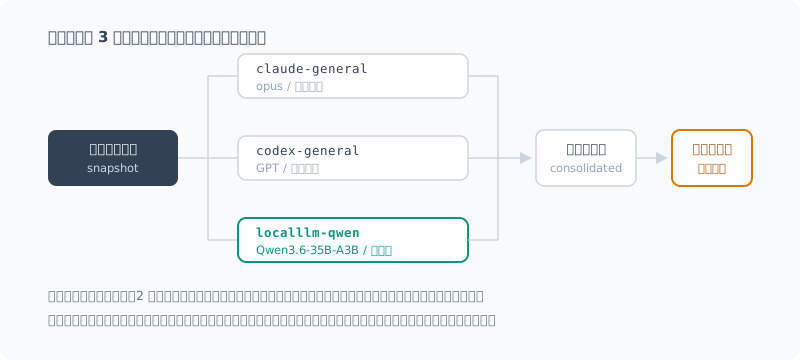
ただし、登録できたことと使えることは別です。 dev-orchestra はレビュー結果を決まった形式で要求します。
## Finding
- Severity: critical | high | medium | low
- File: <path>
- Line: <number, range, or n/a>
- Category: <correctness | security | performance | tests | …>
- Problem: ...そして、形式を守れなかったレビューは unparsed として「失敗」扱いになります。
ドキュメントにこう書いてありました。
読めないレポートは、コードが問題ないことの証拠にはならない。 それを問題なしとして扱うのは、レビューツールにとって最悪の壊れ方である。
35B のローカルモデルがこの形式を守れるかは、やってみないと分かりません。
バグを仕込んで試す
わざと 2 つ欠陥を入れた diff を食わせました。
 def average_price(items):
-    if not items:
-        return 0
-    return sum(i.price for i in items) / len(items)
+    return sum(i.price for i in items) / len(items)
+
+def top_n(items, n):
+    ordered = sorted(items, key=lambda i: i.price, reverse=True)
+ return ordered[:n+1]- 空リストのガードを消した →
ZeroDivisionError [:n+1]のオフバイワン → n 件のはずが n+1 件返る
結果です。
| 仕込んだ欠陥 | 検出 | 重大度 |
|---|---|---|
| ガード削除による ZeroDivisionError | 検出 | critical |
ordered[:n+1] のオフバイワン | 検出 | high |
2 つとも見つけました。 形式も完全に守られていて、そのままパースできる状態です。 所要 29 秒。
ノイズは多め
ただし、低優先度の指摘が 3 件ぶら下がってきました。 そのうち 1 件がこれです。
- Severity: low
- Category: performance
- Problem: 空チェックを外したことで、空リストでも除算が走るようになった。
- Impact: 性能影響は無視できるが、論理的に誤った挙動が主な問題。
critical で挙げたのと同じ行を、今度は performance として挙げ直しています。 自分で「性能影響は無視できる」と書いているとおり、これは実質的な重複です。
商用モデルに比べると、こういう水増しは目立ちます。 dev-orchestra は重複をある程度まとめてくれますが、 言い回しが違う重複は人が潰すしかありません。
レビュアーを増やすと、その分トリアージの手間も増える。 3 枚目を足すというのは、そういうトレードオフでもありました。
おまけ: 「CLI が入っていない」の犯人は PATH だった
作業中、doctor がこう言い出しました。
Problems
  - Orchestrator: claude CLI is not installed
  - Architect: claude CLI is not installed
  ...
4 つのロールとレビュアー 1 枚が死んでいる、と。 しばらく「claude CLI を入れ直す必要があるのか」と考えていたのですが、 違いました。claude を入れ直して PATH が変わったのに、 シェルが古い PATH を持ったままだっただけです。
$env:PATH = [System.Environment]::GetEnvironmentVariable('PATH','Machine') + ';' +
            [System.Environment]::GetEnvironmentVariable('PATH','User')
読み直したら No problems found. になりました。
CLI を入れ直したあとに「入っていない」と言われたら、まず PATH の鮮度を疑う。 ツールを疑う前に自分のシェルを疑うべきでした。
向き不向き
| 役割 | 可否 | 理由 |
|---|---|---|
| reviewer | 使える | 変更差分はプロンプトで渡されるので、リポジトリを読めなくても成立する |
| architect / implementer / review_fixer | 使えない | ファイルを読み書きできない |
claude や codex はエージェント型の CLI で、関連ファイルを自分で追って調べられます。 対してこのローカル LLM は、渡されたプロンプトしか見えません。 「この関数の呼び出し元も見に行く」類の指摘はできない、ということです。
なので商用モデルの置き換えにはなりません。3 つ目の独立した目として足す、 という位置づけが実態に合っています。
追記: 公式の仕組みが入った
(2026-09-25 追記)
記事を書いたあと、dev-orchestra 0.9.0 が出て、予想どおりアダプタが消えました。
Problems
  - reviewers[2]: unknown provider 'localllm'
- Reviewer localllm-qwen: unknown provider 'localllm'壊れ方も予想どおりでした。config.yaml にレビュアーの登録は残っているのに、
それが指すアダプタだけが無い。設定が片方だけ生き残るので、
更新した時点では気づけません。
ただし、今回は復旧スクリプトを流す必要がありませんでした。 0.9.0 でユーザー独自プロバイダの公式サポートが入っていたからです。
プラグインを改変しなくてよくなった
置き場所は設定ディレクトリの下です。
<設定ディレクトリ>\providers\*.pyconfig.yaml と同じ場所なので、プラグインを更新しても消えません。
アダプタと、それを参照する設定が、同じ寿命になりました。
こちらの変更は import 1 行だけでした。
-from .base import Provider, ResolvedModel, ...
+from orchestrator.providers.base import Provider, ResolvedModel, ...
パッケージの外から読み込まれるので、相対 import が使えません。 ドキュメントにも「built-in をコピーするなら、その 1 行を変えること」と書かれていました。
doctor が由来まで表示してくれるようになったのも助かります。
User providers
  Directory: ...\dev-orchestra\providers
  Code in this directory is imported at startup, from outside the plugin.
  Imported: localllm  <- ...\providers\localllm.py

Local LLM (llama.cpp) (localllm)
  Source: user module ...\providers\localllm.py
「このアダプタはサードパーティで、ここから来ている」と一目で分かります。
本題: インストーラを PowerShell で書いたのが間違いだった
移行自体は簡単だったのですが、ここで今回いちばん厄介な罠を踏みました。
新しい置き場所にアダプタをコピーしたのに、doctor がこう言い続けます。
User providers
  Directory: C:\Users\...\AppData\Roaming\dev-orchestra\providers (not present; nothing imported)
PowerShell では存在するのに、Python からは存在しない。
PowerShell:  Test-Path  -> True    (localllm.py もある)
Python:      os.path.isdir -> False
同じパス文字列です。しかも同じディレクトリの config.yaml は
dev-orchestra がちゃんと読めている。
犯人は Microsoft Store 版 Python のファイルシステム仮想化でした。
Store アプリは %APPDATA% への読み書きをパッケージ内へリダイレクトします。
| 見る側 | 実際に読み書きされる場所 |
|---|---|
| PowerShell | C:\Users\<user>\AppData\Roaming\dev-orchestra\ |
| Store 版 Python | %LOCALAPPDATA%\Packages\PythonSoftwareFoundation.Python.3.13_…\LocalCache\Roaming\dev-orchestra\ |
証拠は、同じ config.yaml のサイズが見る側で違うことでした。
PowerShell から : 0 バイト
Python から : 705 バイトたちが悪いのは、パス文字列では見抜けないことです。
os.environ['APPDATA'] は普通の C:\Users\...\AppData\Roaming を返します。
差が出るのはパスではなく、ファイル操作そのものの方でした。
なので「Python に正しいパスを聞けば安全だろう」という回避策も効きません。 実際それを実装して、同じ場所に書いて、同じように失敗しました。
対処はインストーラを Python で書き直すことでした。
# 読む側と同じインタプリタに書かせる。
# そうすればリダイレクトがあってもなくても、必ず同じ場所になる。
shutil.copyfile(SOURCE, target)パスを正しく計算しようとするのではなく、計算しなくて済むようにする。 こちらが正解でした。
別の Python(python.org 版など)に切り替えると、リダイレクトが無くなって 設定ごと「消えた」ように見えます。
--statusで警告を出すようにしました。
教訓
- 「更新で消える場所に置くしかない」と感じる改造は、長生きしない。 今回はすぐに公式対応が入り、自前の回避策は不要になりました。 同じ不便を感じている人が他にもいた、ということだと思います (こちらから要望を出したわけではなく、タイミングが重なっただけです)
- パスが同じでも、同じ場所とは限らない。 Windows の Store アプリが絡むときは、 「どのプロセスが書いて、どのプロセスが読むのか」を先に確かめる
まとめ
- dev-orchestra のプロバイダは API ではなく CLI をラップする設計。 OpenAI 互換 API があっても、そのままでは繋がらない
- stdin → stdout の薄い CLI を 1 枚挟むだけで、本体に手を入れずに繋がった
- 仕込んだバグ 2 件を両方検出し、要求された出力形式も守れた
- ただし低優先度のノイズが多い。トリアージの手間は増える
- 当初はプラグイン本体を改変するしかなかったが、 0.9.0 で公式のユーザープロバイダ機構が入り、改変は不要になった(追記参照)
- パス文字列が同じでも、同じ場所とは限らない。
Store 版 Python の
%APPDATA%リダイレクトで半日溶かした
課金されず、コードも外に出ない 3 枚目のレビュアーが手に入りました。 商用モデルほどの鋭さはありませんが、 「無料で何度でも回せる別の目」は、それはそれで使いどころがあります。
次は実際の開発でこの 3 枚体制を回してみて、 ローカル分がどれくらい当たるのか(そして外すのか)を見ていく予定です。
Introduction
Update (2026-10-25): With dev-orchestra 1.0.0, I rewrote the steps for writing an adapter from scratch and connecting a local LLM in Connecting My Own Agent to dev-orchestra (Local LLM Edition). If you’re connecting one now, that post is the shortcut. This post is a record of my trial and error back in the 0.8.0 days.
Last time, I set up a local LLM environment (llama.cpp + Vulkan + Qwen3.6-35B-A3B) on a mini PC with Ryzen AI. Generation runs at around 20 t/s, which is plenty fast for chatting.
Since I now have a model on hand, I wondered whether I could use it for code review. I use a Claude Code plugin called dev-orchestra, which has a mechanism for having multiple AIs review code independently.
By default there are two reviewers: Claude and Codex. I’m adding the local Qwen as a third.
I had three reasons:
- No charges — it’s free no matter how many times it reviews
- The code never leaves my machine — I can use it on things I can’t send outside
- An independent third opinion — another pair of eyes for “is it really right?” when the other two agree
The short answer: it works. But it didn’t connect cleanly; there was one wall.
The Wall: Providers Wrap CLIs, Not APIs
dev-orchestra does have a way to “add a reviewer”.
dev_orchestra.py reviewer add --provider <名前> --role generalBut --provider only accepts existing CLIs like claude and codex.
The local LLM exposes an OpenAI-compatible API,
so I assumed “setting the endpoint will be enough to connect it”,
but reading the adapter code showed me otherwise.
def build_command(self, mode, resolved, cwd, extra_args, options) -> List[str]:
    ...
What a provider returns is an array of command arguments. And the side that runs it looked like this:
proc = subprocess.Popen(
    list(command), cwd=cwd,
    stdin=subprocess.PIPE, stdout=subprocess.PIPE, ...
)
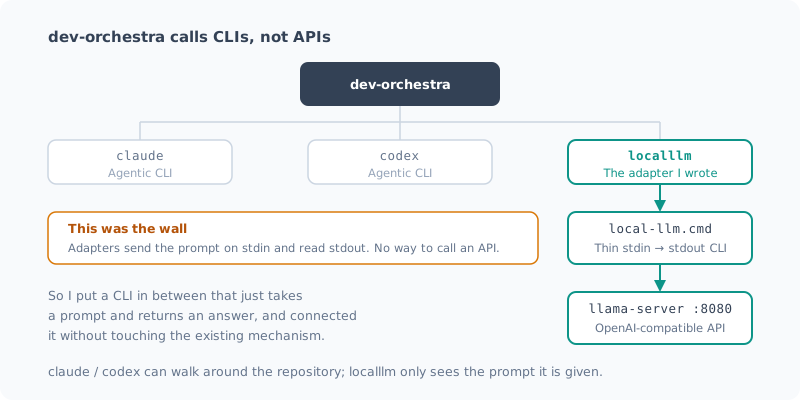
The prompt is passed on stdin, and the answer is read from stdout. In other words, a provider is “something that wraps a CLI”, with no way to call an API.
The Fix: Put a Thin CLI in Between
Modifying dev-orchestra itself seemed like the wrong approach, so I wrote a CLI that just takes a prompt and returns an answer.
prompt = sys.stdin.read()
answer = complete(prompt, port, ...)   # localhost:8080 に投げるだけ
sys.stdout.write(answer)
It uses only the standard library (urllib.request was enough).
If the server is down, it starts it automatically and waits.
Reviews run unattended, so it would be a problem if things stopped here.
Don’t forget to make it respond to --version. dev-orchestra uses that to check whether the CLI exists.
Write Batch Files in ASCII
Since this is Windows, I added a .cmd wrapper, and at first I got this:
'。' is not recognized as an internal or external command,
operable program or batch file.
The cause was a Japanese comment in a REM line.
cmd.exe reads the UTF-8 bytes using the OEM code page,
so the comment gets mangled and interpreted as a command. It still works, but shows an error every time.
The safe choice was to write batch files in ASCII only.
Writing the Adapter
All that’s left is an adapter that wraps the CLI.
class LocalLLMProvider(Provider):
    name = "localllm"
    executable = r"C:\Projects\local-llm\bin\local-llm.cmd"

    def build_command(self, mode, resolved, cwd, extra_args, options):
        if mode == MODE_IMPLEMENT:
            raise ModelResolutionError(
                "localllm cannot implement: it has no file access."
            )
        ...
It explicitly refuses implement mode. This CLI can’t read or write files, so if it were accidentally assigned the implementer role, it would fail in the hardest way to notice: “it succeeded, but nothing changed”. It’s safer to make it say it can’t do what it can’t do.
Registering it took just one line in the provider registry.
register(localllm.LocalLLMProvider.name, localllm.build_provider)It Lives in the Plugin Cache, So Updates Wipe It
The adapter goes here:
%USERPROFILE%\.claude\plugins\cache\dev-orchestra\dev-orchestra\0.8.0\
  scripts\orchestrator\providers\
As the name says, it’s a cache, so updating the plugin deletes it. The path even includes the version number.
So I kept the original in my own project and prepared an install script that restores everything when you run it again.
pwsh -File integrations\dev-orchestra\install.ps1            # 導入
pwsh -File integrations\dev-orchestra\install.ps1 -Status    # 状態確認
pwsh -File integrations\dev-orchestra\install.ps1 -Uninstall # 撤去
The reviewer registration itself lives in %APPDATA%\dev-orchestra\config.yaml, so it survives.
What breaks is that only the adapter disappears and you get “unknown provider”.
With a modification like this, one you “have no choice but to put somewhere updates will wipe”, if you don’t prepare recovery steps alongside it, your future self will definitely be in trouble six months later.
[Update] This section describes 0.8.0. 0.9.0 added an official mechanism, so there’s no longer any need to modify the plugin. If you’re doing the same thing today, don’t use this method. I wrote about what happened in “Postscript: An Official Mechanism Arrived” at the end of the post.
Trying It Out
The registration worked.
1. claude-general     claude   opus               latest   general
2. codex-general      codex    recommended-coding latest   general
3. localllm-qwen      localllm qwen3.6-35b-a3b    latest   general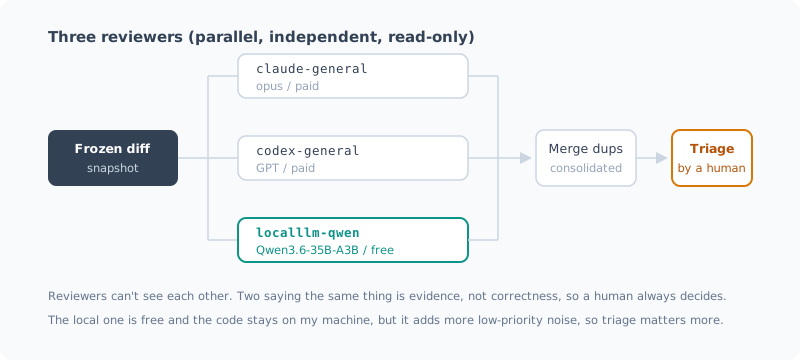
But being registered and being usable are two different things. dev-orchestra requires review results in a fixed format.
## Finding
- Severity: critical | high | medium | low
- File: <path>
- Line: <number, range, or n/a>
- Category: <correctness | security | performance | tests | …>
- Problem: ...
And a review that doesn’t follow the format is treated as unparsed, a “failure”.
The documentation put it like this:
An unreadable report is not evidence that the code is fine. Treating it as “no problems” is the worst way a review tool can break.
Whether a 35B local model can stick to this format is something you only find out by trying.
Planting Bugs to Test It
I fed it a diff with two deliberate defects.
 def average_price(items):
-    if not items:
-        return 0
-    return sum(i.price for i in items) / len(items)
+    return sum(i.price for i in items) / len(items)
+
+def top_n(items, n):
+    ordered = sorted(items, key=lambda i: i.price, reverse=True)
+ return ordered[:n+1]- Removed the empty-list guard →
ZeroDivisionError - Off-by-one in
[:n+1]→ returns n+1 items instead of n
The results:
| Planted defect | Detected | Severity |
|---|---|---|
| ZeroDivisionError from removing the guard | Detected | critical |
Off-by-one in ordered[:n+1] | Detected | high |
It found both. The format was followed perfectly, ready to parse as is. It took 29 seconds.
Lots of Noise
That said, three low-priority findings came along with them. Here’s one of them:
- Severity: low
- Category: performance
- Problem: Removing the empty check means the division now runs even for an empty list.
- Impact: The performance impact is negligible; the main problem is the logically wrong behavior.
It raises the same line it already flagged as critical, this time as performance. As it says itself, “the performance impact is negligible”, so this is effectively a duplicate.
Compared with commercial models, this kind of padding stands out. dev-orchestra merges duplicates to some extent, but duplicates worded differently have to be weeded out by a human.
Add more reviewers, and the triage work grows with them. Adding a third reviewer was that kind of trade-off too.
Bonus: The “CLI Isn’t Installed” Culprit Was PATH
While I was working, doctor started saying this:
Problems
  - Orchestrator: claude CLI is not installed
  - Architect: claude CLI is not installed
  ...
Four roles and one reviewer were dead, it said. For a while I wondered whether I needed to reinstall the claude CLI, but that wasn’t it. I had reinstalled claude and the PATH had changed, but my shell was still holding the old PATH, that’s all.
$env:PATH = [System.Environment]::GetEnvironmentVariable('PATH','Machine') + ';' +
            [System.Environment]::GetEnvironmentVariable('PATH','User')
After reloading it, I got No problems found.
If you’re told a CLI “isn’t installed” right after reinstalling it, suspect a stale PATH first. I should have suspected my own shell before the tool.
What It’s Good and Bad At
| Role | Usable? | Why |
|---|---|---|
| reviewer | Yes | The diff is passed in the prompt, so it works without reading the repository |
| architect / implementer / review_fixer | No | It can’t read or write files |
claude and codex are agentic CLIs that can follow related files and investigate on their own. This local LLM, on the other hand, only sees the prompt it’s given. That means it can’t make findings like “I also checked the callers of this function”.
So it’s not a replacement for commercial models. Adding it as a third, independent pair of eyes is what fits the reality.
Postscript: An Official Mechanism Arrived
(Added 2026-09-25)
After I wrote this post, dev-orchestra 0.9.0 came out, and as expected, the adapter disappeared.
Problems
  - reviewers[2]: unknown provider 'localllm'
  - Reviewer localllm-qwen: unknown provider 'localllm'
It broke exactly the way I expected, too. The reviewer registration was still in config.yaml,
but the adapter it pointed to was gone. Only half of the setup survives,
so you can’t tell at the moment you update.
This time, though, I didn’t need to run the recovery script. That’s because 0.9.0 had added official support for user-defined providers.
No More Modifying the Plugin
They go under the config directory:
<設定ディレクトリ>\providers\*.pyIt’s the same place as config.yaml, so they survive plugin updates.
The adapter and the config that refers to it now have the same lifetime.
The change on my side was just one import line.
-from .base import Provider, ResolvedModel, ...
+from orchestrator.providers.base import Provider, ResolvedModel, ...
It’s loaded from outside the package, so relative imports don’t work. The documentation also said, “if you copy a built-in, change that one line”.
It also helps that doctor now shows where each one comes from.
User providers
  Directory: ...\dev-orchestra\providers
  Code in this directory is imported at startup, from outside the plugin.
  Imported: localllm  <- ...\providers\localllm.py

Local LLM (llama.cpp) (localllm)
  Source: user module ...\providers\localllm.py
You can tell at a glance that “this adapter is third-party, and it comes from here”.
The Real Story: Writing the Installer in PowerShell Was a Mistake
The migration itself was easy, but this is where I stepped into the nastiest trap of this whole exercise.
I copied the adapter to the new location, but doctor kept saying this:
User providers
  Directory: C:\Users\...\AppData\Roaming\dev-orchestra\providers (not present; nothing imported)
It exists from PowerShell, but not from Python.
PowerShell:  Test-Path  -> True    (localllm.py もある)
Python:      os.path.isdir -> False
Same path string. And dev-orchestra could read config.yaml
in the same directory just fine.
The culprit was file system virtualization in the Microsoft Store version of Python.
Store apps redirect reads and writes to %APPDATA% into the package.
| Who’s looking | Where reads and writes actually go |
|---|---|
| PowerShell | C:\Users\<user>\AppData\Roaming\dev-orchestra\ |
| Store Python | %LOCALAPPDATA%\Packages\PythonSoftwareFoundation.Python.3.13_…\LocalCache\Roaming\dev-orchestra\ |
The evidence was that the same config.yaml had a different size depending on who looked.
PowerShell から : 0 バイト
Python から     : 705 バイト
What makes it nasty is that you can’t spot it from the path string.
os.environ['APPDATA'] returns the ordinary C:\Users\...\AppData\Roaming.
The difference shows up not in the path but in the file operations themselves.
So the workaround “just ask Python for the correct path and it’ll be safe” doesn’t work either. I actually implemented that, wrote to the same place, and failed the same way.
The fix was to rewrite the installer in Python.
# 読む側と同じインタプリタに書かせる。
# そうすればリダイレクトがあってもなくても、必ず同じ場所になる。
shutil.copyfile(SOURCE, target)
Instead of trying to compute the path correctly, make it so you don’t have to compute it at all. That was the right answer.
If you switch to a different Python (such as the python.org build), the redirection goes away and your config looks like it “disappeared” along with everything else. I made
--statusshow a warning about it.
Lessons
- A modification that feels like it “has to live somewhere updates will wipe” won’t last long. This time official support arrived quickly, and my own workaround became unnecessary. I think it means other people were feeling the same inconvenience (I didn’t request it; the timing just happened to line up)
- The same path doesn’t necessarily mean the same place. When Windows Store apps are involved, first check “which process writes, and which process reads”
Summary
- dev-orchestra providers are designed to wrap CLIs, not APIs. Even with an OpenAI-compatible API, you can’t connect it as is
- Putting a thin stdin → stdout CLI in between was enough to connect it without touching dev-orchestra itself
- It detected both planted bugs and stuck to the required output format
- But there’s a lot of low-priority noise. Triage takes more work
- At first the only way was to modify the plugin itself, but 0.9.0 added an official user-provider mechanism, so no modification is needed (see the postscript)
- The same path string doesn’t necessarily mean the same place.
The Store Python
%APPDATA%redirection cost me half a day
I now have a third reviewer that costs nothing and keeps the code on my machine. It’s not as sharp as the commercial models, but “another pair of eyes you can run as often as you like for free” has its uses.
Next, I plan to run this three-reviewer setup on real development work and see how often the local one hits (and misses).
関連記事 Related Posts
dev-orchestra で役割ごとに決まった指示を渡してみた Giving dev-orchestra Standing Instructions per Role
dev-orchestra 1.2.1 で入った instructions を試しました。implementer やレビュアーへの決まった指示をリポジトリに書いておくと、毎回のプロンプトに入ります。どう表示され、どこに入り、指示を変える変更がどう扱われるかを、実際の出力で確かめます。 I tried instructions, added in dev-orchestra 1.2.1. Standing instructions for the implementer or reviewers written in the repository go into every prompt. I check, with real output, how they are shown, where they go, and how a change to the instructions is treated.
dev-orchestra のレビュアーとロールを組み替えてみた Rearranging dev-orchestra's Reviewers and Roles
dev-orchestra の役(ロール)ごとのモデルの指定方法、レビュアーの観点の選び方、分野の専門役を提案させる config suggest-roles を紹介します。わざとバグを仕込んだ変更を 9 人のレビュアーに見せて、人数を増やすと何が変わるかも測ってみました。 How to set the model for each role in dev-orchestra, how to choose reviewer focuses, and config suggest-roles, which proposes domain specialists. I also showed a change with deliberately planted bugs to 9 reviewers to see what changes as you add more of them.
dev-orchestra のプリセット quality / standard / fast を比べてみた Comparing dev-orchestra's quality / standard / fast presets
dev-orchestra の初期設定で選ぶプリセット quality / standard / fast を、Claude Code だけ・Codex だけ・両方の 3 つの環境で実際に展開して比べました。役ごとのモデル、レビュアーの人数、コストを削る度合いがどう変わるか、どれを選べばいいかをまとめます。 I expanded dev-orchestra's setup presets quality / standard / fast in three environments (Claude Code only, Codex only, and both) and compared them. Here is how the per-role models, the number of reviewers, and how much cost is cut change, and which one to pick.