ローカルLLMのベンチマークの取り方(チェックリスト付き) How to Benchmark a Local LLM (with a Checklist)
はじめに
ローカル LLM の設定を変えて速度を比べる。よくある作業ですが、思った以上に簡単に間違えます。
このシリーズで 15 本の記事を書くあいだ、測定の側が間違っていた場面が 19 回ありました (振り返りの回)。 この記事は、その経験を手順書に組み直したものです。失敗談は最小限にして、「こう測る」を書きます。
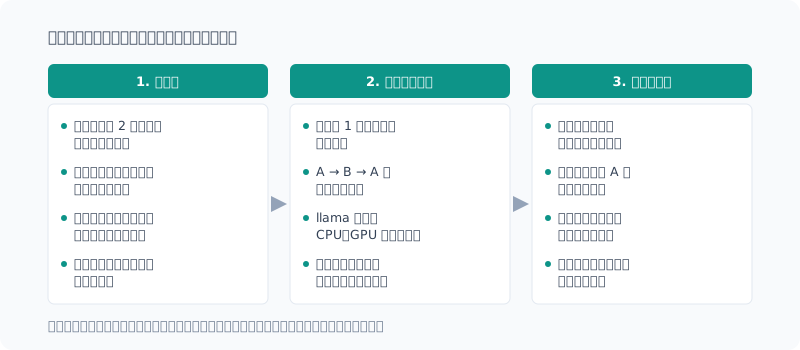
例は llama.cpp(llama-bench / llama-server)と PowerShell ですが、考え方はほかの計測にも使えます。
1. 測る前
ぶれの幅を先に知る
同じ条件を 2 回測ると、どれだけ動くか。 これを最初に確かめます。
私の環境では、同じ設定を別々に起動して測ると、生成速度が 16.79 と 18.57 になりました。約 1 割です。 比べたかった設定の差(約 9%)は、このぶれの中にそっくり埋もれていました(ベンチのぶれの回)。
差がぶれの幅より小さいなら、結論を出さない。 これが全部の前提です。
設定が本当に効いているかを、起動ログで見る
llama-server は、使えない設定を黙って無効にすることがあります。エラーにはならず、起動もします。
srv load_model: cache_reuse is not supported by multimodal, it will be disabled私はこの 1 行を読まず、--cache-reuse が効いていると 4 日間思い込んでいました。
測る前に、起動ログを確かめます。
Get-Content server.log | Select-String 'not supported|disabled|ignor'計測スクリプトに組み込むなら、想定と違えば止まるようにします。
$mm = [bool](Select-String -Path $log -Pattern 'loaded multimodal model' -Quiet)
if (($mode -eq 'off') -eq $mm) { throw "mmproj の状態が想定と違う(mode=$mode)" }
裏で動くものを止める
計測中に別の処理が動くと、結果が汚れます。私が実際に踏んだのは次のものです。
| 割り込んだもの | 何が起きたか |
|---|---|
| 自分で作った自動起動 | 計測中に llama-server がもう 1 つ起動し、メモリが上限寸前に |
| 別の作業(別の AI のセッション) | 同じ条件どうしで 1 割ぶれた(止めて測り直すと 2% 前後) |
| OneDrive の同期 | ファイルを消したのに、空き容量が減っていく |
| PC のスリープ | 2 分半の処理の総時間が 10 時間に |
計測を始める前に、何が動きうるかを列挙して止めます。 とくに「止まっていたら自動で起動する」仕組みは、計測中に動くと最悪です。
裏を止めるだけで、ぶれの幅はここまで変わりました(mmproj の回)。
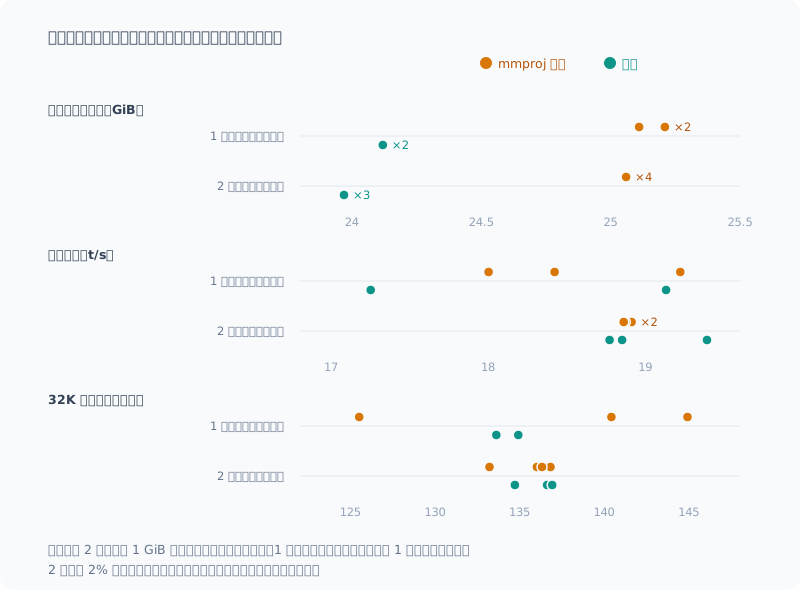
1 回目は、同じ条件どうしの差が 1 割もあったので、「なし」と「あり」のどちらが速いか判断できませんでした。 裏を止めた 2 回目は、ぶれが 2% 前後まで小さくなり、「差は 3% 未満」と言い切れました。
採点器を、正解と誤答の両方で試す
品質(正答率)を測るなら、採点するスクリプトも測定器です。本番の前に、実際の文字列で試します。
$cases = @(
  @('答え: 4821番', '4821', $true),
  @('答え: 1482番', '4821', $false),   # 別の数字
  @('答え: 48210番', '4821', $false),  # 桁が多い
  @('4821番です', '4821', $false)      # 答えの行が無い
)
foreach ($c in $cases) { if ((Test-Answer $c[0] $c[1]) -ne $c[2]) { throw "採点器が違う: $($c[0])" } }
「正解を拾えるか」だけでなく、**「誤答を弾けるか」**も試すのが肝です。
私は \b53\b という正規表現で、「53個」を不正解にしていました(.NET の正規表現は漢字を単語の一部とみなすため)。
数字を囲むなら (?<!\d)53(?!\d) と書きます(thinking の回)。
2. 測っている間
条件は 1 回の起動の中で振る
別々に起動した結果どうしは、比べられません。ウォームアップ、電力、温度の状態が揃わないからです。 llama-bench はカンマ区切りで条件を並べられるので、1 回の起動の中で振ります。
llama-bench -hf <model> -ngl 99 -fa 1 -p 0 -n 128 -d 0,32768 -ctk f16,q8_0 -r 5A → B → A と挟む
1 回の起動の中でも、後に測った条件ほど有利になることがありました。 時間とともに状態がずれていくからです。K の量子化で「+16%」と出た差が、順番を逆にすると「+6%」でした(128K の回)。
対策は、同じ条件を最初と最後に置いて挟むことです。
llama-bench ... -ctk f16,q8_0,f16 -r 2 # f16 → q8_0 → f16最初と最後の f16 が揃っていれば、途中でずれていないと言えます。揃っていなければ、その回の差は信用しません。
回数に余裕があれば、A → B → A → B → A のように交互に並べ、B の各回を前後の A の平均と比べます。 ゆっくりしたずれなら、前後で挟むと打ち消せます。
B の差 = B の値 ÷ (直前の A + 直後の A)÷ 2 − 1mmproj の有無を 7 回交互に測ったときは、この差が +2.6%、−0.6%、−0.2% と向きがばらばらだったので、 「差は 3% 未満」と結論できました(mmproj の回)。
割り込みを記録する
特定のプロセスだけでなく、それ以外が使った CPU と GPU を 10 秒ごとに記録します。
# プロセスごとの CPU 時間の差分から、llama 以外の使用率を出す
$pct = ($now_cpu - $prev_cpu) / $elapsed_sec / [Environment]::ProcessorCount * 100
# GPU はエンジンごとの使用率を pid で集計し、llama 以外を合計する
Get-Counter '\GPU Engine(*)\Utilization Percentage'
最初は llama-server が起動していないかだけを見張っていて、別の作業による割り込みを見逃しました。 見張っているものしか守れません。
スリープを止める(失敗したら中断する)
長い計測の途中でスリープすると、時間の測定が壊れます。 スクリプトの中で、そのプロセスが生きている間だけスリープを抑止します。
Add-Type -Namespace NT -Name Power -MemberDefinition '[DllImport("kernel32.dll")] public static extern uint SetThreadExecutionState(uint f);'
$ES_CONTINUOUS = [uint32]'0x80000000'; $ES_SYSTEM_REQUIRED = [uint32]'0x00000001'
if ([NT.Power]::SetThreadExecutionState($ES_CONTINUOUS -bor $ES_SYSTEM_REQUIRED) -eq 0) { throw 'スリープ抑止に失敗' }
[uint32] の変換を省くと、PowerShell が 0x80000001 を負の数と解釈して呼び出しが失敗します。
私はこれに気づかず、何もしていない抑止を 33 分走らせていました。失敗したら止まるように書くのが大事です。
同じ理由で、途中でエラーが出てもサーバや監視を必ず片付けるようにします。
try {
  # 計測の本体
} finally {
  Get-Process llama-server -EA SilentlyContinue | Stop-Process -Force
  Stop-Job $guard -EA SilentlyContinue; Remove-Job $guard -Force -EA SilentlyContinue
}
片付けを書いていなかったとき、スクリプトは 1 問目で落ちたのに、残った監視ジョブのせいで終わったように見えず、2 時間気づきませんでした。 長い計測は、最初の数件の結果が記録されるところまで見届けてから待ちます。
3. 測ったあと
ありえない値を最初に探す
表を眺めて結論を考える前に、物理的にありえない値が混じっていないかを見ます。
- KV キャッシュが空(深度 0)なのに、KV の量子化で差が出ている
- 深度 0 のほうが、3 万トークン積んだ状態より遅い
- 同じ条件の 2 回が 1 割違う
- 2 分半の処理に 10 時間かかっている
私の失敗の 6 件は、これで見つかりました。逆に「ありえなくはない」外れ値は、ここでは引っかかりません。
外れ値と不正解は、生の出力を読む
正答率の数字だけを見ると、「モデルが間違えた」で終わってしまいます。 不正解になった回の出力そのものを読みます。
| 不正解に見えたもの | 実際 |
|---|---|
| thinking ありで T2 を間違えた | 出力を読むと正しく解けていた。採点の範囲が本文全体だった |
| 16K の 1 問で「答えの行が無い」 | 答えの前に説明を書き始め、max_tokens 64 で打ち切られていた |
| 128K で違う番号を答えた | 先頭 2 文字が同じ別の番号の値を答えていた(取り違え) |
そのために、計測スクリプトは不正解のときに本文全体を残すようにしておきます。
打ち切りは、不正解と分けて数える
max_tokens の上限で切れた回(finish_reason が length)は、答える前に止められただけかもしれません。
不正解に混ぜると、モデルの実力を低く見積もります。「打ち切り」として別に数えます。
単位を数字の横に書く
GiB(2³⁰)と GB(10⁹)を混ぜて比べて、「3% で一致」と書きかけたことがあります。揃えると 1 割の差でした。 比べる 2 つの数字の単位が同じかを、書く前に確かめます。
チェックリスト
測る前
- 同じ条件を 2 回測り、ぶれの幅を知る。差がそれより小さければ結論を出さない
- 入れた設定が有効かを、起動ログで確かめる。想定と違えば止まるようにする
- 計測中に動きうるもの(自動起動、同期、別の作業、スリープ)を列挙して止める
- 採点器は、正解を拾えるかと誤答を弾けるかの両方を、実際の文字列で試す
測っている間
- 比べる条件は 1 回の起動の中で振る
- A → B → A と挟み、最初と最後の A が揃うかを見る
- llama 以外が使った CPU・GPU を記録する
- スリープ抑止は、失敗したら止まるように書く。途中で落ちても必ず片付ける
- 最初の数件が記録されるところまで見届けてから待つ
測ったあと
- 物理的にありえない値が混じっていないかを最初に見る
- 外れ値や不正解は、生の出力を読む
- 上限での打ち切りは、不正解と分けて数える
- 比べる数字の単位が同じかを確かめる
まとめ
- ぶれの幅を先に測る。 差がそれより小さければ「分からない」と書く
- 比べる条件は 1 回の起動の中で、A → B → A と挟んで並べる
- 裏で動くものを止め、それ以外の CPU・GPU を記録する
- 採点器も測定器。正解と誤答の両方で試し、不正解は生の出力を読む
- 安全装置(スリープ抑止、片付け)は、失敗したら止まるように書く
いちばん効いたのは、裏を静かにしたことでした。同じスクリプトのぶれが、それだけで 1 割から 2% 前後に縮みました。
Introduction
Change a local LLM setting and compare the speed. It’s a common task, but it’s easier to get wrong than you’d think.
While I wrote 15 posts in this series, there were 19 times when the measurement itself was wrong (the retrospective post). This post reorganizes that experience into a procedure. I keep the war stories to a minimum and write down “how to measure”.
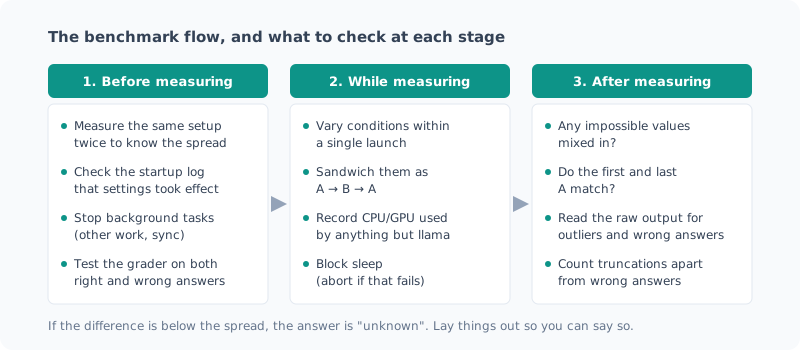
The examples use llama.cpp (llama-bench / llama-server) and PowerShell, but the ideas apply to other measurements too.
1. Before Measuring
Know the Spread First
If you measure the same conditions twice, how much does it move? This is the first thing to check.
In my environment, measuring the same setting in separate launches gave generation speeds of 16.79 and 18.57. That’s about 10%. The difference between the settings I wanted to compare (about 9%) was completely buried in that spread (the benchmark noise post).
If the difference is smaller than the spread, don’t draw a conclusion. Everything else rests on this.
Check in the Startup Log That a Setting Really Took Effect
llama-server sometimes silently disables a setting it can’t use. It doesn’t raise an error, and it still starts.
srv load_model: cache_reuse is not supported by multimodal, it will be disabledI didn’t read this one line, and for 4 days I believed --cache-reuse was in effect.
Before measuring, check the startup log.
Get-Content server.log | Select-String 'not supported|disabled|ignor'If you build it into a measurement script, make it stop when things differ from what you expect.
$mm = [bool](Select-String -Path $log -Pattern 'loaded multimodal model' -Quiet)
if (($mode -eq 'off') -eq $mm) { throw "mmproj の状態が想定と違う(mode=$mode)" }
Stop What Runs in the Background
If something else runs during a measurement, it pollutes the results. These are the ones I actually ran into.
| What interrupted | What happened |
|---|---|
| An auto-start I built myself | A second llama-server started during the measurement, and memory came close to the limit |
| Other work (another AI’s session) | Runs under the same conditions varied by 10% (about 2% after stopping it and measuring again) |
| OneDrive sync | Free space kept shrinking even though I had deleted files |
| PC sleep | A 2.5-minute job took 10 hours in total |
Before starting a measurement, list what could run and stop it. Mechanisms that “start automatically if stopped” are the worst when they kick in during a measurement.
Just stopping the background changed the spread this much (the mmproj post).
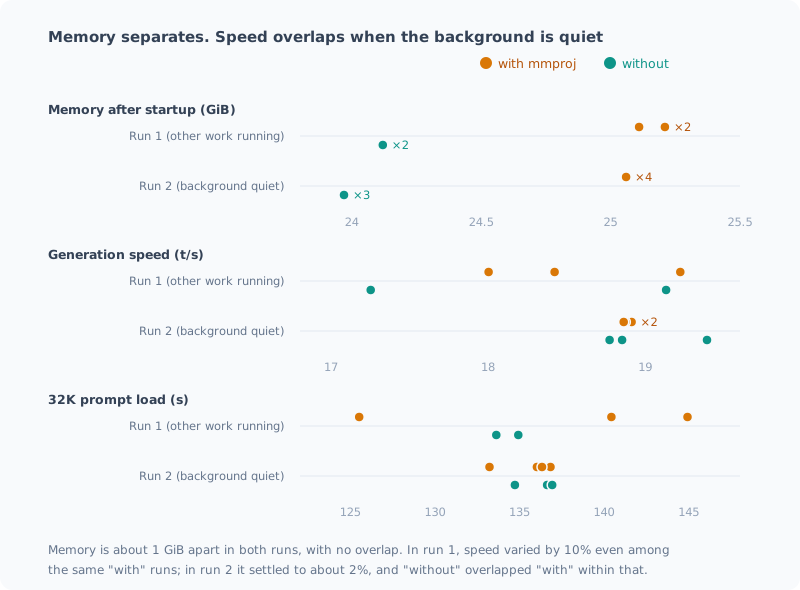
In run 1, the difference between identical conditions was as much as 10%, so I couldn’t tell whether “without” or “with” was faster. In run 2, with the background stopped, the spread shrank to about 2%, and I could say flatly that “the difference is under 3%”.
Test the Grader with Both Right and Wrong Answers
If you measure quality (accuracy), the grading script is also a measuring instrument. Test it on real strings before the real run.
$cases = @(
  @('答え: 4821番', '4821', $true),
  @('答え: 1482番', '4821', $false),   # 別の数字
  @('答え: 48210番', '4821', $false),  # 桁が多い
  @('4821番です', '4821', $false)      # 答えの行が無い
)
foreach ($c in $cases) { if ((Test-Answer $c[0] $c[1]) -ne $c[2]) { throw "採点器が違う: $($c[0])" } }
The key is to test not only “does it pick up right answers” but also “does it reject wrong ones”.
I was marking “53個” (53 items) as wrong with the regex \b53\b (because .NET regex treats kanji as part of a word).
To bound a number, write (?<!\d)53(?!\d) (the thinking post).
2. While Measuring
Vary Conditions Within a Single Launch
Results from separate launches can’t be compared, because warm-up, power and temperature aren’t in the same state. llama-bench lets you list conditions separated by commas, so vary them within one launch.
llama-bench -hf <model> -ngl 99 -fa 1 -p 0 -n 128 -d 0,32768 -ctk f16,q8_0 -r 5Sandwich as A → B → A
Even within one launch, the later a condition was measured, the more it was favored at times, because the state drifts over time. A difference that came out as “+16%” for K quantization was “+6%” when I reversed the order (the 128K post).
The fix is to sandwich it by placing the same condition first and last.
llama-bench ... -ctk f16,q8_0,f16 -r 2 # f16 → q8_0 → f16If the first and last f16 match, you can say nothing drifted in between. If they don’t, I don’t trust that run’s difference.
If you have runs to spare, alternate them like A → B → A → B → A, and compare each B run against the average of the A before and after it. Slow drift cancels out when you sandwich it from both sides.
B の差 = B の値 ÷ (直前の A + 直後の A)÷ 2 − 1When I measured with and without mmproj alternately 7 times, this difference went +2.6%, −0.6% and −0.2%, pointing in different directions, so I could conclude “the difference is under 3%” (the mmproj post).
Record Interruptions
Not just a specific process: record the CPU and GPU used by everything else every 10 seconds.
# プロセスごとの CPU 時間の差分から、llama 以外の使用率を出す
$pct = ($now_cpu - $prev_cpu) / $elapsed_sec / [Environment]::ProcessorCount * 100
# GPU はエンジンごとの使用率を pid で集計し、llama 以外を合計する
Get-Counter '\GPU Engine(*)\Utilization Percentage'
At first I only watched whether llama-server had started, and I missed the interruption from other work. You can only protect against what you watch.
Block Sleep (and Abort If That Fails)
If the PC sleeps in the middle of a long measurement, the timing breaks. Inside the script, block sleep only while that process is alive.
Add-Type -Namespace NT -Name Power -MemberDefinition '[DllImport("kernel32.dll")] public static extern uint SetThreadExecutionState(uint f);'
$ES_CONTINUOUS = [uint32]'0x80000000'; $ES_SYSTEM_REQUIRED = [uint32]'0x00000001'
if ([NT.Power]::SetThreadExecutionState($ES_CONTINUOUS -bor $ES_SYSTEM_REQUIRED) -eq 0) { throw 'スリープ抑止に失敗' }
If you leave out the [uint32] conversion, PowerShell interprets 0x80000001 as a negative number and the call fails.
I didn’t notice this and ran a sleep block that did nothing for 33 minutes. What matters is writing it so it stops when it fails.
For the same reason, make sure you always clean up the server and the monitoring, even if an error occurs midway.
try {
  # 計測の本体
} finally {
  Get-Process llama-server -EA SilentlyContinue | Stop-Process -Force
  Stop-Job $guard -EA SilentlyContinue; Remove-Job $guard -Force -EA SilentlyContinue
}
When I hadn’t written the cleanup, the script crashed on the first question, but the leftover monitoring job made it look like it hadn’t finished, and I didn’t notice for 2 hours. For a long measurement, watch until the first few results are recorded before you wait.
3. After Measuring
Look for Impossible Values First
Before staring at the table and thinking about conclusions, check whether any physically impossible values got mixed in.
- KV quantization makes a difference even though the KV cache is empty (depth 0)
- Depth 0 is slower than the state with 30,000 tokens loaded
- Two runs under the same conditions differ by 10%
- A 2.5-minute job takes 10 hours
Six of my mistakes were found this way. On the other hand, outliers that are “not impossible” don’t get caught here.
Read the Raw Output for Outliers and Wrong Answers
If you only look at the accuracy numbers, it ends with “the model got it wrong”. Read the actual output of the runs that were marked wrong.
| What looked wrong | What it actually was |
|---|---|
| Got T2 wrong with thinking on | Reading the output, it had solved it correctly. The grading covered the whole body |
| ”No answer line” on one 16K question | It started writing an explanation before the answer and was cut off by max_tokens 64 |
| Answered a different number at 128K | It answered with the value for a different number whose first 2 characters were the same (a mix-up) |
For that, set up the measurement script to keep the full body when an answer is wrong.
Count Truncations Separately from Wrong Answers
A run cut off at the max_tokens limit (finish_reason is length) may simply have been stopped before it could answer.
Mixing those into wrong answers underestimates the model. Count them separately as “truncated”.
Write the Unit Next to the Number
I once compared GiB (2³⁰) and GB (10⁹) mixed together and nearly wrote “matches within 3%”. Once I made them the same, the difference was 10%. Before writing, check whether the two numbers you compare use the same unit.
Checklist
Before measuring
- Measure the same conditions twice to know the spread. If the difference is smaller than that, don’t draw a conclusion
- Check in the startup log that the settings you added are in effect. Make it stop if things differ from what you expect
- List what could run during the measurement (auto-starts, sync, other work, sleep) and stop it
- Test the grader on real strings for both picking up right answers and rejecting wrong ones
While measuring
- Vary the conditions you compare within a single launch
- Sandwich as A → B → A and check that the first and last A match
- Record the CPU and GPU used by anything other than llama
- Write the sleep block so it stops when it fails. Always clean up, even if it crashes midway
- Watch until the first few results are recorded before you wait
After measuring
- First check for physically impossible values
- Read the raw output for outliers and wrong answers
- Count truncations at the limit separately from wrong answers
- Check that the numbers you compare use the same unit
Summary
- Measure the spread first. If the difference is smaller than that, write “unknown”
- Lay out the conditions you compare within a single launch, sandwiched as A → B → A
- Stop what runs in the background, and record the CPU and GPU used by everything else
- The grader is a measuring instrument too. Test it with both right and wrong answers, and read the raw output for wrong answers
- Write safety measures (sleep blocking, cleanup) so they stop when they fail
What helped most was quieting the background. That alone shrank the spread of the same script from 10% to about 2%.
関連記事 Related Posts
ベンチで「効果を見つけた」と思ったら、測定のぶれだった I Thought My Benchmark Found an Effect, but It Was Measurement Noise
過去に下した設定判断を検証しようとして、逆の結果が出ました。喜びかけたところで物理的におかしい点に気づき、測り直したら元の判断が正しかった。別々に起動したベンチを比較してはいけない、という話です。 When I tried to verify a settings decision I'd made earlier, I got the opposite result. Just as I was about to celebrate, I noticed something physically odd, measured again, and the original decision was right. This is about why you shouldn't compare benchmarks from separate launches.
コンテキストを 128K まで伸ばしたら、壁はメモリではなく待ち時間だった I Stretched the Context to 128K, and the Wall Was Waiting Time, Not Memory
ローカルLLMのコンテキストを32Kから128Kまで伸ばして測りました。予想していたメモリ不足は起きず、理由はモデルの構造にありました。代わりに見えた壁はプロンプトの取り込み時間で、128Kを読ませるだけで21〜24分かかります。途中で自分の自動起動に計測を汚された話も含みます。 I stretched my local LLM's context from 32K to 128K and measured it. The memory shortage I expected never happened, and the reason lay in the model's architecture. The wall I hit instead was prompt ingestion time: just reading 128K takes 21–24 minutes. It also covers how my own auto-start polluted the measurements along the way.
ローカルLLMを13回測って、測定のほうが19回間違っていた I Measured My Local LLM 13 Times, and the Measurements Were Wrong 19 Times
ローカルLLM環境の構築と検証を13本の記事に書くあいだに、測定する側が間違っていた場面が19回ありました。比べ方、採点器のバグ、外からの割り込み、前提の取り違え、動いていなかった安全装置。気づいたきっかけを数えると、半分以上は「ありえない値」か「生データ」でした。測る前のチェックリストにまとめます。 While writing 13 posts about building and testing my local LLM setup, the measuring side was wrong 19 times: how I compared, bugs in the grader, interruptions from outside, wrong assumptions, and safety mechanisms that weren't working. Counting how I noticed, more than half came from "impossible values" or "raw data". I turn them into a checklist for before measuring.