ローカルLLMを13回測って、測定のほうが19回間違っていた I Measured My Local LLM 13 Times, and the Measurements Were Wrong 19 Times
はじめに
Ryzen AI の PC でローカル LLM を組み直し、速度や品質を測っては記事にしてきました。 掃除から始めて、128K の読み取り品質まで 13 本です。
書き終えて読み返すと、測定そのものが間違っていた場面がやたらと多いことに気づきました。 モデルや設定の話をしているつもりで、実際には「測り方」の失敗談ばかり書いています。
数えたら 19 回ありました。今回はそれを全部並べ、 次に測る前に見るチェックリストにまとめます。新しい計測はしていません。
19 回の一覧
| # | 記事 | 何が起きたか | 気づいたきっかけ |
|---|---|---|---|
| 1 | 掃除 | 69 GB 消したのに空き容量が 150 GB 減った。裏で OneDrive が毎分 6 GB 書き込んでいた | ありえない値 |
| 2 | 構築 | 投機デコードの比較で、対照群の起動がダウンロード待ちでタイムアウト。片側の数字しか残らなかった | 生データ |
| 3 | 〃 | 「--cache-reuse が効いている」と書いたが、最初から無効だった。効いていたのは既定の別の仕組み | ログ(後日) |
| 4 | ベンチのぶれ | 別々に起動したベンチを比べ、「q8_0 が速い」と逆の結論を出しかけた。実行ごとのばらつきが 10% | ありえない値 |
| 5 | SVG の図 | 「図は 0.8 倍に縮む」と思い込んでいた。実測するとデスクトップでは 1.06 倍、狭い画面では 0.41 倍 | 書く前に実測した |
| 6 | 3 つの AI のレビュー | レビューの打率を集計するスクリプトが、存在しない状態名 untriaged を探していた。警告が永久に出ない | AI レビュー |
| 7 | thinking | 本文全体を採点していて、途中計算の多い thinking ON だけが不利になった | 生データ |
| 8 | 〃 | \b53\b が「53個」にマッチしない。.NET は漢字を単語文字とみなす | ありえない値 |
| 9 | 128K | 理論値と実測を「3% で一致」と書きかけた。GiB と 10⁹ バイトを混ぜていた。揃えると 1 割の差 | 検算 |
| 10 | 〃 | 計測中に、自分で作った自動起動が llama-server(26 GB)を立ち上げていた | ありえない値 |
| 11 | 〃 | 同じ起動の中で比べても、後に測った条件ほど速かった。+16% と出た差が、順序を入れ替えると +6% | ありえない値 |
| 12 | 〃 | 「割り込みの前に終わったから無傷」と判断した回が、実は外れ値(−24%、正しくは −15%) | 後から疑った |
| 13 | 〃 | 「128K の読み込みは約 6 分」と見積もった。実際は 18〜24 分 | 検算(実測と比較) |
| 14 | 〃 | llama-bench の所要時間を「回数に比例」と思って逆算し、矛盾を作り出していた。実際は条件の数に比例 | 検算 |
| 15 | キャッシュ | 結果の行を変数に吸い込むバグで、何も表示されなかった | 生データ |
| 16 | 〃 | 引数の渡し方の誤りでサーバの起動が 3 回とも失敗し、エラーのまま最後まで進んでいた | ログ |
| 17 | 〃 | 計測中に PC が 10 時間スタンバイしていた。2 分半の処理の総時間が 36,197 秒と出て気づいた | ありえない値 |
| 18 | 〃 | スリープ抑止のスクリプトが、型変換のエラーで何もしていなかった | エラー出力 |
| 19 | 128K の読み取り | max_tokens 64 が短く、答えを書く前に打ち切っていた。取り出しの失敗と区別できない | 生データ |
15〜18 は記事には書いていません。記事の結論に影響しないところで直したためです。 ただ、「測ったつもりで測れていなかった」という意味では同じ種類の失敗なので、ここに含めました。
5 つの型
並べてみると、失敗はおおむね 5 つの型に分かれます。
1. 比べ方が間違っている(#2, #4, #11)
比較の前提が崩れているものです。
- 対照群が取れていない(#2)
- 別々に起動したものを比べる(#4)
- 同じ起動でも、順番が効いている(#11)
#4 の教訓として「1 回の起動の中で条件を振る」と書きました。 その 2 本後の記事で、それでも順番のぶん偏ることを踏んでいます(#11)。 最後に落ち着いたのは、A → B → A と挟んで測り、最初と最後の A が揃うかを見る方法でした。
2. 測定器が壊れている(#6, #7, #8, #9, #15, #19)
数字を作る道具のほうが間違っているものです。いちばん多い型でした。
採点の正規表現(#7, #8)、集計スクリプト(#6)、単位(#9)、出力の扱い(#15)、 モデルに渡す上限(#19)。どれも、結果の数字はそれらしく出てしまうのが厄介です。
#19 は、採点器を 12 通りの文字列で検証した後に踏みました。 採点器は正しかったのに、採点器に渡す前の段階で答えが切れていました。 測定器は採点器だけではなく、入力から集計までの全部です。
3. 外から割り込まれている(#1, #10, #12, #17)
測っている最中に、別のものが動いていたものです。
OneDrive(#1)、自分の自動起動(#10)、監視していなかった何か(#12)、スタンバイ(#17)。 #10 のあとに llama-server の起動を見張る監視を入れましたが、 見張っていたのは llama-server だけでした(#12)。 最終的には、llama 以外が使った CPU と GPU を 10 秒ごとに記録するようにしています。
それでも、割り込みが一切ない回どうしで 1〜4 割ぶれました。 全部を見張っても、ぶれはゼロになりません。
4. 前提を確かめていない(#3, #5, #13, #14)
「そうなっているはず」を確かめずに使ったものです。
- 入れた設定が有効になっているはず(#3)
- 図は縮んでいるはず(#5)
- 短い入力の速度が長い入力でも続くはず(#13)
- 所要時間は回数に比例するはず(#14)
#3 は発覚まで 4 日かかりました。「設定を入れた → 速くなった → その設定のおかげ」と結びつけて、 起動ログに出ていた「無効にします」の 1 行を読んでいませんでした。
5. 安全装置が動いていない(#16, #18)
失敗を防ぐはずの仕組み自体が壊れていたものです。
スリープ抑止(#18)は、動いていないのに何も言いませんでした。 サーバの起動待ち(#16)は、起動に失敗しても待ち続けて、次の処理に進んでいました。 どちらも、「失敗したら止まる」ように直したのが対処です。 安全装置は、黙って失敗するのがいちばん危険です。
どうやって気づいたか
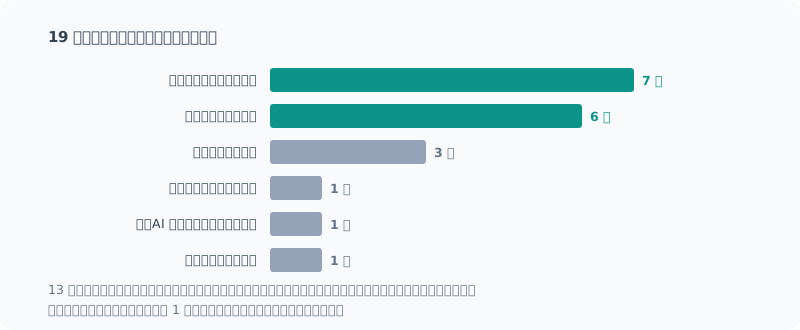
19 件のうち 13 件は、「ありえない値」か「生データ」で見つかりました。
「ありえない値」の例を並べると、どれも物理的にそうはならないものです。
- 消したのに空き容量が減る(#1)
- KV キャッシュが空の深度 0 で、KV の量子化の差が出る(#4)
- KV が空のほうが、3 万トークン積んだ状態より遅い(#10)
- 深度 0 の速度が、実行順に上がっていく(#11)
- 2 分半の処理の総時間が 10 時間(#17)
逆に言えば、ありえなくはない誤りはここで引っかかりません。 #12 の −24% は「そういうこともあるか」と思える値だったので、見逃しました。
「生データ」は、集計した数字ではなくモデルの出力やサーバのログそのものを読んだ場面です。 #7 は不正解になった出力を読んだら正しく解けていた、#19 は答えが途中で切れていた。 正答率の数字だけを見ていたら、どちらも「モデルが間違えた」で終わっていました。
一方、先回りして確かめて見つけたのは 1 件だけ(#5)です。記事に「0.8 倍に縮む」と書く前に、念のため実測しました。 ほとんどは、測って、おかしいと思って、戻って見つけています。
測る前のチェックリスト
19 回分の対処を、次に測る前に見る形にまとめました。
比べ方
- 同じ条件を 2 回測り、ぶれの幅を先に知る。差がそれより小さければ結論を出さない
- 比べる条件は 1 回の起動の中で振る。さらに A → B → A と挟み、最初と最後の A が揃うかを見る
- 対照群の数字が実際に取れているかを確かめてから比べる
測定器
- 採点器は、正解を拾えるかと誤答を弾けるかの両方を、実際の文字列で試す
- 採点器の前の段階(入力の組み立て、出力の上限、表示)も測定器の一部として見る
- 単位を数字の横に書く。比べる 2 つの単位が同じかを確かめる
割り込み
- 計測中に何が動きうるかを列挙する(自動起動、同期、スリープ)
- 特定のプロセスだけでなく、それ以外が使った CPU・GPU を記録する
前提
- 入れた設定が有効になっているかを、起動ログで確かめる
- 短い入力で測った値を、長い入力に外挿しない。本番と同じ長さで一度は測る
安全装置
- 抑止・待機・監視の仕組みは、失敗したら止まるように書く
- 安全装置が実際に効いたかを、終わったあとに確かめる
結果を見るとき
- 物理的にありえない値が混じっていないかを最初に見る
- 不正解や外れ値は、生の出力を読む
- 最初の結果が面白いときほど疑う。その説明が他に何を予測するかを確かめる
まとめ
- 13 本の記事で、測定の側が 19 回間違っていた
- 型は 5 つ。比べ方、測定器、割り込み、前提、安全装置。いちばん多いのは測定器の誤り
- 19 件中 13 件は、ありえない値か生データで気づいた。集計した数字だけでは見つからない
- 先回りして見つけたのは 1 件だけ。だから、測ったあとで疑う手順を先に決めておく
モデルがどれだけ速いか、どれだけ読めるかを測ってきましたが、 振り返って一番よく分かったのは、自分の測り方の信用度のほうでした。
Introduction
I rebuilt my local LLM setup on a Ryzen AI PC, measuring speed and quality and writing posts about it. Starting from the cleanup up to reading quality at 128K, that’s 13 posts.
When I reread them after finishing, I noticed an awful lot of moments where the measurement itself was wrong. I thought I was writing about models and settings, but what I’d actually written was mostly stories of failing at “how to measure”.
I counted 19. This time I line them all up and turn them into a checklist to look at before the next measurement. There are no new measurements in this post.
All 19
| # | Post | What happened | How I noticed |
|---|---|---|---|
| 1 | Cleanup | I deleted 69 GB, yet free space dropped by 150 GB. OneDrive was writing 6 GB a minute in the background | Impossible value |
| 2 | Build | In the speculative decoding comparison, the control’s startup timed out waiting for a download. Only one side’s numbers were left | Raw data |
| 3 | 〃 | I wrote “--cache-reuse works”, but it was disabled from the start. What worked was a different mechanism on by default | Log (later) |
| 4 | Benchmark noise | Comparing benchmarks from separate launches, I nearly reached the opposite conclusion, “q8_0 is faster”. Run-to-run variation was 10% | Impossible value |
| 5 | SVG figures | I assumed “figures shrink to 0.8×”. Measured, it was 1.06× on desktop and 0.41× on a narrow screen | Measured before writing |
| 6 | Three-AI review | The script tallying review hit rates looked for a nonexistent status, untriaged. The warning could never fire | AI review |
| 7 | thinking | I graded the whole response, which penalized only thinking ON with its many intermediate steps | Raw data |
| 8 | 〃 | \b53\b doesn’t match “53個”. .NET treats kanji as word characters | Impossible value |
| 9 | 128K | I almost wrote that theory and measurement “agreed within 3%”. I had mixed GiB and 10⁹ bytes. Aligned, they differ by 10% | Double-check |
| 10 | 〃 | During measurement, my own auto-start launched llama-server (26 GB) | Impossible value |
| 11 | 〃 | Even within one launch, conditions measured later were faster. A +16% difference became +6% when I swapped the order | Impossible value |
| 12 | 〃 | A run I judged “unaffected because it finished before the interruption” was actually an outlier (−24%; really −15%) | Doubted it later |
| 13 | 〃 | I estimated “reading 128K takes about 6 minutes”. It actually took 18–24 minutes | Double-check (against measurement) |
| 14 | 〃 | I worked backward from llama-bench run time assuming it was “proportional to repetitions” and manufactured a contradiction. It was actually proportional to the number of conditions | Double-check |
| 15 | Cache | A bug swallowed the result lines into a variable, so nothing was displayed | Raw data |
| 16 | 〃 | A mistake in passing arguments made the server fail to start all 3 times, and the run carried on to the end in an error state | Log |
| 17 | 〃 | The PC went into standby for 10 hours during measurement. I noticed when a 2.5-minute job showed a total time of 36,197 seconds | Impossible value |
| 18 | 〃 | The sleep-prevention script wasn’t doing anything because of a type conversion error | Error output |
| 19 | Reading 128K | max_tokens 64 was too short and cut the model off before it wrote the answer. Indistinguishable from a retrieval failure | Raw data |
I didn’t write about 15–18 in the posts. I fixed them where they didn’t affect the posts’ conclusions. But they’re the same kind of failure, “I thought I measured it but I hadn’t”, so I included them here.
Five Types
Lined up, the failures fall roughly into five types.
1. Comparing the Wrong Way (#2, #4, #11)
These are cases where the premise of the comparison had broken down.
- The control wasn’t captured (#2)
- Comparing things from separate launches (#4)
- Even within one launch, the order mattered (#11)
As the lesson from #4, I wrote “sweep conditions within a single launch”. Two posts later, I found that even then the order skews the results (#11). What I finally settled on was sandwiching the measurement as A → B → A and checking that the first and last A agree.
2. The Measuring Instrument Is Broken (#6, #7, #8, #9, #15, #19)
These are cases where the tools producing the numbers were wrong. This was the most common type.
The grading regexes (#7, #8), a tally script (#6), units (#9), output handling (#15), the limit passed to the model (#19). The tricky part with all of them is that the resulting numbers still look plausible.
I hit #19 after verifying the grader against 12 strings. The grader was right, but the answer had been cut off in the stage before the grader. The measuring instrument isn’t just the grader; it’s everything from input to tally.
3. Interrupted from Outside (#1, #10, #12, #17)
These are cases where something else was running in the middle of the measurement.
OneDrive (#1), my own auto-start (#10), something I wasn’t monitoring (#12), standby (#17). After #10 I added monitoring to watch for llama-server starting, but llama-server was all it watched (#12). In the end, I log the CPU and GPU used by anything other than llama every 10 seconds.
Even so, runs with no interruption at all still varied by 10–40% from each other. Watching everything doesn’t bring the variation to zero.
4. Not Checking Assumptions (#3, #5, #13, #14)
These are cases where I used “it should be like this” without checking.
- The setting I added should be enabled (#3)
- Figures should be shrinking (#5)
- The speed on short inputs should hold for long inputs (#13)
- Run time should be proportional to repetitions (#14)
#3 took 4 days to come to light. I connected “I added the setting → it got faster → thanks to that setting” and never read the one line in the startup log that said “will be disabled”.
5. Safety Mechanisms Not Working (#16, #18)
These are cases where the very mechanism meant to prevent failure was broken.
Sleep prevention (#18) said nothing while it wasn’t working. The wait for server startup (#16) kept waiting even when startup failed, then moved on to the next step. For both, the fix was making them stop when they fail. A safety mechanism is most dangerous when it fails silently.
How I Noticed
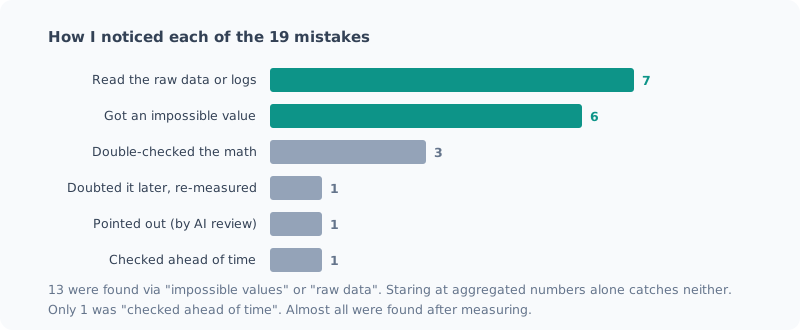
13 of the 19 were found through an “impossible value” or “raw data”.
Lined up, every example of an “impossible value” is something that physically can’t happen.
- Free space shrinks after deleting files (#1)
- KV quantization makes a difference at depth 0, where the KV cache is empty (#4)
- An empty KV is slower than one holding 30,000 tokens (#10)
- Speed at depth 0 rises in the order of execution (#11)
- A 2.5-minute job takes 10 hours in total (#17)
Put the other way around, mistakes that aren’t impossible don’t get caught here. The −24% in #12 was a value that seemed like “well, that can happen”, so I let it slide.
“Raw data” means the moments when I read the model’s output or the server’s log itself, not the aggregated numbers. In #7, reading an output marked wrong showed it had solved the problem correctly; in #19, the answer had been cut off partway. Had I looked only at the accuracy numbers, both would have ended as “the model got it wrong”.
Meanwhile, only 1 was found by checking ahead of time (#5). Before writing “it shrinks to 0.8×” in the post, I measured it just in case. Almost all the rest I found by measuring, thinking something was off, and going back.
Checklist Before Measuring
I turned the fixes from all 19 into something to look at before the next measurement.
Comparison
- Measure the same condition twice and learn the spread first. If a difference is smaller than that, don’t draw a conclusion
- Sweep the conditions being compared within one launch. Also sandwich them as A → B → A and check that the first and last A agree
- Before comparing, confirm that the control’s numbers were actually captured
Measuring instrument
- Test the grader on real strings for both whether it picks up correct answers and whether it rejects wrong ones
- Treat the stages before the grader (building the input, output limits, display) as part of the measuring instrument too
- Write the unit next to the number. Check that the two things being compared use the same unit
Interruptions
- List what might run during the measurement (auto-starts, sync, sleep)
- Log not just specific processes but the CPU and GPU used by everything else
Assumptions
- Check in the startup log that the settings you added are actually enabled
- Don’t extrapolate values measured on short inputs to long inputs. Measure at least once at the real length
Safety mechanisms
- Write prevention, waiting and monitoring mechanisms so that they stop when they fail
- After finishing, check that the safety mechanisms actually took effect
When looking at results
- First check whether any physically impossible values are mixed in
- For wrong answers and outliers, read the raw output
- The more interesting the first result, the more you should doubt it. Check what else that explanation predicts
Summary
- Across 13 posts, the measuring side was wrong 19 times
- Five types: comparison, measuring instrument, interruptions, assumptions, safety mechanisms. Measuring-instrument errors were the most common
- 13 of the 19 I noticed through impossible values or raw data. You won’t find them in the aggregated numbers alone
- Only 1 was found ahead of time. So decide in advance how you’ll doubt the results after measuring
I’ve been measuring how fast the model is and how well it reads, but looking back, what I came to understand best was how far I can trust my own way of measuring.
関連記事 Related Posts
ローカルLLMのベンチマークの取り方(チェックリスト付き) How to Benchmark a Local LLM (with a Checklist)
ローカルLLMの速度や品質を測るときに、結果を信用できるものにする手順をまとめました。同じ条件でも1割ぶれる、順番で結果が変わる、裏の処理で5倍ぶれる、採点器が壊れている。実際に踏んだ失敗から作った、測る前・測っている間・測ったあとのチェックリストです。 I put together the steps that make the results trustworthy when measuring the speed or quality of a local LLM. The same conditions vary by 10%, the order changes the result, background work causes 5x swings, and the grader is broken. This is a before, during and after checklist built from mistakes I actually made.
コンテキストを 128K まで伸ばしたら、壁はメモリではなく待ち時間だった I Stretched the Context to 128K, and the Wall Was Waiting Time, Not Memory
ローカルLLMのコンテキストを32Kから128Kまで伸ばして測りました。予想していたメモリ不足は起きず、理由はモデルの構造にありました。代わりに見えた壁はプロンプトの取り込み時間で、128Kを読ませるだけで21〜24分かかります。途中で自分の自動起動に計測を汚された話も含みます。 I stretched my local LLM's context from 32K to 128K and measured it. The memory shortage I expected never happened, and the reason lay in the model's architecture. The wall I hit instead was prompt ingestion time: just reading 128K takes 21–24 minutes. It also covers how my own auto-start polluted the measurements along the way.
ベンチで「効果を見つけた」と思ったら、測定のぶれだった I Thought My Benchmark Found an Effect, but It Was Measurement Noise
過去に下した設定判断を検証しようとして、逆の結果が出ました。喜びかけたところで物理的におかしい点に気づき、測り直したら元の判断が正しかった。別々に起動したベンチを比較してはいけない、という話です。 When I tried to verify a settings decision I'd made earlier, I got the opposite result. Just as I was about to celebrate, I noticed something physically odd, measured again, and the original decision was right. This is about why you shouldn't compare benchmarks from separate launches.