機密コードをクラウドに出さずにAIでレビューする(ローカルLLM × dev-orchestra) Reviewing Confidential Code with AI Without Sending It to the Cloud (Local LLM × dev-orchestra)
はじめに
AI にコードレビューをさせると、自分では気づけないバグが見つかります。 3 つの AI にレビューさせた回では、自分で書いた 1,418 行から実バグが 11 件出ました。
ただ、クラウドの AI にコードを送れない場面があります。
- 業務のコードで、社外のサービスに送ることが契約や規程で禁じられている
- 個人情報や認証情報に近い処理が含まれている
- まだ公開していない製品のコード
そういうコードでも、手元の PC の中だけでAI にレビューさせる方法をまとめます。 使うのは、ミニPCで動かしているローカル LLM(Qwen3.6-35B-A3B)と、 複数の AI にレビューを分担させるツール dev-orchestra です。
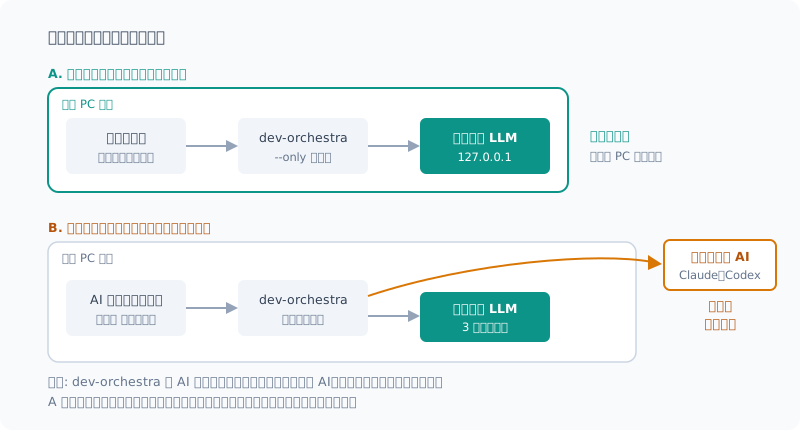
方針: 2 つの使い方を分ける
| A. ローカルで完結 | B. クラウドと併用 | |
|---|---|---|
| 向いているコード | 社外に出せないもの | 公開してよいもの |
| レビュアー | ローカル LLM だけ | クラウドの AI + ローカル LLM |
| コードの行き先 | PC の中だけ | クラウドにも送られる |
| 見つかる量 | 少なめ | 多い |
機密のものは A、それ以外は B。 1 つの仕組みで、この 2 つを切り替えられるようにします。
構成
dev-orchestra の「プロバイダ」は、CLI をラップする設計です。API を直接叩く口がありません。 そこで、プロンプトを標準入力で受けて答えを標準出力に返すだけの薄い CLI を挟みます。
dev-orchestra
  └─ プロバイダ localllm(ユーザープロバイダとして登録)
       └─ local-llm.cmd → local-llm.py(stdin → API → stdout)
            └─ llama-server(127.0.0.1:8080、この PC の中)
dev-orchestra 0.9.0 から、プラグイン本体に手を入れずに独自のプロバイダを足せる仕組み(ユーザープロバイダ)が入りました。 アダプタは dev-orchestra の設定フォルダに置くので、プラグインを更新しても消えません。 作り方の詳細はレビュアーに追加した回に書いています。dev-orchestra 1.0.0 で一からアダプタを書く手順は、自作のエージェントを繋いだ回にまとめ直しました。
手順
1. アダプタを入れて、レビュアーとして登録する
アダプタ(localllm.py)と、プロンプトを中継する薄い CLI の中身は、
レビュアーに追加した回で説明しています。
ここでは、それを dev-orchestra の設定フォルダ(providers)に置いた前提で進めます。
# アダプタを dev-orchestra の設定フォルダに入れる(私の環境ではインストーラを Python で書いた)
python integrations\dev-orchestra\install.py

# プラグインの場所(バージョン番号として比べて、いちばん新しいもの)
$P = (Get-ChildItem "$env:USERPROFILE\.claude\plugins\cache\dev-orchestra\dev-orchestra" -Directory |
      Sort-Object { [version]$_.Name } -Descending | Select-Object -First 1).FullName

# レビュアーとして追加し、名前とモデルを付ける
python "$P\scripts\dev_orchestra.py" reviewer add --provider localllm --role general
python "$P\scripts\dev_orchestra.py" reviewer list          # 追加された番号を確かめる
python "$P\scripts\dev_orchestra.py" reviewer set 3 --model qwen3.6-35b-a3b --id localllm-qwen
reviewer set の番号は、reviewer list で確かめたものに置き換えてください。
インストーラは Python で書いてあります。 dev-orchestra が Microsoft Store 版の Python で動いている場合、
Store 版は %APPDATA% を別の場所に振り替えるので、PowerShell でコピーしたファイルは dev-orchestra から見えません。
読む側と同じ Python で書き込めば、振り替えの有無に関係なく一致します。
2. 機密のコードは、ターミナルから直接、ローカルだけでレビューする
python "$P\scripts\dev_orchestra.py" review snapshot
python "$P\scripts\dev_orchestra.py" state record test ok
python "$P\scripts\dev_orchestra.py" review run --only localllm-qwen
--only でレビュアーを絞るのが肝です。付け忘れると、登録してある全レビュアー(クラウドの AI を含む)に差分が送られます。
結果は dev-orchestra の統合ファイルに書き出されるので、それを自分で読んで採否を決めます。
3. 公開してよいコードは、全員でレビューする
python "$P\scripts\dev_orchestra.py" review runクラウドの AI 2 つとローカル LLM の、3 つの意見が揃います。
最大の落とし穴: 呼び出し元の AI がコードを読む
dev-orchestra は、Claude Code などの AI のエージェントから呼び出して使うこともできます。 その場合、呼び出した AI 自身が、レビューの対象のコードを読みます。
レビュアーをローカル LLM だけに絞っても、呼び出し元がクラウドの AI なら、コードはクラウドに出ていきます。
機密のコードを扱うときは、AI のエージェントを通さず、ターミナルから dev-orchestra のコマンドを直接実行してください。 上の図の A が成り立つのは、この条件のときだけです。
ローカル LLM のレビューの実力
では、ローカル LLM だけでどこまで見つけられるのか。2 つの計測があります。
わざと入れたバグは見つけた
関数に 2 つの欠陥を仕込んで、レビューさせました。
| 仕込んだ欠陥 | 結果 |
|---|---|
| ガードを消して ZeroDivisionError が起きる | 検出(critical) |
[:n+1] のオフバイワン | 検出(high) |
所要時間は 29 秒。要求した出力の形式も守れていました。
実際のコードでは、6 件中 1 件だった
自分で書いた 1,418 行を、クラウドの AI 2 つとローカル LLM にレビューさせたときの結果です。
| レビュアー | 指摘 | 採用 | 却下 | 重複 |
|---|---|---|---|---|
| Claude | 6 | 6 | 0 | 0 |
| Codex | 6 | 4 | 0 | 2 |
| ローカル LLM | 6 | 1 | 5 | 0 |
ローカル LLM の却下 5 件は、「〜の可能性がある」で終わる推測の指摘が多く、 中には自分の指摘と矛盾しているものもありました。 採用した 1 件(エラー応答の本文を握り潰している件)は、まっとうな指摘です。
見つかる量と正確さは、クラウドの AI に及びません。 これは正直に書いておきます。
なぜ差が出るのか
いちばん大きいのは、見えている範囲の違いです。
| クラウドの AI(エージェント型) | ローカル LLM | |
|---|---|---|
| 見えるもの | 差分に加えて、関連ファイルを自分で読みに行ける | 渡された差分だけ |
| できる指摘 | 「この関数の呼び出し元で壊れる」 | 差分の中で閉じた指摘 |
ローカル LLM の役割は、あくまでレビュアーです。 ファイルを読み書きできないので、設計や実装を任せる用途には向きません(アダプタでも実装の役割は断るようにしています)。
それでもローカルで回す価値
| 観点 | ローカル LLM だけのレビュー |
|---|---|
| コードの行き先 | PC の外に出ない |
| 費用 | 電気代だけ。何回回しても課金されない |
| 見つかる量 | クラウドより少ない |
| 手間 | 推測の指摘を読んで却下する手間が増える |
「クラウドに出せないから、AI のレビューを諦める」よりは、ずっと良いと考えています。 わざと入れた典型的なバグは見つけられたので、見落としやすい単純なミスの網としては働きます。
長い差分を扱うときの注意
- コンテキスト長: 1,400 行・62 KB の差分で 19,303 トークンになり、16K の設定では断られた。
-c 65536にしてある - 読み込み時間: 3 万トークンの差分なら 2〜3 分。レビューを回すたびにかかる
- 2 回目は速いとは限らない: 同じ文書への質問なら読み直しは末尾だけで済むが、差分が変われば読み直しになる
まとめ
- 機密のコードはローカル LLM だけ、公開してよいものはクラウドと併用、と使い分ける
- dev-orchestra のユーザープロバイダでローカル LLM を登録し、
--onlyでレビュアーを絞る - AI のエージェントから呼ぶと、その AI がコードを読む。 機密のものはターミナルから直接実行する
- ローカル LLM は、仕込んだバグ 2 件は見つけたが、実コードでは 6 件中 1 件。網としては働くが、クラウドの代わりにはならない
- それでも、コードを外に出さずに AI の目を通せるのは大きい
Introduction
When you have an AI review your code, it finds bugs you’d never notice yourself. In the post where I had three AIs review my code, 11 real bugs came out of 1,418 lines I had written.
But there are situations where you can’t send code to a cloud AI.
- Work code, where a contract or company policy forbids sending it to outside services
- Code that handles personal data or sits close to credentials
- Code for a product that hasn’t been released yet
This post shows how to have an AI review even that kind of code entirely inside your own PC. I use a local LLM (Qwen3.6-35B-A3B) running on my mini PC, and dev-orchestra, a tool that splits a review across several AIs.
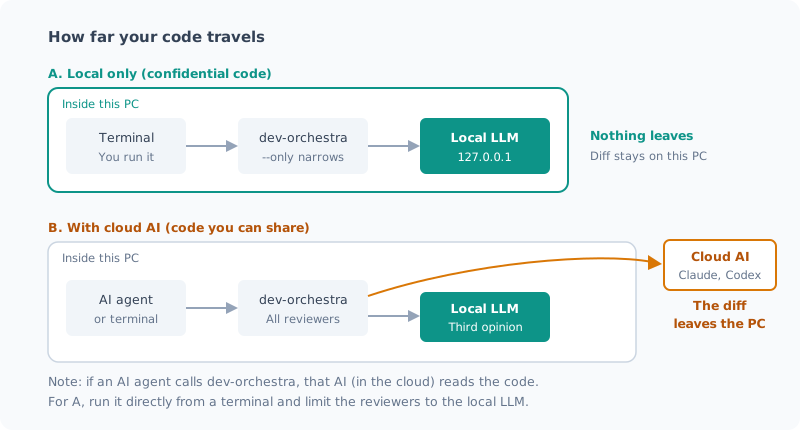
Approach: Keep Two Ways of Using It Apart
| A. Local only | B. Combined with cloud | |
|---|---|---|
| Suited to | Code that can’t leave the company | Code that can be shared |
| Reviewers | Local LLM only | Cloud AI + local LLM |
| Where the code goes | Only inside the PC | Also sent to the cloud |
| Findings | Fewer | More |
Confidential code gets A, everything else gets B. I set things up so one mechanism can switch between the two.
Setup
dev-orchestra’s “providers” are designed to wrap CLIs. There’s no way to call an API directly. So I put a thin CLI in between that just takes the prompt on standard input and returns the answer on standard output.
dev-orchestra
  └─ プロバイダ localllm(ユーザープロバイダとして登録)
       └─ local-llm.cmd → local-llm.py(stdin → API → stdout)
            └─ llama-server(127.0.0.1:8080、この PC の中)
dev-orchestra 0.9.0 added a way to add your own providers without touching the plugin itself (user providers). The adapter lives in dev-orchestra’s config folder, so it survives plugin updates. The details of building it are in the post where I added it as a reviewer. I rewrote the steps for writing an adapter from scratch on dev-orchestra 1.0.0 in the post where I connected my own agent.
Steps
1. Install the adapter and register it as a reviewer
The adapter (localllm.py) and the thin CLI that relays the prompt are explained in
the post where I added it as a reviewer.
Here I assume they’re already in dev-orchestra’s config folder (providers).
# アダプタを dev-orchestra の設定フォルダに入れる(私の環境ではインストーラを Python で書いた)
python integrations\dev-orchestra\install.py

# プラグインの場所(バージョン番号として比べて、いちばん新しいもの)
$P = (Get-ChildItem "$env:USERPROFILE\.claude\plugins\cache\dev-orchestra\dev-orchestra" -Directory |
      Sort-Object { [version]$_.Name } -Descending | Select-Object -First 1).FullName

# レビュアーとして追加し、名前とモデルを付ける
python "$P\scripts\dev_orchestra.py" reviewer add --provider localllm --role general
python "$P\scripts\dev_orchestra.py" reviewer list          # 追加された番号を確かめる
python "$P\scripts\dev_orchestra.py" reviewer set 3 --model qwen3.6-35b-a3b --id localllm-qwen
Replace the number in reviewer set with the one you see in reviewer list.
The installer is written in Python. If dev-orchestra runs on the Microsoft Store version of Python,
the Store version redirects %APPDATA% to a different location, so files copied with PowerShell are invisible to dev-orchestra.
If you write with the same Python that does the reading, the paths match whether or not redirection happens.
2. Review confidential code locally only, straight from the terminal
python "$P\scripts\dev_orchestra.py" review snapshot
python "$P\scripts\dev_orchestra.py" state record test ok
python "$P\scripts\dev_orchestra.py" review run --only localllm-qwen
The key is narrowing the reviewers with --only. If you forget it, the diff is sent to every registered reviewer, cloud AIs included.
The results are written to dev-orchestra’s merged file, and I read it myself to decide what to accept.
3. Review shareable code with everyone
python "$P\scripts\dev_orchestra.py" review runYou get three opinions: two cloud AIs and the local LLM.
The Biggest Pitfall: The Calling AI Reads the Code
dev-orchestra can also be called from an AI agent such as Claude Code. In that case, the calling AI itself reads the code under review.
Even if you narrow the reviewers to the local LLM, if the caller is a cloud AI, your code goes out to the cloud.
When you handle confidential code, don’t go through an AI agent. Run the dev-orchestra commands directly from a terminal. Pattern A in the figure above only holds under this condition.
How Good Are the Local LLM’s Reviews?
So how much can the local LLM find on its own? I have two measurements.
It found the bugs I planted
I planted two defects in a function and had it review the code.
| Planted defect | Result |
|---|---|
| Removed a guard so a ZeroDivisionError occurs | Found (critical) |
Off-by-one in [:n+1] | Found (high) |
It took 29 seconds, and it stuck to the output format I asked for.
On real code, it was 1 out of 6
These are the results when two cloud AIs and the local LLM reviewed 1,418 lines I had written.
| Reviewer | Findings | Accepted | Rejected | Duplicates |
|---|---|---|---|---|
| Claude | 6 | 6 | 0 | 0 |
| Codex | 6 | 4 | 0 | 2 |
| Local LLM | 6 | 1 | 5 | 0 |
Many of the local LLM’s 5 rejected findings were guesses ending in “this might …”, and some even contradicted its own other findings. The 1 I accepted (the error response body being swallowed) was a legitimate finding.
In both quantity and accuracy, it doesn’t match the cloud AIs. I want to be honest about that.
Why the gap?
The biggest factor is how much each one can see.
| Cloud AI (agent-based) | Local LLM | |
|---|---|---|
| What it sees | The diff, plus related files it can go and read itself | Only the diff it’s given |
| Findings it can make | ”This breaks at the caller of this function” | Findings closed within the diff |
The local LLM’s role is strictly that of a reviewer. It can’t read or write files, so it isn’t suited to being handed design or implementation (the adapter also refuses the implementation role).
Why It’s Still Worth Running Locally
| Aspect | Review with the local LLM only |
|---|---|
| Where the code goes | Never leaves the PC |
| Cost | Just electricity. No charge however many times you run it |
| Findings | Fewer than the cloud |
| Effort | More effort reading and rejecting speculative findings |
I think it’s far better than “giving up on AI review because the code can’t go to the cloud.” It caught the typical bugs I planted, so it works as a net for the simple mistakes that are easy to miss.
Notes on Long Diffs
- Context length: a 1,400-line, 62 KB diff came to 19,303 tokens and was rejected with a 16K setting. I use
-c 65536 - Load time: a 30,000-token diff takes 2–3 minutes, every time you run a review
- The second run isn’t necessarily faster: for questions about the same document only the end gets reprocessed, but if the diff changes, it’s all reprocessed
Summary
- Split usage: local LLM only for confidential code, combined with the cloud for code that can be shared
- Register the local LLM as a dev-orchestra user provider and narrow the reviewers with
--only - If you call it from an AI agent, that AI reads the code. Run confidential reviews directly from a terminal
- The local LLM found both planted bugs, but only 1 of 6 on real code. It works as a net, but it doesn’t replace the cloud
- Even so, being able to put AI eyes on code without it leaving your PC is a big deal
関連記事 Related Posts
WSLからホストのローカルLLMを使う方法を調べて、やめた I Looked into Using the Host's Local LLM from WSL, and Decided Not To
WSL上の開発でWindowsホストのローカルLLMをレビュアーとして使いたい。経路は2つあり、どちらも実現はできます。ただし片方は安全性を、もう片方は信頼性を差し出す必要があったので見送りました。その判断の記録です。 I wanted to use the local LLM on my Windows host as a reviewer for development in WSL. There are two routes, and either one can be made to work. But one meant giving up safety and the other meant giving up reliability, so I passed. This is a record of that decision.
dev-orchestra に自作のエージェントを繋いでみた(ローカルLLM編) Connecting My Own Agent to dev-orchestra (Local LLM Edition)
dev-orchestra 1.0.0 で、自作のアダプタを一から書いてローカル LLM をレビュアーに加えてみました。プロンプトを受けて答えを返す小さな CLI と、50 行ほどのアダプタだけで繋がります。置き場所、doctor での確認、できる役とできない役、注意点までまとめます。 With dev-orchestra 1.0.0, I wrote my own adapter from scratch and added a local LLM as a reviewer. All it takes is a small CLI that takes a prompt and returns an answer, plus an adapter of about 50 lines. I cover where to put it, checking it with doctor, which roles it can and can't take, and the cautions.
自分が書いた1418行を3つのAIにレビューさせたら、実バグが11件出た I Had Three AIs Review 1418 Lines I Wrote, and They Found 11 Real Bugs
Claude・Codex・ローカルQwenの3枚に、自分で書いて自分で動かしていたスクリプトをレビューさせました。3件は自力では気づけないもので、1件は「レビュー結果を集計するスクリプト自体」のバグでした。一方で、3枚とも見逃した欠陥もあります。 I had three reviewers, Claude, Codex and a local Qwen, review scripts I had written and been running myself. Three were bugs I couldn't have found on my own, and one was in the very script that tallies the review results. There was also a defect all three missed.