AIに複数レビューさせるのが面倒すぎて、自動で回すプラグインを作ってみた Running Multiple AI Reviews by Hand Was Too Tedious, So I Built a Plugin That Automates It
はじめに
dev-orchestra という Claude Code / Codex 用のプラグインを作って、1.0.0 を出しました。
1 文で依頼すると、設計 → 実装 → テスト → 複数の AI による独立したレビュー → 指摘の仕分け → 修正 → 再テスト、までを順に回してくれるものです。
この記事では、何ができるかの詳しい説明は次の記事に回して、なぜ作ったのかと、作って使ってみてどうだったかを書きます。
dev-orchestra は GitHub で公開しています(MIT ライセンス)。役に立ちそうと思ったら、スターを付けてもらえるとうれしいです。
作る前:人が運び屋になっていた
AI にコードを書かせるようになってから、気になっていたことがありました。 AI は自分が書いたコードのレビューが苦手です。バグを生んだ前提を、レビューするときもそのまま持っているからです。
なので、書かせたコードを別の AI にもレビューさせるようにしていました。 やっていたのはこういうことです。
- ターミナル A のエージェントに実装させる
- 差分をコピーして、ターミナル B と C のエージェントにレビューを頼む
- 終わるのを待つ
- 結果をコピーしてターミナル A に戻し、直させる
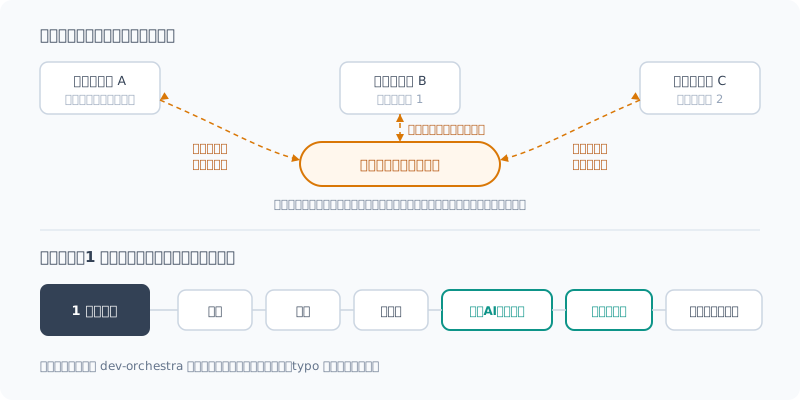
これが想像以上に面倒でした。
- いつ終わるかが毎回ちがう。数十秒で返ってくることもあれば、何分もかかることもある。そのあいだ待機するしかない
- レビュー役を増やすほど、コピペの往復が増える
- 返ってきた指摘は重複していたり、的外れだったりする。どれを直すかを自分で仕分けてから戻す必要がある
つまり、AI に仕事をさせているはずなのに、自分が AI どうしの運び屋になっていたわけです。
別の AI に見せる意味はあったのか
手間をかけてまで続けていたのは、手応えがあったからです。
数字で確かめたのは、少しあとのことです。dev-orchestra の初期版ができてから、それで回した結果を以前の記事に書きました。自分で書いて自分で動かしていたスクリプト(1418 行)を 3 つの AI にレビューさせ、実在するバグが 11 件見つかりました。うち 3 件は、自分ではまず気づけないものでした。
ただし、これは 1 回だけの結果です。3 つ目のレビュアー(ローカルLLM)は 6 件中 1 件しか当たらず、3 つとも見逃した欠陥もありました。複数の AI に見せれば完璧、というわけではありません。
それでも、「1 つの AI に書かせて終わり」よりは明らかにましでした。 問題は効果ではなく、手間のほうだったわけです。
作ったもの:dev-orchestra
そこで、運び屋の仕事をまるごと任せられるようにしました。 普段どおりエージェントに話しかけるだけです。
この issue を設定済みのワークフローで実装してすると dev-orchestra が、依頼に必要な工程だけを選んで順に回します。
| 工程 | やること |
|---|---|
| 設計 | 調べて計画を書く。承認するまで実装には進まない |
| 実装 | 計画からコードとテストを書く |
| レビュー | 2 つ以上の AI が、同じ差分を互いの結果を見ずに読む |
| トリアージ | 重複をまとめ、どの指摘が本物かを仕分ける |
| 修正 | 採用した指摘だけを直し、テストをやり直す |
typo の修正なら編集だけ、仕様の変更なら全部、というように工程は依頼の大きさで変わります。
使ってみてよかったこと
1. トリアージがいい塩梅
いちばん効いたのはここでした。
複数の AI にレビューさせると、指摘は重複するし、的外れなものも混ざります。それを全部「直して」と渡すと、要らない変更が量産されます。
dev-orchestra は、指摘を機械的に重複統合したうえで、オーケストレーター役の AI が採用・却下・重複に仕分けます。修正役に届くのは採用した指摘だけです。 この仕分けが、自分でやるのとほぼ同じ感覚の、いい塩梅で進みます。
2. 実装の精度が上がった
測って比べたわけではなく、体感です。 設計・実装・レビューを分けて回すようになってから、実装がおおむね狙いどおりに仕上がると感じています。
たとえばテストコードを書かせるだけの依頼でも、レビューと修正の工程を挟んだあとのほうが、出来上がりがよくなっていました。
実働 3 週間で作り直したもの
0.1.0 を出したのが 9/10、1.0.0 が 10/12。期間は 1 か月ほどですが、実際に手を動かしたのは 3 週間ほどです。その間にバージョンを 30 回ほど刻みました。 使いながら「ここが困る」を潰していった結果です。印象に残っているものを挙げます。
| 作り直したこと | 理由 |
|---|---|
| モデル名を推測しない | 存在しないモデル名で動いたつもりになるのを防ぐ。設定には系列名と「最新」だけを書く |
| レビューする差分を凍結する | 全員が同じものを見ていないと、指摘を比べられない |
| 2 回目のレビューは修正分だけ | 毎回全部を見せ直すと、時間もトークンも倍になる |
| 小さい変更はレビュアーを減らす | typo に 3 人がかりは無駄 |
| 計画の承認を待つ | 設計がずれたまま実装まで走ると、やり直しが大きい |
| 読み取り専用は CLI で強制する | 「書き換えないで」とお願いするだけでは守られないことがあった |
困ったこと:トークンがすぐ尽きる
作っていていちばん困ったのは、動かすたびにお金(トークン)がかかることでした。
複数の AI を本物の CLI で動かすので、テストのつもりで回しただけでもトークンがみるみる減ります。何度か上限に当たって、作業が止まりました。
そこで、上の表のうち「2 回目は修正分だけ」「小さい変更はレビュアーを減らす」のような、無駄に AI を呼ばないための仕組みを少しずつ入れてきました。
とはいえ、まだ十分とは思っていません。トークンの使い方をもっと効率的にするのが、1.0.0 以降のいちばんの課題です。
よければ使ってみてください
Claude Code なら 2 行で入ります。
claude plugin marketplace add istb16/dev-orchestra
claude plugin install dev-orchestra@dev-orchestra
Codex でも動きます。何ができるのか、どんな構成で使えるのかは、紹介の記事にまとめました。
複数の AI を動かすぶん、トークンの消費は 1 つの AI で済ませるより増えます。まずは小さな依頼から試すのがおすすめです。
まとめ
- AI に書かせたコードを別の AI にもレビューさせると、自分では気づけないバグが見つかる
- ただ手作業では、ターミナル間のコピペと待機で自分が運び屋になっていた
- それを任せられるようにしたのが dev-orchestra。1 文の依頼で、設計からレビュー・修正まで回る
- よかったのはトリアージのいい塩梅と、実装(テストだけでも)の精度が上がったと感じたこと(体感)
- 困ったのはトークン消費。効率化が 1.0.0 以降の課題
- 実働 3 週間ほどで 1.0.0。よければ使ってみてください
GitHub: istb16/dev-orchestra(スターを付けてもらえると励みになります)
Introduction
I built a plugin for Claude Code / Codex called dev-orchestra and released 1.0.0.
You make a one-sentence request, and it runs design → implementation → testing → independent reviews by multiple AIs → sorting the findings → fixes → re-testing, in order.
I’ll leave the detailed explanation of what it can do to the next post. Here I’ll write about why I built it and how it went once I built and used it.
dev-orchestra is public on GitHub (MIT license). If it looks useful to you, I’d be happy if you gave it a star.
Before: I Had Become the Courier
Ever since I started having AI write code, one thing had bothered me. AI is bad at reviewing code it wrote itself. When it reviews, it still holds the same assumptions that produced the bug.
So I had started having a different AI review the code too. Here’s what I was doing:
- Have the agent in terminal A implement it
- Copy the diff and ask the agents in terminals B and C to review it
- Wait for them to finish
- Copy the results back to terminal A and have it fix things
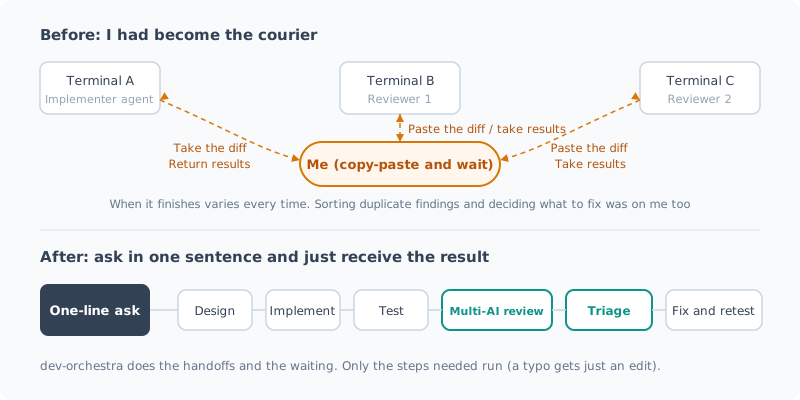
This turned out to be more tedious than I’d imagined.
- When it finishes is different every time. Sometimes it comes back in tens of seconds, sometimes it takes several minutes. In the meantime, all I can do is wait
- The more reviewers I add, the more copy-paste round trips there are
- The findings that come back are duplicated or off the mark. I have to sort out which ones to fix myself before passing them back
In other words, I was supposed to be having AI do the work, yet I had become the courier between AIs.
Was Showing It to Another AI Worth It?
I kept at it despite the effort because it felt like it was paying off.
I checked it with numbers a little later. Once the early version of dev-orchestra was ready, I wrote up a run with it in an earlier post. I had three AIs review a script I had written and was running myself (1418 lines), and they found 11 real bugs. Three of them were ones I would almost certainly never have noticed myself.
That said, this is the result of a single run. The third reviewer (a local LLM) hit only 1 of 6, and there were also defects all three missed. Showing code to several AIs doesn’t make it perfect.
Even so, it was clearly better than “have one AI write it and call it done”. The problem wasn’t the effect; it was the effort.
What I Built: dev-orchestra
So I made it possible to hand off the courier job entirely. You just talk to your agent as usual.
この issue を設定済みのワークフローで実装してdev-orchestra then picks only the steps the request needs and runs them in order.
| Step | What it does |
|---|---|
| Design | Investigates and writes a plan. It doesn’t move on to implementation until you approve |
| Implementation | Writes code and tests from the plan |
| Review | Two or more AIs read the same diff without seeing each other’s results |
| Triage | Merges duplicates and sorts out which findings are real |
| Fix | Fixes only the accepted findings and re-runs the tests |
A typo fix gets just an edit, a spec change gets everything: the steps change with the size of the request.
What Worked Well
1. Triage strikes the right balance
This was what helped most.
When multiple AIs review code, the findings overlap, and some are off the mark. Pass all of them along with “fix these” and you get a pile of unnecessary changes.
dev-orchestra mechanically merges duplicate findings, then the orchestrator AI sorts them into accepted, rejected, and duplicate. Only the accepted findings reach the fixer. This sorting lands at just the right balance, feeling almost the same as doing it myself.
2. Implementation got more accurate
I didn’t measure and compare this; it’s my impression. Since I started running design, implementation and review as separate steps, I feel implementations mostly come out as intended.
For example, even for a request that was only to write test code, the result was better after going through the review and fix steps.
What I Rebuilt in Three Weeks of Actual Work
I released 0.1.0 on 9/10 and 1.0.0 on 10/12. That’s about a month, but I actually worked on it for about three weeks. In that time I cut around 30 versions. That’s the result of fixing “this is a problem” as I used it. Here are the ones that stuck with me.
| What I rebuilt | Why |
|---|---|
| Don’t guess model names | Prevents thinking it ran when it used a model name that doesn’t exist. The config holds only the family name and “latest” |
| Freeze the diff under review | If everyone isn’t looking at the same thing, you can’t compare the findings |
| The second review covers only the fixes | Showing everything again each time doubles both the time and the tokens |
| Fewer reviewers for small changes | Three reviewers for a typo is a waste |
| Wait for plan approval | If design drifts and it runs all the way through implementation, the redo is large |
| Enforce read-only in the CLI | Just asking “don’t modify anything” was sometimes not respected |
The Problem: Tokens Run Out Fast
The biggest problem while building it was that every run costs money (tokens).
Because it runs multiple AIs through the real CLIs, tokens drain fast even when I only meant to run a test. I hit the limit several times and work stopped.
So I gradually added mechanisms to avoid calling AIs needlessly, like “the second review covers only the fixes” and “fewer reviewers for small changes” in the table above.
Still, I don’t think it’s enough yet. Making token use more efficient is the biggest challenge after 1.0.0.
Give It a Try If You Like
In Claude Code, it installs with two lines.
claude plugin marketplace add istb16/dev-orchestra
claude plugin install dev-orchestra@dev-orchestra
It works with Codex too. What it can do and the setups you can use it with are covered in the introduction post.
Because it runs multiple AIs, it uses more tokens than getting by with a single AI. I recommend starting with small requests.
Summary
- Having another AI review code an AI wrote finds bugs you wouldn’t notice yourself
- But by hand, copy-pasting between terminals and waiting turned me into the courier
- dev-orchestra is what lets me hand that off. A one-sentence request runs everything from design to review and fixes
- What worked well: triage strikes the right balance, and I felt implementation (even just tests) got more accurate (my impression)
- The problem: token consumption. Efficiency is the challenge after 1.0.0
- 1.0.0 in about three weeks of actual work. Give it a try if you like
GitHub: istb16/dev-orchestra (a star would be very encouraging)
関連記事 Related Posts
dev-orchestra で役割ごとに決まった指示を渡してみた Giving dev-orchestra Standing Instructions per Role
dev-orchestra 1.2.1 で入った instructions を試しました。implementer やレビュアーへの決まった指示をリポジトリに書いておくと、毎回のプロンプトに入ります。どう表示され、どこに入り、指示を変える変更がどう扱われるかを、実際の出力で確かめます。 I tried instructions, added in dev-orchestra 1.2.1. Standing instructions for the implementer or reviewers written in the repository go into every prompt. I check, with real output, how they are shown, where they go, and how a change to the instructions is treated.
dev-orchestra のレビュアーとロールを組み替えてみた Rearranging dev-orchestra's Reviewers and Roles
dev-orchestra の役(ロール)ごとのモデルの指定方法、レビュアーの観点の選び方、分野の専門役を提案させる config suggest-roles を紹介します。わざとバグを仕込んだ変更を 9 人のレビュアーに見せて、人数を増やすと何が変わるかも測ってみました。 How to set the model for each role in dev-orchestra, how to choose reviewer focuses, and config suggest-roles, which proposes domain specialists. I also showed a change with deliberately planted bugs to 9 reviewers to see what changes as you add more of them.
dev-orchestra のプリセット quality / standard / fast を比べてみた Comparing dev-orchestra's quality / standard / fast presets
dev-orchestra の初期設定で選ぶプリセット quality / standard / fast を、Claude Code だけ・Codex だけ・両方の 3 つの環境で実際に展開して比べました。役ごとのモデル、レビュアーの人数、コストを削る度合いがどう変わるか、どれを選べばいいかをまとめます。 I expanded dev-orchestra's setup presets quality / standard / fast in three environments (Claude Code only, Codex only, and both) and compared them. Here is how the per-role models, the number of reviewers, and how much cost is cut change, and which one to pick.