はじめに
夏になると毎年のように「どこかで大雨」「どこかで地震」「熱中症警戒アラート」というニュースが流れます。でも「今、日本のどこが一番危ないのか」をまとめて確認できるサービスが、意外と見当たりませんでした。
気象・地震・大気質・熱波をひとつの画面で横断的に確認できたら便利だと思い、JAPAN RISK MAP を作りました。
作ったもの
JAPAN RISK MAP は、全47都道府県の危険スコアをリアルタイムで算出し、ランキング+地図で表示するWebアプリです。
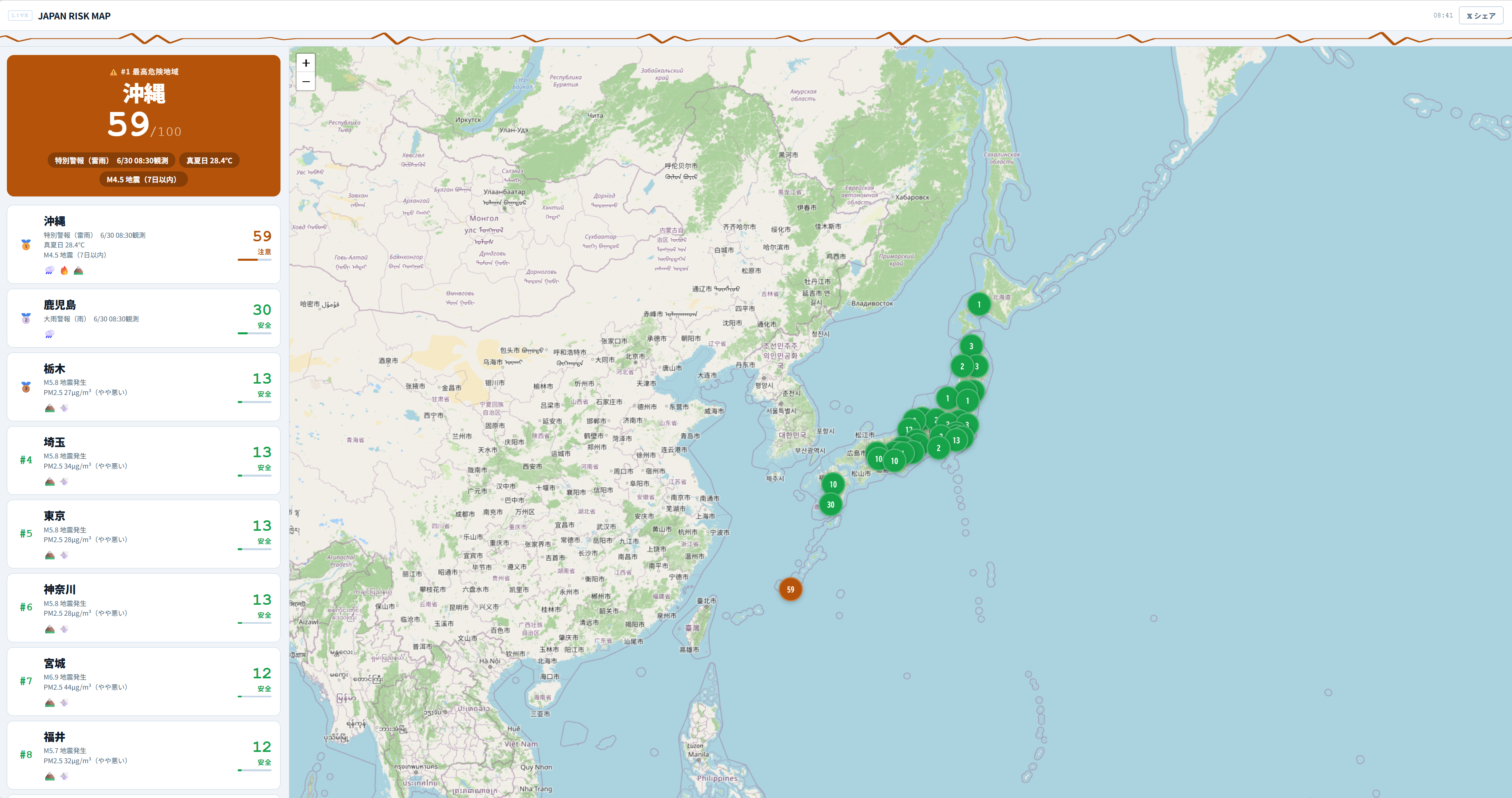
データは 5分ごとに自動更新されるため、ページを開いたままにしておけば最新の状況を常に確認できます。
収集しているデータ
4つのカテゴリのデータを統合して、都道府県ごとの危険スコアを算出しています。
| カテゴリ | 主な内容 |
|---|---|
| 気象 | 大雨・暴風・雷・注意報・警報 |
| 地震 | 震度・発生頻度 |
| 大気質 | PM2.5・黄砂・光化学スモッグ |
| 熱波 | 熱中症警戒アラート・WBGT値 |
画面の構成
地図ビュー
都道府県ごとに色分けされた日本地図を表示しています。スコアが高いほど赤く、低いほど緑に近い色になるため、地理的な危険の偏りが一目でわかります。
ランキングビュー
危険度の高い都道府県から順に並んだリストです。具体的なスコアと順位を数値で確認できるため、地図では読み取りにくい細かい差も把握できます。
自動更新
気象や地震の状況は刻々と変わります。5分間隔で自動更新されるため、ページを開いたままにしておくだけで状況の変化を追えます。
作ってみて
複数の外部データソースをリアルタイムで取得・統合する部分が一番難しいところでした。各データの更新タイミングがバラバラなため、スコア算出のタイミングの調整に手間がかかりました。
また、「危険スコア」の定義自体も試行錯誤が必要でした。気象警報の重み・震度の換算・PM2.5の基準値など、単純に数値を足し合わせるだけでは実態に合わないケースがあり、調整を繰り返しています。
まとめ
- 気象・地震・大気質・熱波の4カテゴリを統合した危険スコアを算出
- 47都道府県をランキング+地図でリアルタイム表示
- 5分ごとに自動更新されるため、開きっぱなしで最新状況を確認できる
- 「今日、日本のどこが一番危ないか」をひと目で把握したい場面に使えます
Introduction
Every summer, the news is full of “heavy rain somewhere,” “an earthquake somewhere,” and “heatstroke alerts.” Yet I couldn’t find a service that lets you check, all in one place, where in Japan is the most dangerous right now.
I thought it would be handy to see weather, earthquakes, air quality, and heat waves on a single screen, so I built JAPAN RISK MAP.
What I Built
JAPAN RISK MAP is a web app that calculates a risk score for all 47 prefectures in real time and shows them as a ranking plus a map.
The data updates automatically every 5 minutes, so if you leave the page open, you always see the latest situation.
Data It Collects
It combines data from four categories to calculate a risk score for each prefecture.
| Category | Main contents |
|---|---|
| Weather | Heavy rain, storms, lightning, advisories, warnings |
| Earthquakes | Seismic intensity, frequency |
| Air quality | PM2.5, yellow dust, photochemical smog |
| Heat waves | Heatstroke alerts, WBGT values |
Screen Layout
Map View
It shows a map of Japan colored by prefecture. The higher the score, the redder the color, and the lower, the closer to green, so you can see at a glance where the risk is concentrated geographically.
Ranking View
A list of prefectures in order from the highest risk. You can check the exact scores and ranks as numbers, so you can also see small differences that are hard to read from the map.
Auto Refresh
Weather and earthquake conditions change from moment to moment. It refreshes automatically every 5 minutes, so you can follow changes just by keeping the page open.
Building It
The hardest part was fetching and combining multiple external data sources in real time. Each source updates on its own schedule, so getting the timing of the score calculation right took some work.
Defining the “risk score” itself also took trial and error. The weight of weather warnings, how to convert seismic intensity, the reference values for PM2.5: simply adding the numbers together doesn’t match reality in some cases, so I keep adjusting it.
Summary
- Calculates a risk score that combines four categories: weather, earthquakes, air quality, and heat waves
- Shows the 47 prefectures as a ranking plus a map in real time
- Updates automatically every 5 minutes, so you can leave it open and see the latest situation
- Useful when you want to see at a glance “where in Japan is the most dangerous today”
関連記事 Related Posts
dev-orchestra で役割ごとに決まった指示を渡してみた Giving dev-orchestra Standing Instructions per Role
dev-orchestra 1.2.1 で入った instructions を試しました。implementer やレビュアーへの決まった指示をリポジトリに書いておくと、毎回のプロンプトに入ります。どう表示され、どこに入り、指示を変える変更がどう扱われるかを、実際の出力で確かめます。 I tried instructions, added in dev-orchestra 1.2.1. Standing instructions for the implementer or reviewers written in the repository go into every prompt. I check, with real output, how they are shown, where they go, and how a change to the instructions is treated.
[Released] dev-orchestra: 作業単位の並列実行と役割ごとの指示を追加 v1.1.0 - v1.2.1 [Released] dev-orchestra: Parallel Work Units and Per-Role Instructions v1.1.0 - v1.2.1
dev-orchestra の v1.1.0 から v1.2.1 までの変更をまとめました。計画を作業単位に分けて並べて走らせる機能、役割ごとに決まった指示を渡す機能、設計の前の質問、進み具合の報告の設定が入りました。Windows で出力を取り込んでいる人は、文字コードの変更に注意してください。 A roundup of dev-orchestra's changes from v1.1.0 to v1.2.1: running a plan as work units side by side, standing instructions per role, questions before the design, and settings for progress reports. If you capture its output on Windows, note the encoding change.
dev-orchestra の作業単位で、計画を分けて並べて実装してみた Splitting a Plan into dev-orchestra Work Units and Implementing Them Side by Side
dev-orchestra 1.2.0 で入った作業単位を試しました。計画に ## Units を書き、2 つの作業単位を別々の git worktree で並べて Claude に実装させ、作業ツリーへマージし、最後の統合の作業単位をその場で走らせるまでを、実際のコマンドと出力で追います。 I tried the work units added in dev-orchestra 1.2.0. I wrote a ## Units section in a plan, had Claude implement two units side by side in separate git worktrees, merged them into the working tree, and ran the final integration unit in place, with the actual commands and output.